Enhancing User Experience with localStorage
Using localStorage to enhance the user experience
This lesson is about using localStorage. All modern browsers support localStorage. This is a way of persistently storing data in the browser. If your application stores data in localStorage, this data will be available on that computer and that specific browser until localStorage is cleared. For your applications, this can be a useful way to allow users to take up where they left off in using your application. That saves the user’s time, and can definitely provide the user with a better experience in using your application. This is similar to the idea of an application storing cookies for their server so that the application can customize how the application works for you. That is how sites like Amazon are able to provide customized views of the items they sell. This can make good sense for any application that can sharpen its focus to match what a previous user has viewed/used for that application. The difference between cookies and localStorage is mainly that cookies are stored both on your computer and on the application’s server, whereas localStorage is only on the client (your) computer. So, cookies are primarily read on the server-side, while localStorage is only read on the client.
Starting this project
For a change, we will start this project without making use of a custom template that I prebuilt. This is to go over the steps to starting a project without using or making your own templates. This will hopefully be a part of the toolset that you develop on your programming adventure.
Starting the project using StackBlitz
We will start with one of StackBlitz’s standard templates, the JS Vanilla template. This was done in the first lesson, you can review that here: Starting using StackBlitz. Very briefly, here are the steps shown there:
-
Login to your StackBlitz account.
-
Click on the New project button, and click on the Popular templates.
-
Look for the JS Vanilla template and click on that.
-
Edit the project info to change the title to using_localStorage.
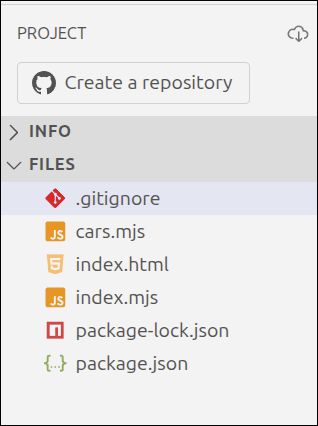
In the PROJECT panel on the left, hover over the FILES area and click on the New File icon. Name the new file cars.mjs. Create another new file called index.mjs. Right-click and delete the public and src folders. Your PROJECT section should look like this:
Starting the project using Vite
Start by creating a directory called using_localStorage by first changing into your ~/Documents directory. Then, create a folder called public inside of the using_localStorage directory.
$ cd ~/Documents
$ mkdir using_localStorage
$ cd using_localStorage
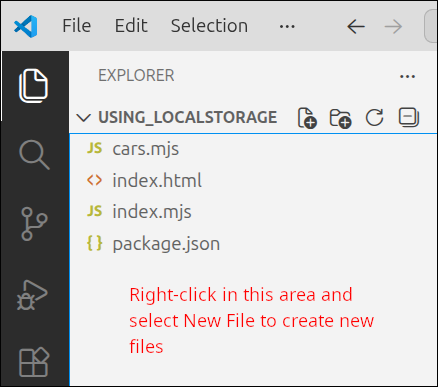
Start up Visual Studio (VS) Code and open the ~/Documents/using_localStorage folder. In the EXPLORER panel on the left, right-click in the files area and select New File. Create the files, index.html, index.mjs, package.json and cars.mjs. This is what your EXPLORER panel should look like:
Source code for project
Copy the contents of index.html, index.mjs and cars.mjs and use them to replace the contents of index.html, index.mjs and cars.mjs inside of StackBlitz or VS Code, respectively.
<!DOCTYPE html>
<html lang="en">
  <head>
    <meta charset="UTF-8" />
    <script type="module" src="index.mjs"></script>
    <title>Cars</title>
  </head>
  <body>
    <dialog id="add_dlg">
      Enter car info: <br />
      Make:
      <input type="text" id="make_box"><br />
      Model:
      <input type="text" id="model_box"><br />
      Price:
      <input type="text" id="price_box"><br />
      <br />
      <button id="ok_button">Ok</button>
    </dialog>
    <dialog id="edit_dlg">
      Edit car info: <br />
      Make:
      <input type="text" id="make_edit_box"><br />
      Model:
      <input type="text" id="model_edit_box"><br />
      Price:
      <input type="text" id="price_edit_box"><br />
      <br />
      <button id="cancel_button">Cancel</button>
      <button id="submit_button">Submit</button>
      <button id="delete_button">Delete</button>
    </dialog>
    <br />
    <button id="add_button">Add car</button>
    <button id="load_data_button">Load Test Data</button>
    <h1>Cars table</h1>
    <table border="1">
      <thead>
        <tr>
          <th id="make_heading" aria-sort="none">Make</th>
          <th id="model_heading" aria-sort="none">Model</th>
          <th id="price_heading" aria-sort="none">Price</th>
        </tr>
      </thead>
      <tbody id="cars_tbody"></tbody>
    </table>
  </body>
</html>import { Car } from "./cars.mjs";
if (document.readyState === "loading") {
document.addEventListener('DOMContentLoaded', init);
} else {
init();
}
function createApp() {
// private values here
const self = {
handleOk: handleOk,
handleSort: handleSort,
showAddDlg: showAddDlg,
showEditDlg: showEditDlg,
handleSubmit: handleSubmit,
handleDelete: handleDelete,
handleLoad: handleLoad
};
let car_data = [];
const make_box = document.getElementById("make_box");
const model_box = document.getElementById("model_box");
const price_box = document.getElementById("price_box");
const cars_tbody = document.getElementById("cars_tbody");
const add_dlg = document.getElementById("add_dlg");
const add_button = document.getElementById("add_button");
add_button.addEventListener("click", self.showAddDlg);
const edit_dlg = document.getElementById("edit_dlg");
const make_edit_box = document.getElementById("make_edit_box");
const model_edit_box = document.getElementById("model_edit_box");
const price_edit_box = document.getElementById("price_edit_box");
const submit_button = document.getElementById("submit_button");
submit_button.addEventListener("click", self.handleSubmit);
let car_id;
const cancel_button = document.getElementById("cancel_button");
const delete_button = document.getElementById("delete_button");
cancel_button.addEventListener("click", () => { edit_dlg.close(); });
delete_button.addEventListener("click", self.handleDelete);
// =========== API for interacting with user =========
function handleOk() {
const make = make_box.value.trim();
const model = model_box.value.trim();
const price = Number(price_box.value.trim());
const car = new Car(make, model, price);
car_data.push(car);
console.log('car_data:', car_data);
updateTable();
make_box.value = "";
model_box.value = "";
price_box.value = "";
add_dlg.close();
}
function handleSort(event) {
const id = event.target.id;
const property = id.split("_")[0];
if (property === "make" || property === "model") {
sortByString(property);
} else if (property === "price") {
sortByNumber(property);
}
}
function showEditDlg(event) {
const id = event.currentTarget.id;
const car = car_data[id];
console.log('car', car);
car_id = id;
make_edit_box.value = car.make;
model_edit_box.value = car.model;
price_edit_box.value = car.price;
edit_dlg.showModal();
}
function handleSubmit() {
const make = make_edit_box.value.trim();
const model = model_edit_box.value.trim();
const price = Number(price_edit_box.value.trim());
const car = car_data[car_id];
car.make = make;
car.model = model;
car.price = price;
updateTable();
edit_dlg.close();
}
function handleDelete() {
const index = car_id;
car_data.splice(index,1);
updateTable();
edit_dlg.close();
}
function showAddDlg() {
add_dlg.showModal();
}
function handleLoad() {
const c1 = new Car("Toyota", "Corolla", 28465.99);
const c2 = new Car("Honda", "Civic", 35423.99);
const c3 = new Car("Nissan", "Rogue", 34198.99);
const c4 = new Car("Lexus", "UX 250h", 43728.99);
car_data = [];
car_data.push(c1);
car_data.push(c2);
car_data.push(c3);
car_data.push(c4);
updateTable();
}
// =========== end of API for interacting with user ==
// =========== helper functions =============
function updateTable() {
const fragment = makeFragment();
cars_tbody.replaceChildren(fragment);
}
function makeFragment() {
const fragment = document.createDocumentFragment();
for (let i = 0; i < car_data.length; i++) {
const car = car_data[i];
const tr = document.createElement('tr');
tr.setAttribute("id", i);
tr.addEventListener("click", (event) => {
self.showEditDlg(event);
});
let td = document.createElement('td');
let contents = document.createTextNode(car.make);
td.appendChild(contents);
tr.appendChild(td);
td = document.createElement('td');
contents = document.createTextNode(car.model);
td.appendChild(contents);
tr.appendChild(td);
td = document.createElement('td');
contents = document.createTextNode(car.price);
td.appendChild(contents);
tr.appendChild(td);
fragment.appendChild(tr);
}
return fragment;
}
function sortByString(property) {
const header = document.getElementById(property + "_heading");
const sort_dir = header.getAttribute("aria-sort");
if (sort_dir === "none" || sort_dir === "descending") {
car_data.sort((a,b) => a[property].localeCompare(b[property]));
header.setAttribute("aria-sort", "ascending");
} else if (sort_dir === "ascending") {
car_data.sort((a,b) => b[property].localeCompare(a[property]));
header.setAttribute("aria-sort", "descending");
}
resetHeadings(property);
updateTable();
}
function sortByNumber(property) {
const header = document.getElementById(property + "_heading");
const sort_dir = header.getAttribute("aria-sort");
if (sort_dir === "none" || sort_dir === "descending") {
car_data.sort((a,b) => a[property] - b[property]);
header.setAttribute("aria-sort", "ascending");
} else if (sort_dir === "ascending") {
car_data.sort((a,b) => b[property] - a[property]);
header.setAttribute("aria-sort", "descending");
}
resetHeadings(property);
updateTable();
}
function resetHeadings(property) {
const id = property + "_heading";
const headers = document.getElementsByTagName('th');
for (let header of headers) {
if (header.id !== id) {
header.setAttribute("aria-sort", "none");
}
}
}
// =========== end of helper functions ======
return self;
}
function init() {
console.log('init called');
const myApp = createApp();
const ok_button = document.getElementById("ok_button");
ok_button.addEventListener("click", myApp.handleOk);
const load_data_button = document.getElementById("load_data_button");
load_data_button.addEventListener("click", myApp.handleLoad);
const table_headers = document.getElementsByTagName('th');
for (let header of table_headers) {
header.addEventListener("click", () => {
myApp.handleSort(event);
});
}
}export class Car {
constructor(make, model, price) {
this.make = make;
this.model = model;
this.price = price;
}
toString() {
return this.make + "," + this.model + "," + this.price;
}
}Those are the files we ended up with at the end of the last lesson Gathering input for a Table.
package.json for Vite project only
Here is the contents to use for package.json, if you are trying to create a Vite project. Do not use this for StackBlitz. The package.json inside the StackBlitz is already correct, and should be left as is.
{
  "name": "vite-template-my-template",
  "private": true,
  "version": "0.0.0",
  "type": "module",
  "scripts": {
    "dev": "vite",
    "build": "vite build",
    "preview": "vite preview"
  },
  "devDependencies": {
    "vite": "^7.1.7"
  }
}
This is the key file to begin to make a Vite project. Note the "scripts" and "devDependencies" values. Those are essential for making a Vite project.
So, copy package.json's contents into your package.json inside VS Code. Then run the following commands to start up the Vite server for your project.
$ cd ~/Documents/using_localStorage
$ npm install
$ npm run dev
Using localStorage, a simple example
To start to get a feel for how localStorage works, we will create files called test.html and test.mjs that use JavaScript and localStorage to persist some data. Just as you did to create the cars.mjs file, create the files called test.html and test.mjs in your project.
If you are using StackBlitz, open the Preview in another tab. Make sure that you add test.html on to the end of the URL, to be able to look at test.html
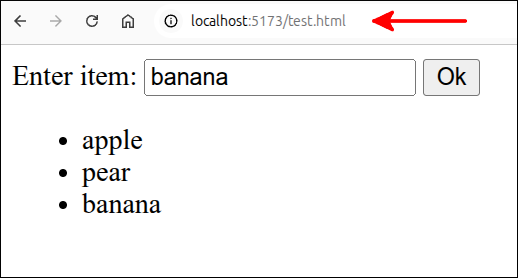
If you are using a Vite project, then you need to use the URL, localhost:5173/test.html, instead of localhost:5173.
Here is the code for test.html:
<!DOCTYPE html>
<html>
  <head>
    <meta charset="UTF-8" />
    <script type="module" src="./test.mjs"></script>
    <title>Test of localStorage</title>
  </head>
  <body>
    Enter item:
    <input type="text" id="item_box">
    <button id="ok_button">Ok</button>
    <ul id="item_list">
    </ul>
  </body>
</html>
Here is the code for test.mjs:
if (document.readyState === "loading") {
  document.addEventListener('DOMContentLoaded', init);
} else {
  init();
}

class ListItem {
  constructor(contents) {
    this.contents = contents;
  }
}

function handleOk() {
  console.log('handleOk called');
  const item_list = document.getElementById("item_list");
  const item_box = document.getElementById("item_box");
  const contents = item_box.value.trim();
  const item = new ListItem(contents);
  const li = document.createElement('li');
  li.appendChild(document.createTextNode(item.contents));
  item_list.appendChild(li);
}

function init() {
  console.log('init called');
  const ok_button = document.getElementById("ok_button");
  ok_button.addEventListener("click", handleOk);
}
I actually used incremental development to create test.mjs. You can tell with the console.log() statements that I checked to make sure that the functions were being called correctly. But, since this is just a simple example, I don’t show the incremental steps. I also added the ListItem class. Since the ListItem class is simple, I just included it here, instead of placing it in a separate module.
Just copying and pasting the code is good enough for what we want to do. Here is a screen shot of the application using Vite, after entering three fruits. Note the URL ends with /test.html.
Here is a screen shot of the application using StackBlitz
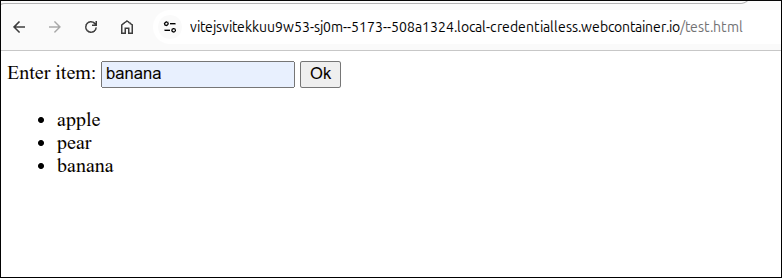
Note the URL also ends with /test.html, just as it would if developing locally with Vite.
Using localStorage to persist the data
To persist the data, we want to do several things:
-
Store the list item data in an array, called item_data.
-
Create a function called
updateList()that will take the data in the array and populate the <ul id="item_list"> (unordered list). -
Store a JSON.stringified version of item_data into localStorage.
-
Modify the
init()function to check if the key for the data is stored in localStorage. If the data does exist, then parse the value from localStorage to recreate item_data and call theupdateList()function.
The nice thing about localStorage is that it is available in all modern browsers and stores this so that it is only on the client’s computer. The client must use the same browser for the application. So, the data in localStorage is specific to the client’s computer and the browser she/he used to load the application. In this sense, localStorage is a private copy of the application’s data.
We will go into the limitations of localStorage later on in this lesson. For now, the one thing you need to understand about localStorage is that localStorage can only store data that consists of a key:value pair. This means that for any value that is not just a single value, the value must be converted into a string using the JSON.stringify() function. When, you retrieve the value, using the key, the value must be converted back into the original object using the JSON.parse() function.
Here is a modified version of test.mjs that does the first two items on our to-do list.
if (document.readyState === "loading") {
  document.addEventListener('DOMContentLoaded', init);
} else {
  init();
}

class ListItem {
  constructor(contents) {
    this.contents = contents;
  }
}

function handleOk(item_data) {
  console.log('handleOk called');
  //const item_list = document.getElementById("item_list");
  const item_box = document.getElementById("item_box");
  const contents = item_box.value.trim();
  const item = new ListItem(contents);
  item_data.push(item);
  updateList(item_data);
  //const li = document.createElement('li');
  //li.appendChild(document.createTextNode(item.contents));
  //item_list.appendChild(li);
}

function updateList(item_data) {
  const item_list = document.getElementById("item_list");
  const fragment = document.createDocumentFragment();
  for (let item of item_data) {
    const li = document.createElement('li');
    li.appendChild(document.createTextNode(item.contents));
    fragment.appendChild(li);
  }
  item_list.replaceChildren(fragment);
}

function init() {
  console.log('init called');
  let item_data = [];
  const ok_button = document.getElementById("ok_button");
  ok_button.addEventListener("click", () => {
    handleOk(item_data);
  });
}
The new lines are 13, 15, 19-23, 26-35, 39 and 41-43. Let’s talk about the changes to the init() function first. These are lines 39 and 41-43. Line 39 creates the variable item_data as an empty array. This is where we will hold the ListItem elements. Lines 41-43 have changed the way the handleOk() function is being set at the function that responds to the "click" event of the Ok button. Since we are creating item_data inside of init(), we need to pass item_data to the handling function, handleOk().
Line 13 has been modified to accept the parameter item_data. Line 15 comments out the item_list as that will be needed inside the updateList() function. Line 19 appends the ListItem object to the end of item_data. Line 20 calls the updateList() function with item_data as the argument. Lines 21-23 comments out the lines that were used to create the <li> element and append it to item_list. These lines are moved into the updateList() function.
Lines 26-35 define the updateList() function. Line 27 gets a reference to the <ul id="item_list"> element. Line 28 creates an empty Document fragment named fragment. Lines 29-33 define a for loop that iterates over all the ListItem elements stored in item_data. Line 30 creates a <li> element, called li. Line 31 creates a Text Node out of the ListItem's contents, and appends this to the <li> element. Line 32 appends the <li> element to fragment. Line 34 uses the replaceChildren() method to replace the contents of the <ul> element with fragment.
If you ran the application now, it would appear to run the same as in the previous version. That is because we only have added an array for storing the ListItems, instead of appending the <li> elements straight into the <ul> element.
Next, we will modify test.mjs to store the data from item_data into localStorage. Remember, that array must be JSON.stringified before storage. We will also make it so that the init() function will restore item_data if it is found inside of localStorage.
if (document.readyState === "loading") {
  document.addEventListener('DOMContentLoaded', init);
} else {
  init();
}

class ListItem {
  constructor(contents) {
    this.contents = contents;
  }
}

function handleOk(item_data) {
  console.log('handleOk called');
  //const item_list = document.getElementById("item_list");
  const item_box = document.getElementById("item_box");
  const contents = item_box.value.trim();
  const item = new ListItem(contents);
  item_data.push(item);
  updateList(item_data);
  const list_values = JSON.stringify(item_data);
  localStorage.setItem("item_data", list_values);
  //const li = document.createElement('li');
  //li.appendChild(document.createTextNode(item.contents));
  //item_list.appendChild(li);
}

function updateList(item_data) {
  const item_list = document.getElementById("item_list");
  const fragment = document.createDocumentFragment();
  for (let item of item_data) {
    const li = document.createElement('li');
    li.appendChild(document.createTextNode(item.contents));
    fragment.appendChild(li);
  }
  item_list.replaceChildren(fragment);
}

function init() {
  console.log('init called');
  let item_data = [];
  if (localStorage.getItem("item_data") !== null) {
    item_data = JSON.parse(localStorage.getItem("item_data"));
    updateList(item_data);
  }
  const ok_button = document.getElementById("ok_button");
  ok_button.addEventListener("click", () => {
    handleOk(item_data);
  });
}
The new lines are 21-22 and 42-45. Line 21 uses JSON.stringify() to convert the item_data array into a string and store this as list_values. Line 22 uses the setItem() method to store list_values with a key of item_data inside of localStorage.
Lines 42-45 define a selection statement that test to see if localStorage has a key called "item_data". If such a key exists, then lines 43 and 44 will be executed. Line 43 uses JSON.parse() to parse the value returned for the item_data key. This is to convert the stringified data back to the JavaScript object that string originated from. Line 44 calls updateList() to display the list items inside of the <ul> element.
To test the application, open up the DevConsole in Chrome or Chromium and click on the Application tab. Then, on the left side, click on Storage. In Chrome/Chromium, the Clear site data button shows up near the top of the Storage area. Click on that to clear localStorage.
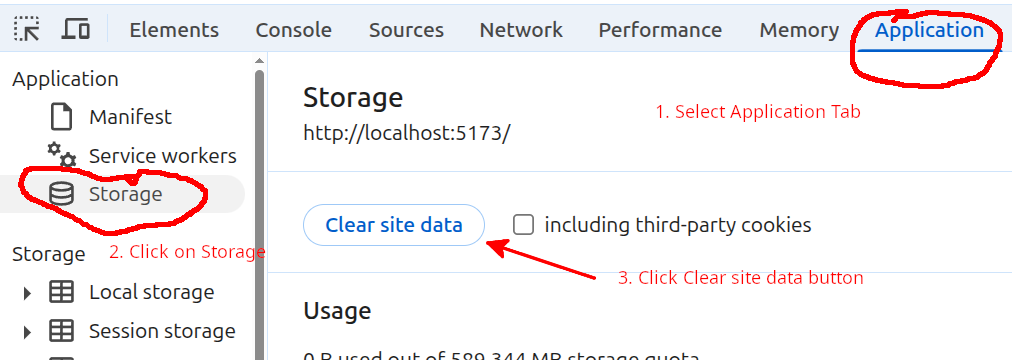
After you have cleared localStorage, add a few items and then refresh the page. You will see that your list of items is restored. You can even close the browser, start it up again to that page, and you will see the list of items show up wherever you left off.
For a more robust application, you would add a button that clears localStorage. We will do this for the Cars application.
Using localStorage for the Cars application
Let’s return to the application that gathers information about cars and displays this information in a HTML table. We can modify index.mjs so that we use localStorage to persist the cars information that is gathered. Here are some things to keep in mind as we do this.
-
Each time the car_data array is changed, we want to update what is stored in localStorage.
-
Upon starting up the application, we will check to see if the key for the car data is found in localStorage. If the key is found, then the data is retrieved and converted back to an array using JSON.parse(). Then, the
updateTable()function can be called to update the HTML table. -
A method for clearing localStorage that is easy for the user should be provided. This can include an explanation that the data will persist until localStorage is cleared. So, if other people will use that computer and run that application, this should be kept in mind.
Let’s start with a version of index.mjs that takes care of the first two items above:
import { Car } from "./cars.mjs";

if (document.readyState === "loading") {
  document.addEventListener('DOMContentLoaded', init);
} else {
  init();
}

function createApp() {
  // private values here
  const self = {
    handleOk: handleOk,
    handleSort: handleSort,
    showAddDlg: showAddDlg,
    showEditDlg: showEditDlg,
    handleSubmit: handleSubmit,
    handleDelete: handleDelete,
    loadFromLocalStorage: loadFromLocalStorage,
    handleLoad: handleLoad
  };
  let car_data = [];
  const make_box = document.getElementById("make_box");
  const model_box = document.getElementById("model_box");
  const price_box = document.getElementById("price_box");
  const cars_tbody = document.getElementById("cars_tbody");
  const add_dlg = document.getElementById("add_dlg");
  const add_button = document.getElementById("add_button");
  add_button.addEventListener("click", self.showAddDlg);
  const edit_dlg = document.getElementById("edit_dlg");
  const make_edit_box = document.getElementById("make_edit_box");
  const model_edit_box = document.getElementById("model_edit_box");
  const price_edit_box = document.getElementById("price_edit_box");
  const submit_button = document.getElementById("submit_button");
  submit_button.addEventListener("click", self.handleSubmit);
  let car_id;
  const cancel_button = document.getElementById("cancel_button");
  const delete_button = document.getElementById("delete_button");
  cancel_button.addEventListener("click", () => { edit_dlg.close(); });
  delete_button.addEventListener("click", self.handleDelete);

  // =========== API for interacting with user =========
  function handleOk() {
    const make = make_box.value.trim();
    const model = model_box.value.trim();
    const price = Number(price_box.value.trim());
    const car = new Car(make, model, price);
    car_data.push(car);
    console.log('car_data:', car_data);
    const car_values = JSON.stringify(car_data);
    localStorage.setItem("car_data", car_values);
    updateTable();
    make_box.value = "";
    model_box.value = "";
    price_box.value = "";
    add_dlg.close();
  }

  function handleSort(event) {
    const id = event.target.id;
    const property = id.split("_")[0];
    if (property === "make" || property === "model") {
      sortByString(property);
    } else if (property === "price") {
      sortByNumber(property);
    }
  }

  function showEditDlg(event) {
    const id = event.currentTarget.id;
    const car = car_data[id];
    console.log('car', car);
    car_id = id;
    make_edit_box.value = car.make;
    model_edit_box.value = car.model;
    price_edit_box.value = car.price;
    edit_dlg.showModal();
  }

  function handleSubmit() {
    const make = make_edit_box.value.trim();
    const model = model_edit_box.value.trim();
    const price = Number(price_edit_box.value.trim());
    const car = car_data[car_id];
    car.make = make;
    car.model = model;
    car.price = price;
    const car_values = JSON.stringify(car_data);
    localStorage.setItem("car_data", car_values);
    updateTable();
    edit_dlg.close();
  }

  function handleDelete() {
    const index = car_id;
    car_data.splice(index,1);
    const car_values = JSON.stringify(car_data);
    localStorage.setItem("car_data", car_values);
    updateTable();
    edit_dlg.close();
  }

  function showAddDlg() {
    add_dlg.showModal();
  }

  function loadFromLocalStorage(car_values) {
    car_data = JSON.parse(car_values);
    updateTable();
  }

  function handleLoad() {
    const c1 = new Car("Toyota", "Corolla", 28465.99);
    const c2 = new Car("Honda", "Civic", 35423.99);
    const c3 = new Car("Nissan", "Rogue", 34198.99);
    const c4 = new Car("Lexus", "UX 250h", 43728.99);
    car_data = [];
    car_data.push(c1);
    car_data.push(c2);
    car_data.push(c3);
    car_data.push(c4);
    const car_values = JSON.stringify(car_data);
    localStorage.setItem("car_data", car_values);
    updateTable();
  }
  // =========== end of API for interacting with user ==

  // =========== helper functions =============
  function updateTable() {
    const fragment = makeFragment();
    cars_tbody.replaceChildren(fragment);
  }

  function makeFragment() {
    const fragment = document.createDocumentFragment();
    for (let i = 0; i < car_data.length; i++) {
      const car = car_data[i];
      const tr = document.createElement('tr');
      tr.setAttribute("id", i);
      tr.addEventListener("click", (event) => {
        self.showEditDlg(event);
      });
      let td = document.createElement('td');
      let contents = document.createTextNode(car.make);
      td.appendChild(contents);
      tr.appendChild(td);
      td = document.createElement('td');
      contents = document.createTextNode(car.model);
      td.appendChild(contents);
      tr.appendChild(td);
      td = document.createElement('td');
      contents = document.createTextNode(car.price);
      td.appendChild(contents);
      tr.appendChild(td);
      fragment.appendChild(tr);
    }
    return fragment;
  }

  function sortByString(property) {
    const header = document.getElementById(property + "_heading");
    const sort_dir = header.getAttribute("aria-sort");
    if (sort_dir === "none" || sort_dir === "descending") {
      car_data.sort((a,b) => a[property].localeCompare(b[property]));
      header.setAttribute("aria-sort", "ascending");
    } else if (sort_dir === "ascending") {
      car_data.sort((a,b) => b[property].localeCompare(a[property]));
      header.setAttribute("aria-sort", "descending");
    }
    resetHeadings(property);
    updateTable();
  }

  function sortByNumber(property) {
    const header = document.getElementById(property + "_heading");
    const sort_dir = header.getAttribute("aria-sort");
    if (sort_dir === "none" || sort_dir === "descending") {
      car_data.sort((a,b) => a[property] - b[property]);
      header.setAttribute("aria-sort", "ascending");
    } else if (sort_dir === "ascending") {
      car_data.sort((a,b) => b[property] - a[property]);
      header.setAttribute("aria-sort", "descending");
    }
    resetHeadings(property);
    updateTable();
  }

  function resetHeadings(property) {
    const id = property + "_heading";
    const headers = document.getElementsByTagName('th');
    for (let header of headers) {
      if (header.id !== id) {
        header.setAttribute("aria-sort", "none");
      }
    }
  }
  // =========== end of helper functions ======

  return self;
}

function init() {
  console.log('init called');
  const myApp = createApp();
  const car_values = localStorage.getItem("car_data");
  if (car_values !== null) {
    myApp.loadFromLocalStorage(car_values);
  }
  const ok_button = document.getElementById("ok_button");
  ok_button.addEventListener("click", myApp.handleOk);
  const load_data_button = document.getElementById("load_data_button");
  load_data_button.addEventListener("click", myApp.handleLoad);
  const table_headers = document.getElementsByTagName('th');
  for (let header of table_headers) {
    header.addEventListener("click", () => {
      myApp.handleSort(event);
    });
  }
}
The new lines are 18, 49-50, 87-88, 96-97, 106-109, 121-122 and 204-207. Line 18 modifies the definition of self, so that the loadFromLocalStorage() function is included in the API functions returned by the factory function. Line 49 gets the JSON.stringified form of the car_data array. Line 50 stores this value using the car_data key inside of localStorage. Lines 87-88, 96-97 and 121-122 do the same things as lines 49-50, in each place where car_data is changed or updated.
Lines 204-227 are the changes made inside the init() function that are used to start loading the data from localStorage to update the car_data array. We need to be careful here in how we do this. Inside of init() we only have access to the factory function’s functions that are returned when createApp() is called on line 203. So, line 204 first gets the value from localStorage that has the key car_data. If this value is not null, then line 206 is executed. Note on line 206, that we are calling one of the functions returned by calling createApp(), and are passing the values, car_values to the function called loadFromLocalStorage().
Lines 106-109 define the loadFromLocalStorage() handler function. As you can see, this has been added to the API functions that are returned by createApp() (our factory function). Line 107 takes the values passed from the call to loadFromLocalStorage() and uses JSON.parse() to convert those values back to a JavaScript array. This array is assigned to be the new value of car_data. Remember that car_data is a private variable for our factory function. So, we need a way to get the values from localStorage upon running the init() function, passed in to the factory function. This is the purpose of the loadFromLocalStorage() handler function.
Adding a way for the user to clear localStorage
Next, let’s modify index.html and index.mjs to provide a simple way for the user to clear localStorage. We can modify index.html to include a <button> element that is used to clear localStorage.
<!DOCTYPE html>
<html lang="en">
  <head>
    <meta charset="UTF-8" />
    <script type="module" src="index.mjs"></script>
    <title>Cars</title>
  </head>
  <body>
    <dialog id="add_dlg">
      Enter car info: <br />
      Make:
      <input type="text" id="make_box"><br />
      Model:
      <input type="text" id="model_box"><br />
      Price:
      <input type="text" id="price_box"><br />
      <br />
      <button id="ok_button">Ok</button>
    </dialog>
    <dialog id="edit_dlg">
      Edit car info: <br />
      Make:
      <input type="text" id="make_edit_box"><br />
      Model:
      <input type="text" id="model_edit_box"><br />
      Price:
      <input type="text" id="price_edit_box"><br />
      <br />
      <button id="cancel_button">Cancel</button>
      <button id="submit_button">Submit</button>
      <button id="delete_button">Delete</button>
    </dialog>
    <br />
    <button id="add_button">Add car</button>
    <button id="load_data_button">Load Test Data</button>
    <button id="clear_storage_button">Clear persistent storage</button>
    <h1>Cars table</h1>
    <table border="1">
      <thead>
        <tr>
          <th id="make_heading" aria-sort="none">Make</th>
          <th id="model_heading" aria-sort="none">Model</th>
          <th id="price_heading" aria-sort="none">Price</th>
        </tr>
      </thead>
      <tbody id="cars_tbody"></tbody>
    </table>
  </body>
</html>
The new line is 36. This just adds a <button id="clear_storage_button"> element to the page.
Next, we modify index.mjs to add an event listener to this button that clears localStorage.
import { Car } from "./cars.mjs";

if (document.readyState === "loading") {
  document.addEventListener('DOMContentLoaded', init);
} else {
  init();
}

function createApp() {
  // private values here
  const self = {
    handleOk: handleOk,
    handleSort: handleSort,
    showAddDlg: showAddDlg,
    showEditDlg: showEditDlg,
    handleSubmit: handleSubmit,
    handleDelete: handleDelete,
    loadFromLocalStorage: loadFromLocalStorage,
    handleClearStorage: handleClearStorage,
    handleLoad: handleLoad
  };
  let car_data = [];
  const make_box = document.getElementById("make_box");
  const model_box = document.getElementById("model_box");
  const price_box = document.getElementById("price_box");
  const cars_tbody = document.getElementById("cars_tbody");
  const add_dlg = document.getElementById("add_dlg");
  const add_button = document.getElementById("add_button");
  add_button.addEventListener("click", self.showAddDlg);
  const edit_dlg = document.getElementById("edit_dlg");
  const make_edit_box = document.getElementById("make_edit_box");
  const model_edit_box = document.getElementById("model_edit_box");
  const price_edit_box = document.getElementById("price_edit_box");
  const submit_button = document.getElementById("submit_button");
  submit_button.addEventListener("click", self.handleSubmit);
  let car_id;
  const cancel_button = document.getElementById("cancel_button");
  const delete_button = document.getElementById("delete_button");
  cancel_button.addEventListener("click", () => { edit_dlg.close(); });
  delete_button.addEventListener("click", self.handleDelete);

  // =========== API for interacting with user =========
  function handleOk() {
    const make = make_box.value.trim();
    const model = model_box.value.trim();
    const price = Number(price_box.value.trim());
    const car = new Car(make, model, price);
    car_data.push(car);
    console.log('car_data:', car_data);
    const car_values = JSON.stringify(car_data);
    localStorage.setItem("car_data", car_values);
    updateTable();
    make_box.value = "";
    model_box.value = "";
    price_box.value = "";
    add_dlg.close();
  }

  function handleSort(event) {
    const id = event.target.id;
    const property = id.split("_")[0];
    if (property === "make" || property === "model") {
      sortByString(property);
    } else if (property === "price") {
      sortByNumber(property);
    }
  }

  function showEditDlg(event) {
    const id = event.currentTarget.id;
    const car = car_data[id];
    console.log('car', car);
    car_id = id;
    make_edit_box.value = car.make;
    model_edit_box.value = car.model;
    price_edit_box.value = car.price;
    edit_dlg.showModal();
  }

  function handleSubmit() {
    const make = make_edit_box.value.trim();
    const model = model_edit_box.value.trim();
    const price = Number(price_edit_box.value.trim());
    const car = car_data[car_id];
    car.make = make;
    car.model = model;
    car.price = price;
    const car_values = JSON.stringify(car_data);
    localStorage.setItem("car_data", car_values);
    updateTable();
    edit_dlg.close();
  }

  function handleDelete() {
    const index = car_id;
    car_data.splice(index,1);
    const car_values = JSON.stringify(car_data);
    localStorage.setItem("car_data", car_values);
    updateTable();
    edit_dlg.close();
  }

  function showAddDlg() {
    add_dlg.showModal();
  }

  function handleClearStorage() {
    localStorage.clear();
    car_data = [];
    updateTable();
  }

  function loadFromLocalStorage(car_values) {
    car_data = JSON.parse(car_values);
    updateTable();
  }

  function handleLoad() {
    const c1 = new Car("Toyota", "Corolla", 28465.99);
    const c2 = new Car("Honda", "Civic", 35423.99);
    const c3 = new Car("Nissan", "Rogue", 34198.99);
    const c4 = new Car("Lexus", "UX 250h", 43728.99);
    car_data = [];
    car_data.push(c1);
    car_data.push(c2);
    car_data.push(c3);
    car_data.push(c4);
    const car_values = JSON.stringify(car_data);
    localStorage.setItem("car_data", car_values);
    updateTable();
  }
  // =========== end of API for interacting with user ==

  // =========== helper functions =============
  function updateTable() {
    const fragment = makeFragment();
    cars_tbody.replaceChildren(fragment);
  }

  function makeFragment() {
    const fragment = document.createDocumentFragment();
    for (let i = 0; i < car_data.length; i++) {
      const car = car_data[i];
      const tr = document.createElement('tr');
      tr.setAttribute("id", i);
      tr.addEventListener("click", (event) => {
        self.showEditDlg(event);
      });
      let td = document.createElement('td');
      let contents = document.createTextNode(car.make);
      td.appendChild(contents);
      tr.appendChild(td);
      td = document.createElement('td');
      contents = document.createTextNode(car.model);
      td.appendChild(contents);
      tr.appendChild(td);
      td = document.createElement('td');
      contents = document.createTextNode(car.price);
      td.appendChild(contents);
      tr.appendChild(td);
      fragment.appendChild(tr);
    }
    return fragment;
  }

  function sortByString(property) {
    const header = document.getElementById(property + "_heading");
    const sort_dir = header.getAttribute("aria-sort");
    if (sort_dir === "none" || sort_dir === "descending") {
      car_data.sort((a,b) => a[property].localeCompare(b[property]));
      header.setAttribute("aria-sort", "ascending");
    } else if (sort_dir === "ascending") {
      car_data.sort((a,b) => b[property].localeCompare(a[property]));
      header.setAttribute("aria-sort", "descending");
    }
    resetHeadings(property);
    updateTable();
  }

  function sortByNumber(property) {
    const header = document.getElementById(property + "_heading");
    const sort_dir = header.getAttribute("aria-sort");
    if (sort_dir === "none" || sort_dir === "descending") {
      car_data.sort((a,b) => a[property] - b[property]);
      header.setAttribute("aria-sort", "ascending");
    } else if (sort_dir === "ascending") {
      car_data.sort((a,b) => b[property] - a[property]);
      header.setAttribute("aria-sort", "descending");
    }
    resetHeadings(property);
    updateTable();
  }

  function resetHeadings(property) {
    const id = property + "_heading";
    const headers = document.getElementsByTagName('th');
    for (let header of headers) {
      if (header.id !== id) {
        header.setAttribute("aria-sort", "none");
      }
    }
  }
  // =========== end of helper functions ======

  return self;
}

function init() {
  console.log('init called');
  const myApp = createApp();
  const car_values = localStorage.getItem("car_data");
  if (car_values !== null) {
    myApp.loadFromLocalStorage(car_values);
  }
  const ok_button = document.getElementById("ok_button");
  ok_button.addEventListener("click", myApp.handleOk);
  const load_data_button = document.getElementById("load_data_button");
  load_data_button.addEventListener("click", myApp.handleLoad);
  const clear_storage_button = document.getElementById("clear_storage_button");
  clear_storage_button.addEventListener("click", myApp.handleClearStorage);
  const table_headers = document.getElementsByTagName('th');
  for (let header of table_headers) {
    header.addEventListener("click", () => {
      myApp.handleSort(event);
    });
  }
}
The new lines are 19, 107-111 and 219-220. Line 19 modifies the definition of self so that handleClearStorage() is added to the API functions returned by the factory function. Lines 219 and 220 are the changes inside the init() function. Line 219 gets a reference to the newly added <button> element and line 229 associates the myApp.handleClearStorage() function with clicking on that button.
Lines 107-111 define the handleClearStorage() handler function. Line 108 clears localStorage. Line 109 sets car_data to an empty array. Line 110 calls updateTable() to update the HTML table. Note that both car_data (a private variable) and updateTable() (a helper function) are only directly accessible from inside the factory function.
Now, the user of the application can clear localStorage any time they want.
Limitations of localStorage
-
The data that can be stored inside of localStorage is limited to key:value pairs. Any values that are not a single object, must be converted into a string using JSON.stringify().
-
The data is stored only on the local computer for the specific browser the user visits the application with. If the user switched to a different browser, that would be a different localStorage.
-
If the user clears browser history, cache, cookies or site data, localStorage is cleared.
-
If the user is in incognito mode, localStorage is cleared when all private tabs are closed or if the private session ends.
-
The user can configure their browser to clear site data automatically upon closing, and this will clear localStorage.
-
Sensitive data should not be stored in localStorage. Malicious or compromised browser extensions which already have full access to a page’s localStorage can steal the tokens. Many applications depend on a number of npm packages, some of which could be compromised and read localStorage. Also, if a developer uses innerHTML rather than textContent, this could provide access to localStorage. Interestingly, many examples of how to make a web application store JSONWebTokens (JWT) in localStorage to manage sessions. But, this is a risky idea and should not be used for any production web application.
Summary
-
This was a relatively short lesson that showed how you can enhance the user experience by providing a kind of persistent data storage using localStorage. This can be useful for an application where you just want to allow the user to take up where they last left off without saving anything.
-
This provided another review on using factory functions. In particular, an emphasis was made on how the returned handler functions for a factory function provide a way to pass values from outside the factory function to the private variables and helper functions inside the factory functions. That is a useful pattern that should be kept in mind if you use a factory function.
-
If you are using localStorage to save an array of JavaScript objects, it is a good idea to create a class for those objects. This is a simple way of making use of localStorage as you can easily construct the objects to store in an array. The array can be stored in string form and easily restored using JSON.parse(). Then, you can make use of the object’s properties and methods to make use of the object’s data. As an example, even if you can store an array of HTML fragments in an array, this would not be easy to work with if you stored that kind of array in localStorage. It is far better to store an array of JavaScript objects. So, this is another good reason for defining your own class or classes for important data in your applications.