An application using IndexedDB through Dexie.js
Building an application that uses Dexie.js to use IndexedDB
Now that we have made use of localStorage to persist some data, let’s make use of another storage that is available in all modern browsers, IndexedDB. IndexedDB is an actual database, unlike localStorage. So, IndexedDB is capable of storing more complex data than localStorage, and can also be used to store a larger amount of data.
IndexedDB is more powerful than localStorage, but this power comes at some cost. IndexedDB is somewhat cumbersome to use and involves syntax that is not common to people who make use of databases. So, we will use Dexie.js as this provides a wrapper that eases the use of IndexedDB.
Here is a link to the documentation for Dexie.js: Getting started with Dexie.js. If you look at that documentation, you will see that Dexie.js can be used with popular libraries like React and frameworks like Angular and Vue. It can also be used with Svelte, a framework that compiles into lightweight, plain JavaScript code for the browser. We will only make use of Dexie.js with plain JavaScript, but it is good to know that it can be used by both JavaScript libraries and frameworks.
Starting off the project
Getting started with StackBlitz
Just as with the last lesson, Enhancing the User Experience using LocalStorage, we can start using one of StackBlitz’s standard templates, the JS Vanilla template. This was done in an earlier lesson, and this can be reviewed here: Starting the lesson in StackBlitz. The steps followed were:
-
Login to your StackBlitz account.
-
Click on the New project button, and click on the Popular templates.
-
Look for the JS Vanilla template and click on that template.
-
Edit the project info and change the Title to something like using_dexie.
-
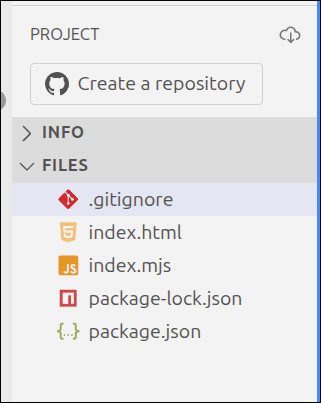
Right-click and delete the public and src folders, and create a new file index.mjs.
This is what the PROJECT section should look like to start:
Getting started using a Vite Project
Start by creating a directory for the project, and a public directory within that directory:
$ cd ~/Documents
$ mkdir using_dexie
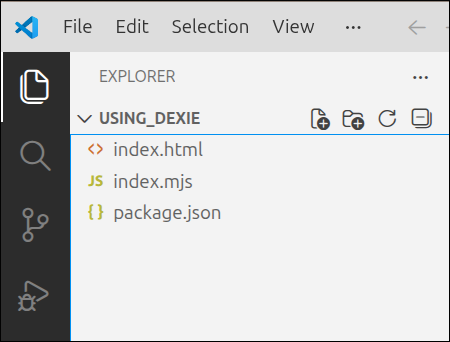
Start up Visual Studio (VS) Code and open the ~/Documents/using_dexie folder. In the EXPLORER panel on the left, right-click in the files area and select New File. Create the files, index.html, index.mjs and package.json. This is what your EXPLORER panel should look like:
Source code for the project
Here is the source for index.html. You can copy this to replace the contents of your index.html file.
<!DOCTYPE html>
<html lang="en">
  <head>
    <meta charset="UTF-8" />
    <script type="module" src="index.mjs"></script>
    <title>Students and Courses</title>
  </head>
  <body>
    <div id="students_div">
      <button id="courses_button">Courses View</button>
      <h1>Students</h1>
    </div>
    <div id="courses_div">
      <button id="students_button">Students View</button>
      <h1>Courses</h1>
    </div>
  </body>
</html>
Lines 1-7 are basically the same lines that we have used for index.html for all our projects so far. But, the <body> element going from lines 8-17, is quite a bit different. Note that there are two main <div> elements. The first <div> element is on lines 9-12. This has an id="students_div" attribute, and will be used to display all the students. Line 10 defines a <button id="courses_button"> element that when clicked on will switch to a Courses view. Line 11 is just a <h1> element to give this <div> a main heading.
Lines 13-16 define the second <div> element. This has an id="courses_div" attribute as this will be used to display the courses. Line 14 has a <button id="students_button"> that will be used to switch back to a Students view. Line 15 is just a <h1> element that makes the main heading for this <div>, Courses.
This is a simple start to index.html. The amount of lines is kept short so that you can see how the two <div> elements will be used.
Here is the source code for index.mjs. You can copy this to replace the contents of your index.mjs file.
if (document.readyState === "loading") {
  document.addEventListener('DOMContentLoaded', init);
} else {
  init();
}

function createInterfaceAPI() {
  // private values
  const self = {
    switchToCourses: switchToCourses,
    switchToStudents: switchToStudents
  };

  // ========== API functions for the user-interface ===== //
  function switchToCourses(courses_div, students_div) {
    courses_div.style.display = "block";
    students_div.style.display = "none";
  }

  function switchToStudents(courses_div, students_div) {
    courses_div.style.display = "none";
    students_div.style.display = "block";
  }
  // =========== end of API functions for the user-interface === //

  // =========== helper functions for user-interface===========

  // =========== end of helper functions for user-interface ====

  return self;
} // end of createInterfaceAPI factory function

function init() {
  console.log('init called');
  const courses_div = document.getElementById("courses_div");
  courses_div.style.display = "none";
  const students_div = document.getElementById("students_div");
  const uiAPI = createInterfaceAPI();
  const courses_button = document.getElementById("courses_button");
  courses_button.addEventListener("click", () => {
    uiAPI.switchToCourses(courses_div, students_div);
  });
  const students_button = document.getElementById("students_button");
  students_button.addEventListener("click", () => {
    uiAPI.switchToStudents(courses_div, students_div);
  });
}
Lines 1-5 are just the standard lines we use to make sure that the init() function is the starting point for the JavaScript execution. Lines 7-31 define the factory function called createInterfaceAPI(). Line 8 is just a comment stating that this is where we will define any private variables and constants for this factory function. Lines 9-12 define the self object, which is the object that this factory function will return. At this point, the only two functions are the
Lines 14 and 24 lay out the section where the API functions for interacting with the user will be defined. Lines 15-18 define the switchToCourses() handler function. This function has courses_div and students_div references passed as parameters. These are needed for this function, as lines 16 and 17 will show the courses_div, and hide the students_div, respectively.
Lines 20-23 define the switchToStudents() handler function. This is similar to the switchToCourses() function. The only difference is that the switchToStudents() function hides courses_div and makes students_div visible.
Lines 26 and 28 lay out the helper function section. These will be functions that help the user-interface API functions to get their tasks done. Right now, there are no helper functions defined yet.
Lines 33-47 define the init() function. Line 35 gets a reference to the <div id="courses_div"> element. Line 36 makes it so that this <div> starts off hidden. Line 37 gets a reference to the <div id="students_div"> element. Line 38 calls the factory function, createHandlers(). That will initialize the private variables and constants for the factory function and returns the handler functions back to the init() function. This makes those handler functions available inside of init(). Line 39 gets a reference to the <button id="courses_button"> element. Lines 40-42 set the click handler for this button to be the switchToCourses() function and pass the courses_div and students_div references.
Line 43 gets a reference to the <button id="students_button"> element. Lines 44-46 set the click handler for that button to be the switchToStudents() function and pass the courses_div and students_div references.
package.json for Vite project only
If you are going to use a local Vite project, you need to use the following for the package.json file. Don’t use this for StackBlitz.
{
  "name": "vite-template-my-template",
  "private": true,
  "version": "0.0.0",
  "type": "module",
  "scripts": {
    "dev": "vite",
    "build": "vite build",
    "preview": "vite preview"
  },
  "devDependencies": {
    "vite": "^7.3.1"
  }
}
Installing Dexie
Now that we have the initial files in place, we need to install the Dexie.js package.
Installing Dexie.js in the StackBlitz project
On the top right of the Terminal area, click on the + sign to open a new terminal. In that terminal, run the following command:
> npm install dexie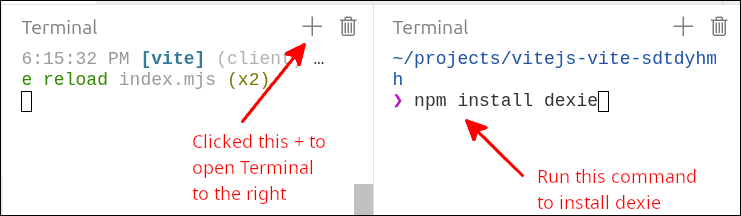
If you look, the package.json file will be updated to show dexie as a dependency.
Installing Dexie.js if using Vite locally
Run the following commands:
$ cd ~/Documents/using_dexie
$ npm install
$ npm install dexie
$ npm run dev
Line 1 just changes into the correct directory. Line 2 uses package.json to set up the project to use Vite. Line 3 adds the dexie package. Finally, line 4 starts up the Vite server so that you can view your project at localhost:5173.
A single page application (SPA)
What we have set up with our index.html and index.msj is a minimal single page application (SPA). A SPA is an application that just has one page and switches between views to show different parts of the application. This is easier to manage than a multi-page application (MPA), and also results in quicker transitions between the different views. If an application only has two or three different views, using a SPA is certainly an option. For a more complex application that is content-heavy (like an e-commerce site), a MPA is usually the better choice in terms of organizing the code.
The following animated gif file demonstrates our application switching views while running the application.
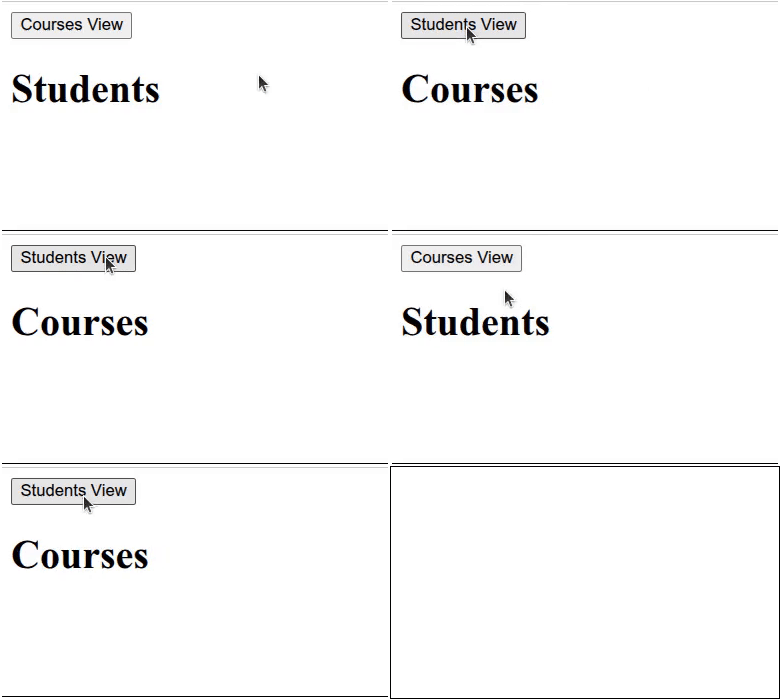
Click on Reload gif to replay animation.
You can see that clicking on the button switches from one view to the next.
Notes
-
Use for .. of loops instead of map
-
Consider showing how
map()can be used to replace a for .. of loop. Both iterate over all elements of an array. -
Use dialog boxes to display the courses for a student, and the students in a course. That will make it so that only two tables need to be drawn, one of the students and one for the courses.
Add ability to initialize database
For this project, we will add all the records to initialize the database. So, we will not worry about adding, editing or deleting any records. This is because we want to focus mainly on how to display the data.
Next, we can modify index.mjs so that we can initialize the database inside our init() function.
import Dexie from "dexie";

if (document.readyState === "loading") {
  document.addEventListener('DOMContentLoaded', init);
} else {
  init();
}

function createInterfaceAPI(dbAPI) {
  // private values
  const self = {
    switchToCourses: switchToCourses,
    switchToStudents: switchToStudents
  };

  // ========== API functions for the user-interface ===== //
  function switchToCourses(courses_div, students_div) {
    courses_div.style.display = "block";
    students_div.style.display = "none";
  }

  function switchToStudents(courses_div, students_div) {
    courses_div.style.display = "none";
    students_div.style.display = "block";
  }
  // =========== end of API functions for the user-interface === //

  // =========== helper functions for user-interface===========

  // =========== end of helper functions for user-interface ====

  return self;
} // end of createInterfaceAPI factory function

function createDatabaseAPI() {
  // private values
  const self = {
    initDB: initDB
  };
  let db;

  // =========== API functions for database interaction ======
  async function initDB() {
    console.log('initDB called');
    db = new Dexie("EnrollmentDB");
    db.version(1).stores({
      students: '++id, first_name, last_name, major',
      courses: '++id, dept, number, title, credits',
      enrollments: '[student_id+course_id], student_id, course_id'
    });
    try {
      await db.open();
      console.log("database opened");
    } catch (error) {
      console.log(error);
    }
  }
  // =========== end of API functions for database interaction ===

  return self;
}

function init() {
  console.log('init called');
  const courses_div = document.getElementById("courses_div");
  courses_div.style.display = "none";
  const students_div = document.getElementById("students_div");
  const dbAPI = createDatabaseAPI();
  console.log('dbAPI', dbAPI);
  dbAPI.initDB();
  const uiAPI = createInterfaceAPI(dbAPI);
  const courses_button = document.getElementById("courses_button");
  courses_button.addEventListener("click", () => {
    uiAPI.switchToCourses(courses_div, students_div);
  });
  const students_button = document.getElementById("students_button");
  students_button.addEventListener("click", () => {
    uiAPI.switchToStudents(courses_div, students_div);
  });
}
The new lines are 1, 9, 35-61 and 68-71. Line 1 imports Dexie so that it can be used to control our database. Line 9 adds the parameter dbAPI to the function createInterfaceAPI(). This is because we will create a second factory function for interacting with the database, called createDatabaseAPI(). When createDatabaseAPI()`is called inside the `init() function, the returned value is stored as dbAPI. We pass that as an argument to createInterfaceAPI() so that the all the functions inside the createInterfaceAPI() factory function have access to the database API functions defined in the createDatabaseAPI() factory function.
Lines 35-61 define the createDatabaseAPI() factory function. This is where all the functionality for interacting with the database will be defined. Lines 37-39 define the self object for this factory function. Right now, self will only return the initDB() function to the calling program. Line 40 defines the connection to the database set up by Dexie.js, and stores this as db. Once the database connection has been opened, then all interactions with the database will use the db object.
Lines 43-57 define the initDB() API function. As the name implies, this function is used to initialize the database set up by Dexie.js. Lines 46-50 define the database schema. A database schema is a definition that controls how the data will be organized. Line 47 says that there will be a students object that is like a table that has rows and columns. Line 47 says that the columns will consist of id, first_name, last_name and major. The ++id means that the id value will be an integer starting at 1, that automatically increases by one for each row. This guarantees that no two rows in the students object will have the same id value. Those columns can be thought of as characteristics or properties of a student. So, within the students object, each row will correspond to a different student. Line 48 creates a courses object that has the columns id, course_dept, course_number, course_title and course_credits. So, each row of the courses object will have values for these columns that correspond to a different course. Line 49 creates an enrollments object that has a constraint and two columns. The [student_id+course_id] is a constraint. This says that no two rows in the enrollments object can have the same combination of student_id and course_id. This is to prevent duplicate enrollments. That is, having the same student enrolling for the same course, will not be repeated. The student_id and course_id columns are to hold the student’s id and the course’s id, respectively. That is, a row in the enrollments object corresponds to a particular student being enrolled in a particular course.
Lines 51-56 define a try/catch block that is used to handle the Promise that is used to initialize the database. Line 52 attempts to open the database. We must await this, so that the Promise can be resolved. If the database is successfully opened, line 53 prints "database opened" to the Console. But, if the Promise results in an error, lines 54-56 will halt execution and display an error message.
Lines 42 and 58 layout the section of this factory function where we will define all the API functions for interacting with the database.
Line 48 starts the definition of the enrollments object with this term:
[student_id+course_id]
This is not actually a field, but it is a constraint that makes it so that no two enrollments recordd can have the same combination of student_id and course_id values. This is to make sure that the same record is not entered more than one time.
As mentioned earlier, the student_id will refer to the id for that student, and course_id will refer to the id for that course. However, unlike in a relational database, there is no way to enforce this constraint for the enrollments table. So, if you use 44 for a student_id, and there is no student with that id, there is no way to prevent this just from the schema when using a non-relational database like IndexedDB or Dexie.js (which is a wrapper around IndexedDB).
Line 68 calls the createdDatabaseAPI() factory function and stores the returned value as dbAPI. Line 69 prints dbAPI to the Console for debugging purposes. just calls the initDB() function. Line 70 calls the initDB() function to actually initialize the database. Line 71 has been modified by passing dbAPI as an argument to the createInterfaceAPI() factory function, so that the interface functions have access to the database API functions.
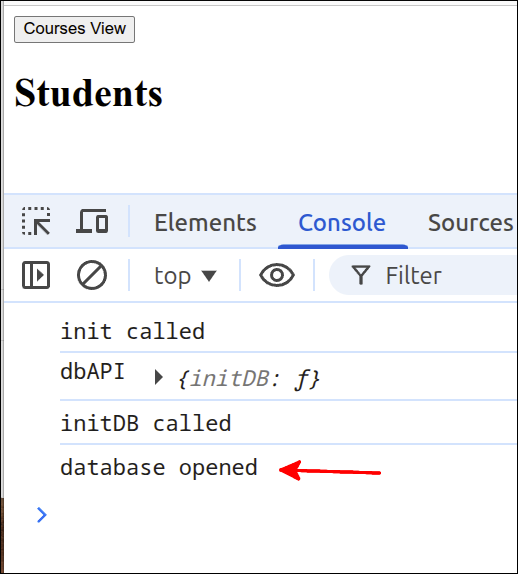
If you run the application you can start by looking at the Console. You should see something like this:
You can switch to the Application tab to see that the database with all the tables and fields has been created.
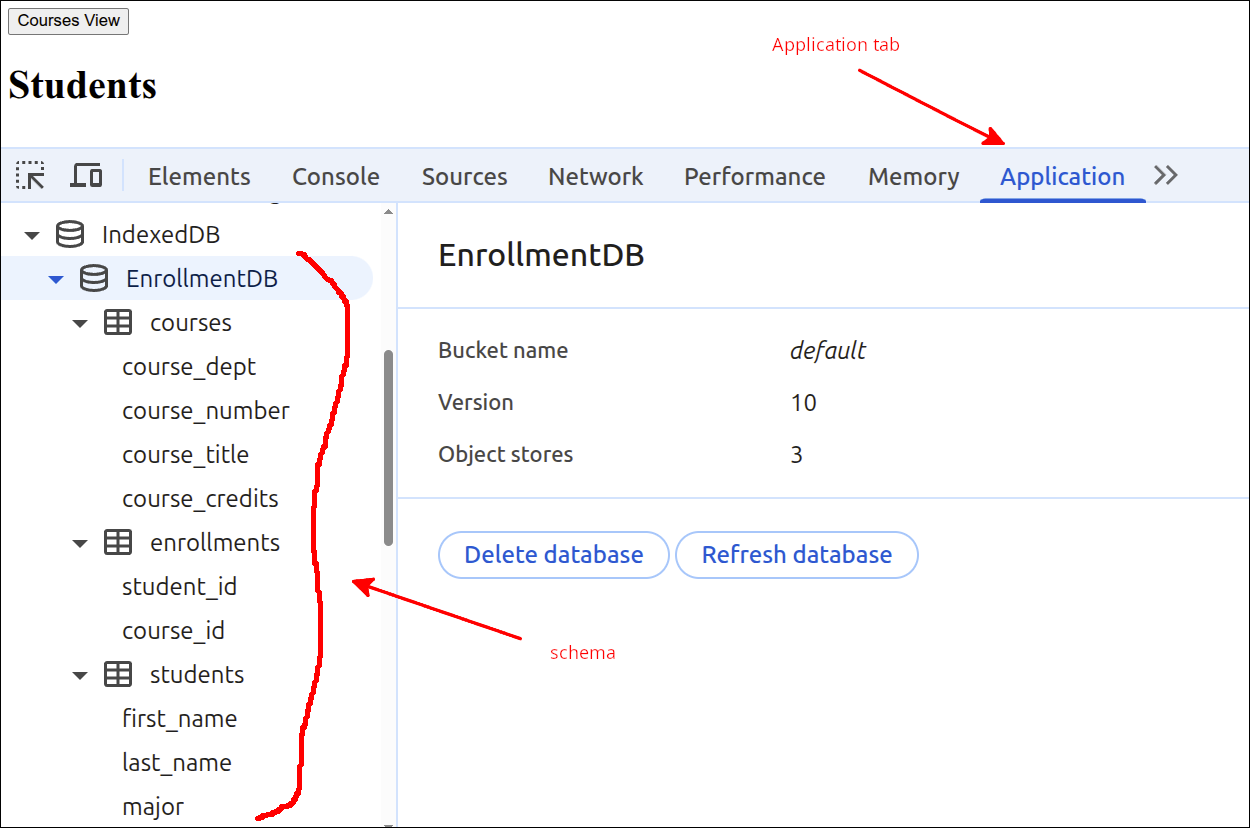
You can see that the tables with their fields have been created.
Databases: Background (skip if you are familar with databases)
What is data and how does this differ from information?
When most people talk about data from a computer-perspective, they really mean information. For a computer scientist, there is an important distinction. For the computer scientist, anything stored in a digital format is data. When what is being stored has meaning to a human, then it becomes information. For our purposes, a database is something that stores information. If what we are storing has no meaning to a human, then we would not store that in a database. So, what we call a database is really an informationbase.
Inside a computer a piece of data might look like this:
01011111
That by itself has no meaning to a human.
By contrast, the following:
"name": "Bob"
has meaning to a human, so it would be considered information. What we want to store in a database is information. So from this point forward, what I will call data, is really information.
Ways of storing data
Suppose you are a student taking a course, and you make notes while attending the course lectures. That is a way of storing data. But, if you lose your notes, the data is also lost. If you have a hundred pages of notes, it may be hard to look up a specific part of the data, unles you have a very organized way of taking notes. But, loosely speaking, your set of notes is a form of a database as it is a collection of related information.
What if a student types out their notes after manually taking them in class. This has the advantage of the student being able to add to the notes things that they did not have time to jot down during the lecture. This also will be more legible and can be electronically searched to some extent. It is also a good way to get the material into another "database" and that is their brain’s memory. This may be better than manual notes, as you can have backup copies. But, you can’t search for something unless you know which document to search for. On top of that, you can only perform searches for words or phrases.
What if the student tries to organize the information into a spreadsheet. The student could create a row in the spreadsheet for a chunk of information. For that row, the student could have columns like Date, course, topic, text. The text column would perhaps consist of a few sentences that are relevant to that topic and course. The student could now look at the data by Date, if they know what dates are relevant to what they need to look up. Or they could look data by course, or by topic. They could look things up based on a combination of those columns too. Then, the amount of text they have to search through has been filtered by using the data in the first three columns. This seems better, as it seems easier to retrieve the data you want. After all, a database is not useful if you can’t retrieve the data you want easily.
Now, suppose the student has created a database to store her/his data. They can filter and sort the data to quickly retrieve the desired data. Suppose that this student works with other people in the same course to add data to this database. Now, there is a greater chance that the useful data that they want to retrieve has been put there by one of their team members.
Database Management Systems (DBMS)
A Database Management System (DBMS) is software that is used to manage a database. IndexedDB is an example of a DBMS. Sqlite and PostgreSQL are other examples of DBMSs. A DBMS is not a database itself, but is the software used to manage the database. So, a DBMS is what facilitates multiple people using the database, and enforcing database integrity. So a DBMS is what can be used to prevent multiple entries of the same data and can enforce how different tables in the database are related. So, if a database keeps track of which customer buys a certain product, any record that does not have a valid customerID or a productID will not be allowed. Those are examples of how database integrity is enforced.
More than one type of database
For many years, the most common type of database used to help run a business was a relational database. This type of database use a common language, SQL or structured-query-language to manipulate the data in the database. This type of database works very well for data that can be organized into separate but related entities like Customers, Products and Sales. This type of database uses a table for each important entity.
Another common type of database is a NoSQL database. Common DBMS software for NoSQL databases would be MongoDB and CouchDB. Instead of organizing data into tables, this type of database organizes data into objects that are like JavaScript objects. In fact, JSON (JavaScript Object Notation) strings, is the way that data is usually stored in NoSQL databases. This makes sense when the data is hierarchical. For example, patient medical records are commonly stored in a DBMS like Mumps which is a kind of NoSQL database system. This makes sense if you are storing the data by individual patient. So, for a given patient, that patient will have an id property and other properties. So, they might have a property for their doctors, and a property for their allergies, and another property for their insurances. So, some records might look like this:
[
  patient1: {
    id: 11735,
    doctors: ["doctor1", "doctor3", "doctor7"],
    allergies: ["allergy1", "allergy5", "allergy19"],
    insurances: ["Medicare", "Kaiser"]
 },
  patient2: {
    id: 11427,
    doctors: ["doctor2", "doctor5", "doctor7"],
    allergies: ["allergy1", "allergy2", "allergy3"],
    insurances: ["Medicare", "aetna"]
  }
]
This is a hierarchical or vertically oriented system. You can see this by visualizing the data being arranged in a tree like this:
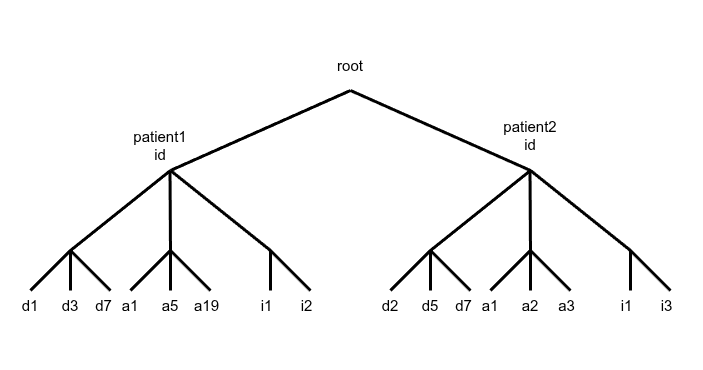
Here d1, d2, d3, … represent doctor1, doctor2, doctor3
a1, a2, a3, … represent allergy1, allergy2, allergy3
i1, i2, i3, … represent insurance1, insurance2, insurance3
This kind of system is good for starting with an individual patient to look up their allergies for example. You select a branch of the tree based on the patient’s id, and then look to see what values lie below. So, patient1 has allergies a1, a5 and a19.
It is not so efficient when you need to query the information horizontally. Imagine that you have a main branch for every patient, and you have many patients. If you want to find out which patients have allergy a7 for example, you have to visit every main branch and follow the path downward to see if the patient has a7. To do this, you have to go through each of the leaves that represent allergies. So, in the simple example shown, you have to visit all three of the leaves for each patient. When, you go down to find if a patient has an allergy, you don’t know how many allergies they have, if any. You have to check each allergy (leaf) individually to see if the allergy exists. This is made a little easier if the allergies are stored as an array. So, if that array is empty, you can stop searching. Also, as you are iterating over each allergy, you can stop as soon as you find it. But, if it is not there or it happens to be the last allergy, you have to go through each allergy. Then, you have to back up to the root, and search the next main branch in the same way. This is a case where a relational database would be far more efficient for this type of search.
This gives you some idea of why different types of database exist, as this definitely is not a one type fits all situation. Somewhat ironically, many companies/organizations don’t investigate the best type of database to use for their specific data and needs. Also, there are more than just two types of databases, even though we only talk about two types here.
Putting data into the database tables (back to the lesson)
For this lesson and any lesson that involves databases, we need to make a distinction between two different sets of tables. One set of tables are the database tables. For a relational database, tables represent the important entities that we store data for. Even for IndexedDB, our use of the Dexie.js wrapper organizes the data into database tables. At the same time, when we display the data on the web page, we often place the data into HTML tables. So, for the purposes of discussion, we will refer to the former tables as database tables, and for the latter we will refer to them as HTML tables.
What we want to do next, is put data into the database tables. Here is the next version of index.mjs that does this:
import Dexie from "dexie";

if (document.readyState === "loading") {
  document.addEventListener('DOMContentLoaded', init);
} else {
  init();
}

function createInterfaceAPI(dbAPI) {
  // private values
  const self = {
    switchToCourses: switchToCourses,
    switchToStudents: switchToStudents
  };

  // ========== API functions for the user-interface ===== //
  function switchToCourses(courses_div, students_div) {
    courses_div.style.display = "block";
    students_div.style.display = "none";
  }

  function switchToStudents(courses_div, students_div) {
    courses_div.style.display = "none";
    students_div.style.display = "block";
  }
  // =========== end of API functions for the user-interface === //

  // =========== helper functions for user-interface===========

  // =========== end of helper functions for user-interface ====

  return self;
} // end of createInterfaceAPI factory function

function createDatabaseAPI() {
  // private values
  const self = {
    initDB: initDB
  };
  let db;

  // =========== API functions for database interaction ======
  async function initDB() {
    console.log('initDB called');
    db = new Dexie("EnrollmentDB");
    db.version(1).stores({
      students: '++id, first_name, last_name, major',
      courses: '++id, dept, number, title, credits',
      enrollments: '[student_id+course_id], student_id, course_id'
    });
    try {
      await db.open();
      console.log("database opened");
      db.students.bulkPut([
        {id: 1, first_name: 'Jane', last_name: 'Doe', major: 'MATH'},
        {id: 2, first_name: 'John', last_name: 'Doe', major: 'CHEM'},
        {id: 3, first_name: 'Alice', last_name: 'Brown', major: 'BIOL'},
        {id: 4, first_name: 'Mason', last_name: 'Jones', major: 'MATH'},
        {id: 5, first_name: 'Mary', last_name: 'Rogers', major: 'CHEM'},
        {id: 6, first_name: 'Carol', last_name: 'Greene', major: 'BIOL'},
        {id: 7, first_name: 'Jill', last_name: 'Manning', major: 'CHEM'},
        {id: 8, first_name: 'George', last_name: 'Hill', major: 'MATH'},
        {id: 9, first_name: 'Alicia', last_name: 'Smith', major: 'CHEM'},
        {id: 10, first_name: 'Robert', last_name: 'Cook', major: 'BIOL'}
      ]).catch (Dexie.BulkError, function (error) {
        console.log(error);
      });
      db.courses.bulkPut([
        {id: 1, dept: 'BIOL', number: '100',
        title: 'Intro to Biology', credits: 3},
        {id: 2, dept: 'BIOL', number: '200',
        title: 'Biology II', credits: 4},
        {id: 3, dept: 'CHEM', number: '100',
        title: 'Intro to Chemistry', credits: 3},
        {id: 4, dept: 'CHEM', number: '110',
        title: 'Chemistry for Non-majors', credits: 3},
        {id: 5, dept: 'MATH', number: '110',
        title: 'Math for Non-science majors', credits: 3},
        {id: 6, dept: 'MATH', number: '205',
        title: 'Calculus I', credits: 4},
        {id: 7, dept: 'MATH', number: '205a',
        title: 'Calculus for Chemistry majors', credits: 4},
        {id: 8, dept: 'MATH', number: '205b',
        title: 'Calculus for Biology majors', credits: 4},
        {id: 9, dept: 'MATH', number: '206',
        title: 'Calculus II', credits: 3},
        {id: 10, dept: 'ENG', number: '100',
        title: 'Expository Writing', credits: 3}
      ]).catch (Dexie.BulkError, function (error) {
        console.log(error);
      });
      db.enrollments.bulkPut([
        {student_id: 1, course_id: 1},
        {student_id: 1, course_id: 4},
        {student_id: 1, course_id: 6},
        {student_id: 1, course_id: 10},
        {student_id: 2, course_id: 1},
        {student_id: 2, course_id: 3},
        {student_id: 2, course_id: 7},
        {student_id: 3, course_id: 2},
        {student_id: 3, course_id: 4},
        {student_id: 3, course_id: 8},
        {student_id: 3, course_id: 10},
        {student_id: 4, course_id: 1},
        {student_id: 4, course_id: 4},
        {student_id: 4, course_id: 6},
        {student_id: 5, course_id: 1},
        {student_id: 5, course_id: 3},
        {student_id: 5, course_id: 7},
        {student_id: 5, course_id: 10},
        {student_id: 6, course_id: 2},
        {student_id: 6, course_id: 4},
        {student_id: 6, course_id: 8},
        {student_id: 6, course_id: 10},
        {student_id: 7, course_id: 1},
        {student_id: 7, course_id: 3},
        {student_id: 7, course_id: 7},
        {student_id: 8, course_id: 1},
        {student_id: 8, course_id: 4},
        {student_id: 8, course_id: 6},
        {student_id: 8, course_id: 10},
        {student_id: 9, course_id: 1},
        {student_id: 9, course_id: 3},
        {student_id: 9, course_id: 7},
        {student_id: 10, course_id: 1},
        {student_id: 10, course_id: 4},
        {student_id: 10, course_id: 6}
      ]).catch (Dexie.BulkError, function (error) {
        console.log(error);
      });
    } catch (error) {
      console.log(error);
    }
  }
  // =========== end of API functions for database interaction ===

  return self;
}

function init() {
  console.log('init called');
  const courses_div = document.getElementById("courses_div");
  courses_div.style.display = "none";
  const students_div = document.getElementById("students_div");
  const dbAPI = createDatabaseAPI();
  console.log('dbAPI', dbAPI);
  dbAPI.initDB();
  const uiAPI = createInterfaceAPI(dbAPI);
  const courses_button = document.getElementById("courses_button");
  courses_button.addEventListener("click", () => {
    uiAPI.switchToCourses(courses_div, students_div);
  });
  const students_button = document.getElementById("students_button");
  students_button.addEventListener("click", () => {
    uiAPI.switchToStudents(courses_div, students_div);
  });
}
The new lines are 54-130. Lines 54-67 put data into the students database table. Lines 68-91 put data into the courses database table. Lines 92-130 put data into the enrollments database table.
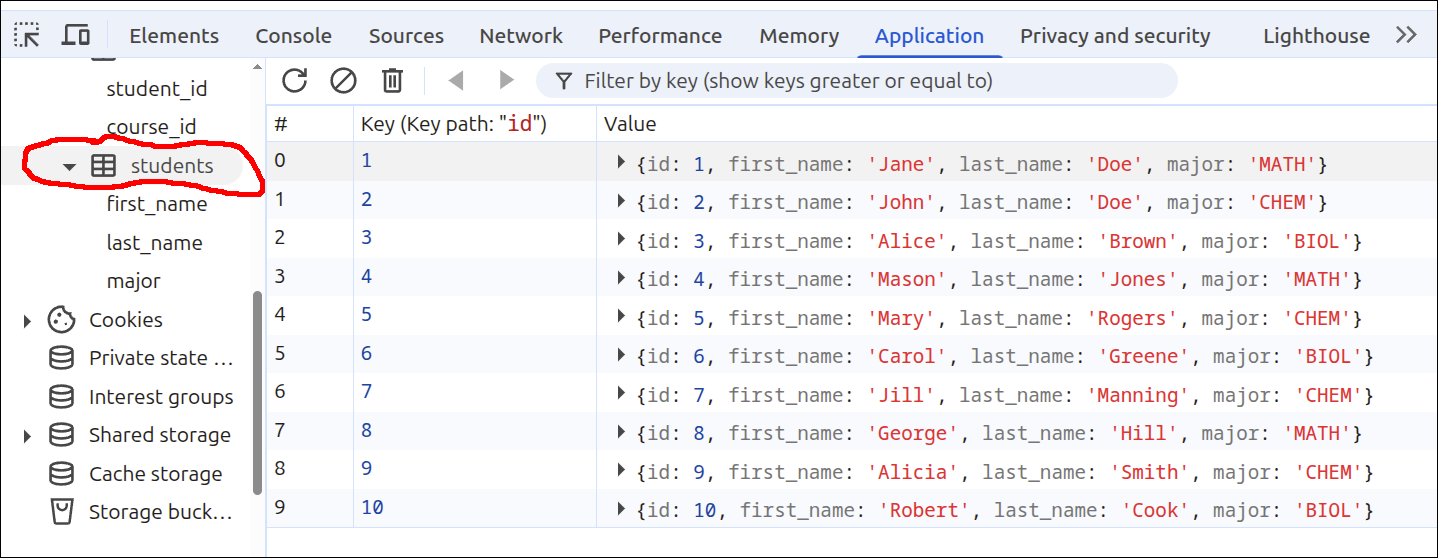
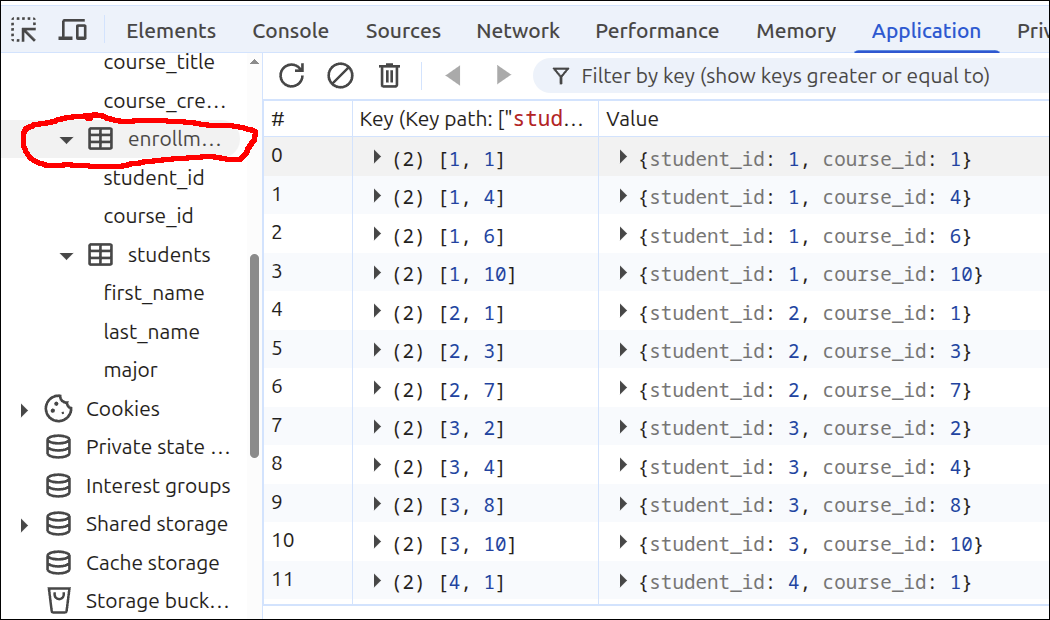
If you run the application now and look at the Application tab in the DevConsole, you can see that there is data in the students, courses and enrollments tables:
Here is the students database table:
Here is the courses database table:
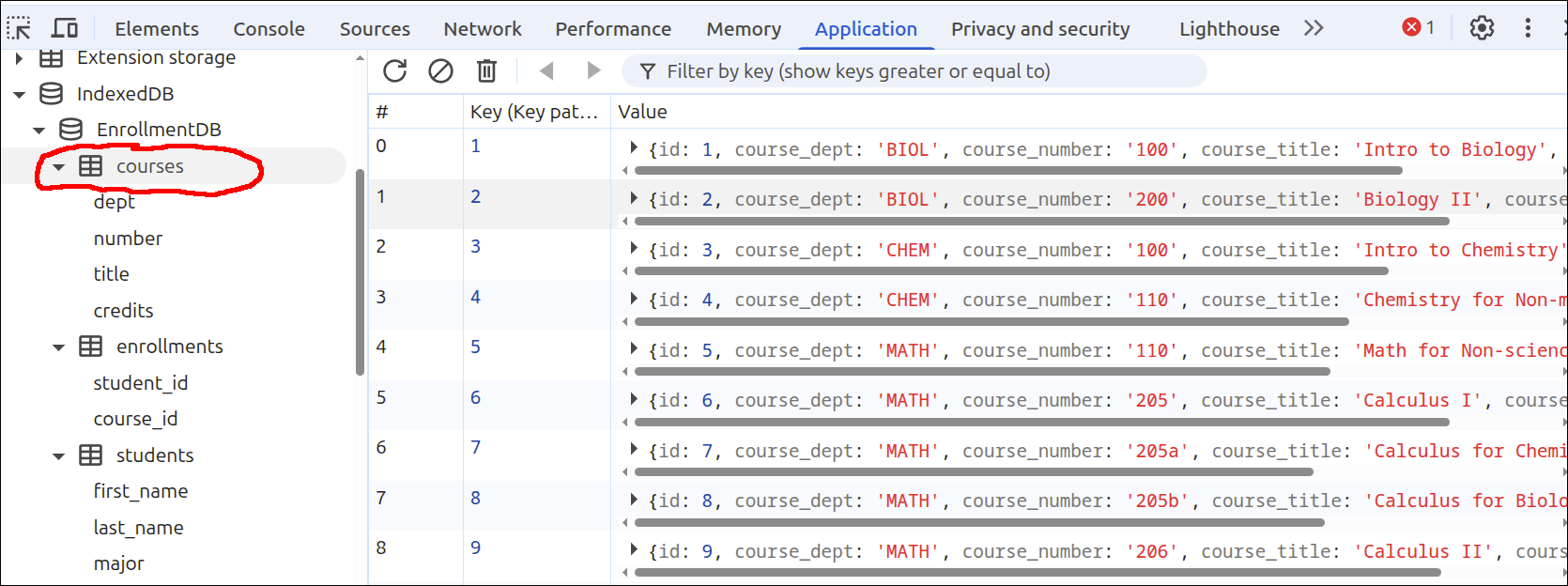
Here is the enrollments database table:
Using simple queries to get the contents of the HTML tables.
Create updateStudentsTable() and updateCoursesTable() functions. Have those functions insert an id for each table row.
Now that we have data inside our database tables, we can work on displaying that data in HTML tables. Let’s start with a HTML tables for both the students <div> and the courses <div>. Here are the changes needed to add those HTML tables inside of index.html:
<!DOCTYPE html>
<html lang="en">
  <head>
    <meta charset="UTF-8" />
    <script type="module" src="index.mjs"></script>
    <title>Students and Courses</title>
  </head>
  <body>
    <div id="students_div">
      <button id="courses_button">Courses View</button>
      <h1>Students</h1>
      <table border="1">
        <thead>
          <tr>
            <th>ID</td>
            <th>First Name</th>
            <th>Last Name</th>
            <th>Major</th>
          </tr>
        </thead>
        <tbody id="students_tbody"></tbody>
      </table>
    </div>
    <div id="courses_div">
      <button id="students_button">Students View</button>
      <h1>Courses</h1>
      <table border="1">
        <thead>
          <tr>
            <th>ID</th>
            <th>Department</th>
            <th>Number</th>
            <th>Title</th>
            <th>Credits</th>
          </tr>
        </thead>
        <tbody id="courses_tbody"></tbody>
      </table>
    </div>
  </body>
</html>
The new lines are 12-22 and 27-38. Lines 12-22 define a HTML <table> element for the students HTML table. Lines 13-20 define the <thead> element. Within that, lines 14-19 define a <tr> element, and lines 15-18 define the <th> elements that will serve as the column headings.
Line 21 defines the <tbody id="students_tbody"> element. This is the element where will place the data for all the students.
Lines 27-38 do the same thing as lines 12-22, except for the courses HTML table.
With the HTML markup in place, we can define some helper functions inside our factory function to update those HTML tables. Here is the new version of index.mjs that does this.
import Dexie from "dexie";

if (document.readyState === "loading") {
  document.addEventListener('DOMContentLoaded', init);
} else {
  init();
}

function createInterfaceAPI(dbAPI) {
  // private values
  const self = {
    switchToCourses: switchToCourses,
    switchToStudents: switchToStudents
  };
  let students_array = [];
  let courses_array = [];
  const students_tbody = document.getElementById("students_tbody");
  const courses_tbody = document.getElementById("courses_tbody");

  // ========== API functions for the user-interface ===== //
  function switchToCourses(courses_div, students_div) {
    courses_div.style.display = "block";
    students_div.style.display = "none";
    updateCoursesTable();
  }

  function switchToStudents(courses_div, students_div) {
    courses_div.style.display = "none";
    students_div.style.display = "block";
    updateStudentsTable();
  }
  // =========== end of API functions for the user-interface === //

  // =========== helper functions for user-interface===========
  async function updateStudentsTable() {
    students_array = await dbAPI.getAllStudents();
    const fragment = document.createDocumentFragment();
    for (let student of students_array) {
      const tr = document.createElement('tr');
      for (let key of Object.keys(student)) {
        let td = document.createElement('td');
        let contents = document.createTextNode(student[key]);
        td.appendChild(contents);
        tr.appendChild(td);
      }
      fragment.appendChild(tr);
    }
    students_tbody.replaceChildren(fragment);
  }

  async function updateCoursesTable() {
    courses_array = await dbAPI.getAllCourses();
    const fragment = document.createDocumentFragment();
    for (let course of courses_array) {
      const tr = document.createElement('tr');
      for (let key of Object.keys(course)) {
        let td = document.createElement('td');
        let contents = document.createTextNode(course[key]);
        td.appendChild(contents);
        tr.appendChild(td);
      }
      fragment.appendChild(tr);
    }
    courses_tbody.replaceChildren(fragment);
  }
  // =========== end of helper functions for user-interface ====

  return self;
} // end of createInterfaceAPI factory function

function createDatabaseAPI() {
  // private values
  const self = {
    initDB: initDB,
    getAllStudents: getAllStudents,
    getAllCourses: getAllCourses
  };
  let db;

  // =========== API functions for database interaction ======
  async function initDB() {
    console.log('initDB called');
    db = new Dexie("EnrollmentDB");
    db.version(1).stores({
      students: '++id, first_name, last_name, major',
      courses: '++id, dept, number, title, credits',
      enrollments: '[student_id+course_id], student_id, course_id'
    });
    try {
      await db.open();
      console.log("database opened");
      db.students.bulkPut([
        {id: 1, first_name: 'Jane', last_name: 'Doe', major: 'MATH'},
        {id: 2, first_name: 'John', last_name: 'Doe', major: 'CHEM'},
        {id: 3, first_name: 'Alice', last_name: 'Brown', major: 'BIOL'},
        {id: 4, first_name: 'Mason', last_name: 'Jones', major: 'MATH'},
        {id: 5, first_name: 'Mary', last_name: 'Rogers', major: 'CHEM'},
        {id: 6, first_name: 'Carol', last_name: 'Greene', major: 'BIOL'},
        {id: 7, first_name: 'Jill', last_name: 'Manning', major: 'CHEM'},
        {id: 8, first_name: 'George', last_name: 'Hill', major: 'MATH'},
        {id: 9, first_name: 'Alicia', last_name: 'Smith', major: 'CHEM'},
        {id: 10, first_name: 'Robert', last_name: 'Cook', major: 'BIOL'}
      ]).catch (Dexie.BulkError, function (error) {
        console.log(error);
      });
      db.courses.bulkPut([
        {id: 1, dept: 'BIOL', number: '100',
        title: 'Intro to Biology', credits: 3},
        {id: 2, dept: 'BIOL', number: '200',
        title: 'Biology II', credits: 4},
        {id: 3, dept: 'CHEM', number: '100',
        title: 'Intro to Chemistry', credits: 3},
        {id: 4, dept: 'CHEM', number: '110',
        title: 'Chemistry for Non-majors', credits: 3},
        {id: 5, dept: 'MATH', number: '110',
        title: 'Math for Non-science majors', credits: 3},
        {id: 6, dept: 'MATH', number: '205',
        title: 'Calculus I', credits: 4},
        {id: 7, dept: 'MATH', number: '205a',
        title: 'Calculus for Chemistry majors', credits: 4},
        {id: 8, dept: 'MATH', number: '205b',
        title: 'Calculus for Biology majors', credits: 4},
        {id: 9, dept: 'MATH', number: '206',
        title: 'Calculus II', credits: 3},
        {id: 10, dept: 'ENG', number: '100',
        title: 'Expository Writing', credits: 3}
      ]).catch (Dexie.BulkError, function (error) {
        console.log(error);
      });
      db.enrollments.bulkPut([
        {student_id: 1, course_id: 1},
        {student_id: 1, course_id: 4},
        {student_id: 1, course_id: 6},
        {student_id: 1, course_id: 10},
        {student_id: 2, course_id: 1},
        {student_id: 2, course_id: 3},
        {student_id: 2, course_id: 7},
        {student_id: 3, course_id: 2},
        {student_id: 3, course_id: 4},
        {student_id: 3, course_id: 8},
        {student_id: 3, course_id: 10},
        {student_id: 4, course_id: 1},
        {student_id: 4, course_id: 4},
        {student_id: 4, course_id: 6},
        {student_id: 5, course_id: 1},
        {student_id: 5, course_id: 3},
        {student_id: 5, course_id: 7},
        {student_id: 5, course_id: 10},
        {student_id: 6, course_id: 2},
        {student_id: 6, course_id: 4},
        {student_id: 6, course_id: 8},
        {student_id: 6, course_id: 10},
        {student_id: 7, course_id: 1},
        {student_id: 7, course_id: 3},
        {student_id: 7, course_id: 7},
        {student_id: 8, course_id: 1},
        {student_id: 8, course_id: 4},
        {student_id: 8, course_id: 6},
        {student_id: 8, course_id: 10},
        {student_id: 9, course_id: 1},
        {student_id: 9, course_id: 3},
        {student_id: 9, course_id: 7},
        {student_id: 10, course_id: 1},
        {student_id: 10, course_id: 4},
        {student_id: 10, course_id: 6}
      ]).catch (Dexie.BulkError, function (error) {
        console.log(error);
      });
    } catch (error) {
      console.log(error);
    }
  }

  async function getAllStudents() {
    return await db.students.toArray();
  }

  async function getAllCourses() {
    return await db.courses.toArray();
  }
  // =========== end of API functions for database interaction ===

  // =========== helper functions for database interaction ====

  // =========== end of helper functions for database interaction ==
  return self;
}

function init() {
  console.log('init called');
  const courses_div = document.getElementById("courses_div");
  courses_div.style.display = "none";
  const students_div = document.getElementById("students_div");
  const dbAPI = createDatabaseAPI();
  console.log('dbAPI', dbAPI);
  dbAPI.initDB();
  const uiAPI = createInterfaceAPI(dbAPI);
  const courses_button = document.getElementById("courses_button");
  courses_button.addEventListener("click", () => {
    uiAPI.switchToCourses(courses_div, students_div);
  });
  const students_button = document.getElementById("students_button");
  students_button.addEventListener("click", () => {
    uiAPI.switchToStudents(courses_div, students_div);
  });
  uiAPI.switchToStudents(courses_div, students_div);
}
The new lines are 15-18, 24, 30, 35-49, 51-64, 75-76, 174-176, 178-180 and 206.
Lines 15-18 add more private values to the createDatabaseAPI() factory function. Line 15 declares students_array to be an empty array. This array will be used to hold the student data from the database. Line 16 declares courses_array to be an empty array, that will be used to hold course data from the database. Line 17 gets a reference the the <tbody id="students_tbody"> element inside the HTML table for displaying students. Line 18 gets a reference to the <tbody id="courses_tbody"> element inside the HTML table for displaying courses.
Line 24 calls the updateCoursesTable() function, that is used to update the contents of the courses HTML table. Similarly, line 30 calls the updateStudentsTable() function that is used to update the students HTML table.
Lines 35-49 define the updateStudentsTable() helper function. This function is declared as async as we need to await the call to dbAPI.getAllStudents() on line 36. Line 37 creates a Document Fragment and stores this as fragment. Line 38-47 define a for loop that iterates over the students in students_array. Line 39 creates a <tr> element. Lines 40-46 define an inner for loop that iterates over all the keys (properties) of a given student. Line 41 creates a <td> element. Line 42 creates a Text Node from student[key]. Line 43 appends that Text Node to the <td> element, and line 44 appends that <td> element to the <tr> element. After the inner for loop completes, the <tr> element has been fully populated, and line 46 appends <tr> to fragment. Finally, after the nested for loop ends, line 48 calls the replaceChildren() method to update the contents of students_tbody.
Lines 51-64 define the updateCoursesTable() helper function. This function is very similar to the updateStudentsTable() function. The main difference is that the updateCoursesTable() function’s nested for loop iterates over all the courses in courses_array.
Lines 75-76 modify the definition of self for the createDatabaseAPI() factory function. Line 75 makes getAllStudents() an API function (i.e. a returned function). Line 76 makes getAllCourses() an API function.
Lines 174-176 define the getAllStudents() database API function. This is just a one line instruction where we await the call to db.students.toArray(). The db.students.toArray() is a Dexie function that makes getting this result very easy, compared to what we would need to do if using IndexedDB without Dexie.js.
Lines 178-180 define the getAllCourses() database API function. This is also another one line instruction where on line 179 we await the call to db.courses.toArray().
With these changes made, the following animated gif file shows what the application looks like when switching views:
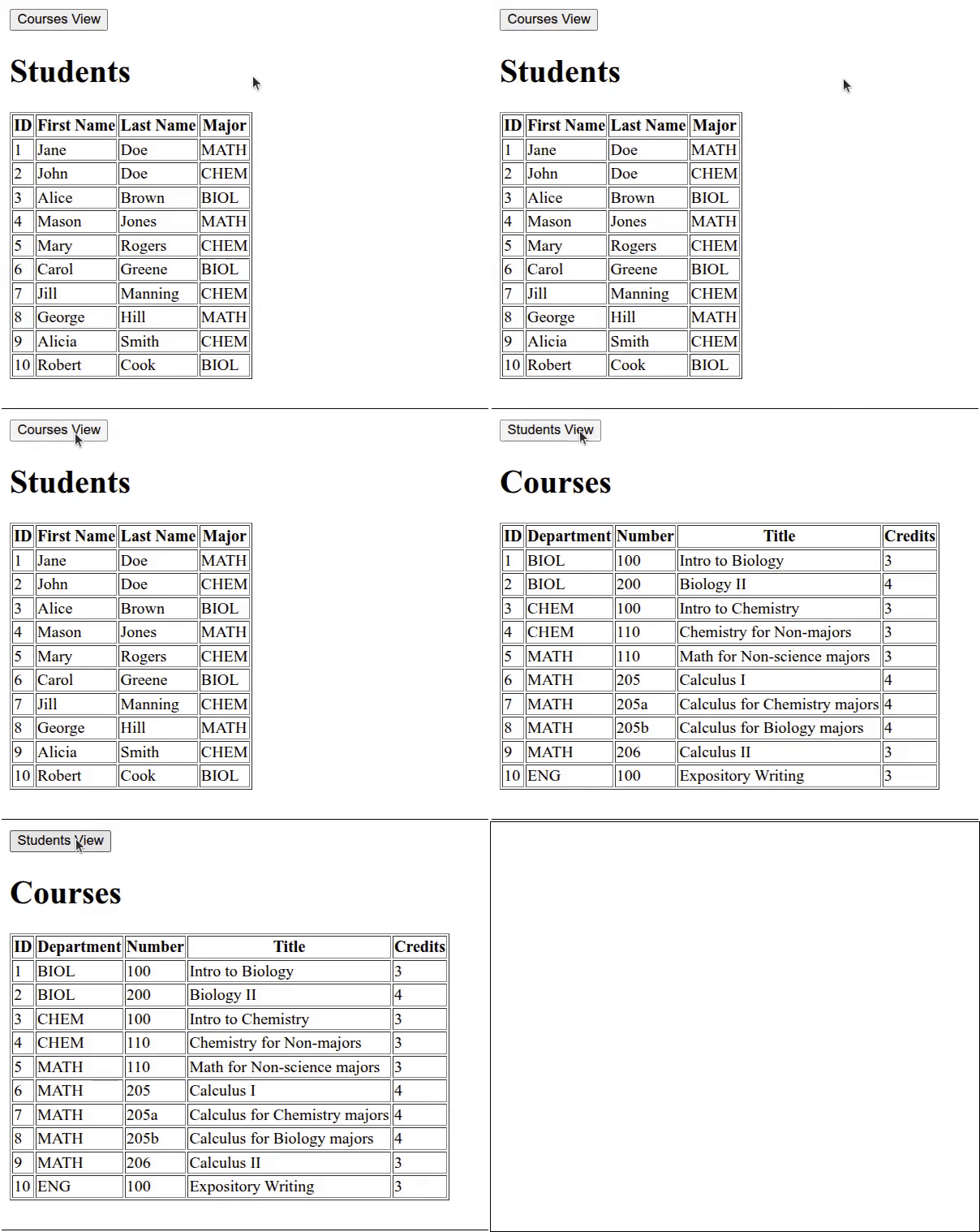
Click on Reload gif to replay animation.
Make application respond to clicking on table rows
We can start by modifying index.html to create a <dialog> element that can be used to display the courses a given student is enrolled in. Here is the new version of index.html:
<!DOCTYPE html>
<html lang="en">
  <head>
    <meta charset="UTF-8" />
    <script type="module" src="index.mjs"></script>
    <title>Students and Courses</title>
  </head>
  <body>
    <div id="students_div">
      <button id="courses_button">Courses View</button>
      <h1>Students</h1>
      <table border="1">
        <thead>
          <tr>
            <th>ID</td>
            <th>First Name</th>
            <th>Last Name</th>
            <th>Major</th>
          </tr>
        </thead>
        <tbody id="students_tbody"></tbody>
      </table>
    </div>
    <div id="courses_div">
      <button id="students_button">Students View</button>
      <h1>Courses</h1>
      <table border="1">
        <thead>
          <tr>
            <th>ID</th>
            <th>Department</th>
            <th>Number</th>
            <th>Title</th>
            <th>Credits</th>
          </tr>
        </thead>
        <tbody id="courses_tbody"></tbody>
      </table>
    </div>
    <dialog id="student_courses_dlg">
      <label id="student_name_label"></label>
      <table border="1">
        <tbody id="student_courses_tbody"></tbody>
      </table>
    </dialog>
  </body>
</html>
The new lines are 40-45. Lines 40-45 define a <dialog id="student_courses_dlg"> element that will be used to display the courses a given student is enrolled in. Line 41 adds a <label> element that will be used to display the student’s name. Lines 42-44 define a <table> element. Line 43 defines the <tbody id="student_courses_tbody"> element that will be used to display the courses the student is enrolled in.
Making the HTML table rows respond to a click event
Next, we can start by modifying index.mjs to do the following things:
-
Modify
updateStudentsTable()so that the <tr> elements have an id corresponding to the student’s id for that row. In addition, add a click event handler to that row that will start the process of showing the courses that a student is enrolled in. -
That click event handler,
showStudentCourses()will call the database API functiongetStudentCourses()to obtain the courses the student is enrolled in. Display that array of courses to the Console. -
Create a database API function,
getStudentCourses()that can return an array of the courses a given student is enrolled in.
Here is the next version of index.mjs. This version will focus only on the courses for a given student. We will handle the students for a given course in a later version of index.mjs:
import Dexie from "dexie";

if (document.readyState === "loading") {
  document.addEventListener('DOMContentLoaded', init);
} else {
  init();
}

function createInterfaceAPI(dbAPI) {
  // private values
  const self = {
    switchToCourses: switchToCourses,
    switchToStudents: switchToStudents
  };
  let students_array = [];
  let courses_array = [];
  const students_tbody = document.getElementById("students_tbody");
  const courses_tbody = document.getElementById("courses_tbody");

  // ========== API functions for the user-interface ===== //
  function switchToCourses(courses_div, students_div) {
    courses_div.style.display = "block";
    students_div.style.display = "none";
    updateCoursesTable();
  }

  function switchToStudents(courses_div, students_div) {
    courses_div.style.display = "none";
    students_div.style.display = "block";
    updateStudentsTable();
  }
  // =========== end of API functions for the user-interface === //

  // =========== helper functions for user-interface===========
  async function updateStudentsTable() {
    students_array = await dbAPI.getAllStudents();
    const fragment = document.createDocumentFragment();
    for (let student of students_array) {
      const tr = document.createElement('tr');
      tr.setAttribute("id", student.id);
      tr.addEventListener("click", showStudentCourses);
      for (let key of Object.keys(student)) {
        let td = document.createElement('td');
        let contents = document.createTextNode(student[key]);
        td.appendChild(contents);
        tr.appendChild(td);
      }
      fragment.appendChild(tr);
    }
    students_tbody.replaceChildren(fragment);
  }

  async function updateCoursesTable() {
    courses_array = await dbAPI.getAllCourses();
    const fragment = document.createDocumentFragment();
    for (let course of courses_array) {
      const tr = document.createElement('tr');
      for (let key of Object.keys(course)) {
        let td = document.createElement('td');
        let contents = document.createTextNode(course[key]);
        td.appendChild(contents);
        tr.appendChild(td);
      }
      fragment.appendChild(tr);
    }
    courses_tbody.replaceChildren(fragment);
  }

  async function showStudentCourses(event) {
    const row = event.currentTarget;
    const id = Number(row.id);
    const courses = await dbAPI.getStudentCourses(id);
    console.log('courses', courses);
  }
  // =========== end of helper functions for user-interface ====

  return self;
} // end of createInterfaceAPI factory function

function createDatabaseAPI() {
  // private values
  const self = {
    initDB: initDB,
    getAllStudents: getAllStudents,
    getAllCourses: getAllCourses,
    getStudentCourses: getStudentCourses
  };
  let db;

  // =========== API functions for database interaction ======
  async function initDB() {
    console.log('initDB called');
    db = new Dexie("EnrollmentDB");
    db.version(1).stores({
      students: '++id, first_name, last_name, major',
      courses: '++id, dept, number, title, credits',
      enrollments: '[student_id+course_id], student_id, course_id'
    });
    try {
      await db.open();
      console.log("database opened");
      db.students.bulkPut([
        {id: 1, first_name: 'Jane', last_name: 'Doe', major: 'MATH'},
        {id: 2, first_name: 'John', last_name: 'Doe', major: 'CHEM'},
        {id: 3, first_name: 'Alice', last_name: 'Brown', major: 'BIOL'},
        {id: 4, first_name: 'Mason', last_name: 'Jones', major: 'MATH'},
        {id: 5, first_name: 'Mary', last_name: 'Rogers', major: 'CHEM'},
        {id: 6, first_name: 'Carol', last_name: 'Greene', major: 'BIOL'},
        {id: 7, first_name: 'Jill', last_name: 'Manning', major: 'CHEM'},
        {id: 8, first_name: 'George', last_name: 'Hill', major: 'MATH'},
        {id: 9, first_name: 'Alicia', last_name: 'Smith', major: 'CHEM'},
        {id: 10, first_name: 'Robert', last_name: 'Cook', major: 'BIOL'}
      ]).catch (Dexie.BulkError, function (error) {
        console.log(error);
      });
      db.courses.bulkPut([
        {id: 1, dept: 'BIOL', number: '100',
        title: 'Intro to Biology', credits: 3},
        {id: 2, dept: 'BIOL', number: '200',
        title: 'Biology II', credits: 4},
        {id: 3, dept: 'CHEM', number: '100',
        title: 'Intro to Chemistry', credits: 3},
        {id: 4, dept: 'CHEM', number: '110',
        title: 'Chemistry for Non-majors', credits: 3},
        {id: 5, dept: 'MATH', number: '110',
        title: 'Math for Non-science majors', credits: 3},
        {id: 6, dept: 'MATH', number: '205',
        title: 'Calculus I', credits: 4},
        {id: 7, dept: 'MATH', number: '205a',
        title: 'Calculus for Chemistry majors', credits: 4},
        {id: 8, dept: 'MATH', number: '205b',
        title: 'Calculus for Biology majors', credits: 4},
        {id: 9, dept: 'MATH', number: '206',
        title: 'Calculus II', credits: 3},
        {id: 10, dept: 'ENG', number: '100',
        title: 'Expository Writing', credits: 3}
      ]).catch (Dexie.BulkError, function (error) {
        console.log(error);
      });
      db.enrollments.bulkPut([
        {student_id: 1, course_id: 1},
        {student_id: 1, course_id: 4},
        {student_id: 1, course_id: 6},
        {student_id: 1, course_id: 10},
        {student_id: 2, course_id: 1},
        {student_id: 2, course_id: 3},
        {student_id: 2, course_id: 7},
        {student_id: 3, course_id: 2},
        {student_id: 3, course_id: 4},
        {student_id: 3, course_id: 8},
        {student_id: 3, course_id: 10},
        {student_id: 4, course_id: 1},
        {student_id: 4, course_id: 4},
        {student_id: 4, course_id: 6},
        {student_id: 5, course_id: 1},
        {student_id: 5, course_id: 3},
        {student_id: 5, course_id: 7},
        {student_id: 5, course_id: 10},
        {student_id: 6, course_id: 2},
        {student_id: 6, course_id: 4},
        {student_id: 6, course_id: 8},
        {student_id: 6, course_id: 10},
        {student_id: 7, course_id: 1},
        {student_id: 7, course_id: 3},
        {student_id: 7, course_id: 7},
        {student_id: 8, course_id: 1},
        {student_id: 8, course_id: 4},
        {student_id: 8, course_id: 6},
        {student_id: 8, course_id: 10},
        {student_id: 9, course_id: 1},
        {student_id: 9, course_id: 3},
        {student_id: 9, course_id: 7},
        {student_id: 10, course_id: 1},
        {student_id: 10, course_id: 4},
        {student_id: 10, course_id: 6}
      ]).catch (Dexie.BulkError, function (error) {
        console.log(error);
      });
    } catch (error) {
      console.log(error);
    }
  }

  async function getAllStudents() {
    return await db.students.toArray();
  }

  async function getAllCourses() {
    return await db.courses.toArray();
  }

  async function getStudentCourses(id) {
    const enrollments = await db.enrollments
      .where('student_id')
      .equals(id)
      .toArray();
    let courseIds = [];
    for (let enrollment of enrollments) {
      const courseId = enrollment.course_id;
      courseIds.push(courseId);
    }
    const courses = await db.courses.bulkGet(courseIds);
    return courses;
  }
  // =========== end of API functions for database interaction ===

  // =========== helper functions for database interaction ====

  // =========== end of helper functions for database interaction ==
  return self;
}

function init() {
  console.log('init called');
  const courses_div = document.getElementById("courses_div");
  courses_div.style.display = "none";
  const students_div = document.getElementById("students_div");
  const dbAPI = createDatabaseAPI();
  console.log('dbAPI', dbAPI);
  dbAPI.initDB();
  const uiAPI = createInterfaceAPI(dbAPI);
  const courses_button = document.getElementById("courses_button");
  courses_button.addEventListener("click", () => {
    uiAPI.switchToCourses(courses_div, students_div);
  });
  const students_button = document.getElementById("students_button");
  students_button.addEventListener("click", () => {
    uiAPI.switchToStudents(courses_div, students_div);
  });
  uiAPI.switchToStudents(courses_div, students_div);
}
The new lines are 40-41, 69-74, 85-86 and 192-204.
Lines 40-41 and 69-74 are new or modified lines inside the createInterfaceAPI() factory function. Line 40 adds the id attribute to the <tr> elements inside the updateStudentsTable() helper function. This id attribute will be required so that when the user clicks on a table row, this id can be obtained. This id is the student’s id. Line 41 adds a "click" event handler to that <tr> element. so the showStudentCourses() function is called when clicking on that table row.
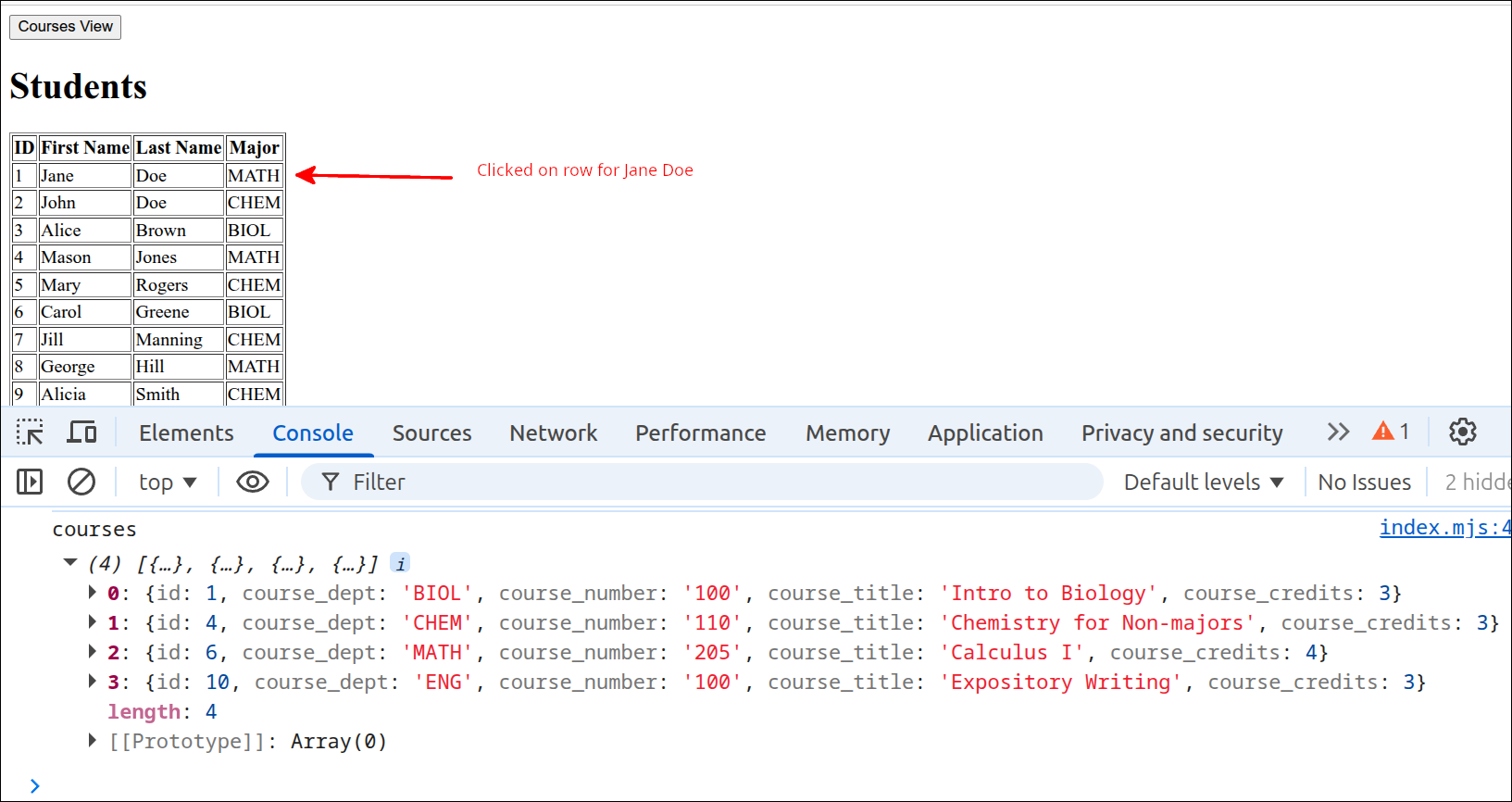
Lines 69-74 define the showStudentCourses() helper function, that is called when the user clicks on a table row (<tr> element). Line 70 obtains the <tr> element and stores this as row. Line 71 converts row.id to a number so it can be used as the student’s id. Line 72 awaits a call to dbAPI.getStudentCourses() to obtain the array of courses that the specified student is enrolled in. Line 73 prints that array to the Console.
Lines 85-86 and 192-204 are new or modified lines inside the createDatabaseAPI() factory function. Line 85 adds a comma to the end of that line, as line 86 will add another API function to be returned with self. Line 86 specifies that the getStudentCourses() function is part of the API for this factory function. This function will be used to obtain an array of courses for a given student, and is called by the showStudentCourses() helper function in the createInterfaceAPI() factory function.
Lines 192-104 define the getStudentCourses() API function. This function must be passed the id for the student to return the courses for. Lines 193-196 form a Dexie call of db.enrollments.where.equals to obtain the enrollments objects where student_id is equal to id. Line 196 completes that call, by storing those enrollments objects into an array. Line 197 declares and empty array called courseIds. This is where the for loop on lines 198-201 will store the course_id values for courses objects where course.id matches enrollment.course_id. Once that for loop completes, the courseIds array is used in the call to db.courses.bulkGet(courseIds) to obtain the array of courses that the student is enrolled in. Line 203 returns that array to the calling program, showStudentCourses().
The following screen shot shows that the courses Jane Doe is enrolled in show up as the courses array:
Filling the <dialog> with the student’s courses
Now that we can get the courses that a student is enrolled in, let’s use that information to populate the <dialog id="student_courses_dlg"> element and show that <dialog>. We already have the HTML markup for this dialog, so we can modify index.mjs to populate that <dialog>. Here is the next version of index.mjs:
import Dexie from "dexie";

if (document.readyState === "loading") {
  document.addEventListener('DOMContentLoaded', init);
} else {
  init();
}

function createInterfaceAPI(dbAPI) {
  // private values
  const self = {
    switchToCourses: switchToCourses,
    switchToStudents: switchToStudents
  };
  let students_array = [];
  let courses_array = [];
  const students_tbody = document.getElementById("students_tbody");
  const courses_tbody = document.getElementById("courses_tbody");
  const student_courses_dlg = document.getElementById("student_courses_dlg");
  const student_name_label = document.getElementById("student_name_label");
  let student_name;

  // ========== API functions for the user-interface ===== //
  function switchToCourses(courses_div, students_div) {
    courses_div.style.display = "block";
    students_div.style.display = "none";
    updateCoursesTable();
  }

  function switchToStudents(courses_div, students_div) {
    courses_div.style.display = "none";
    students_div.style.display = "block";
    updateStudentsTable();
  }
  // =========== end of API functions for the user-interface === //

  // =========== helper functions for user-interface===========
  async function updateStudentsTable() {
    students_array = await dbAPI.getAllStudents();
    const fragment = document.createDocumentFragment();
    for (let student of students_array) {
      const tr = document.createElement('tr');
      tr.setAttribute("id", student.id);
      tr.addEventListener("click", showStudentCourses);
      for (let key of Object.keys(student)) {
        let td = document.createElement('td');
        let contents = document.createTextNode(student[key]);
        td.appendChild(contents);
        tr.appendChild(td);
      }
      fragment.appendChild(tr);
    }
    students_tbody.replaceChildren(fragment);
  }

  async function updateCoursesTable() {
    courses_array = await dbAPI.getAllCourses();
    const fragment = document.createDocumentFragment();
    for (let course of courses_array) {
      const tr = document.createElement('tr');
      for (let key of Object.keys(course)) {
        let td = document.createElement('td');
        let contents = document.createTextNode(course[key]);
        td.appendChild(contents);
        tr.appendChild(td);
      }
      fragment.appendChild(tr);
    }
    courses_tbody.replaceChildren(fragment);
  }

  async function showStudentCourses(event) {
    const row = event.currentTarget;
    const id = Number(row.id);
    student_name = row.childNodes[1].textContent +
      " " + row.childNodes[2].textContent;
    const courses = await dbAPI.getStudentCourses(id);
    console.log('courses', courses);
    showStudentCoursesDlg(courses);
  }

  function showStudentCoursesDlg(courses) {
    student_name_label.textContent = student_name;
    const fragment = document.createDocumentFragment();
    for (let course of courses) {
      console.log('course.dept', course.dept);
      const tr = document.createElement('tr');
      const td = document.createElement('td');
      const contents = document.createTextNode(course.dept +
        " " + course.number);
      td.appendChild(contents);
      tr.appendChild(td);
      fragment.appendChild(tr);
    }
    student_courses_tbody.replaceChildren(fragment);
    console.log(student_courses_dlg);
    student_courses_dlg.showModal();
  }
  // =========== end of helper functions for user-interface ====

  return self;
} // end of createInterfaceAPI factory function

function createDatabaseAPI() {
  // private values
  const self = {
    initDB: initDB,
    getAllStudents: getAllStudents,
    getAllCourses: getAllCourses,
    getStudentCourses: getStudentCourses
  };
  let db;

  // =========== API functions for database interaction ======
  async function initDB() {
    console.log('initDB called');
    db = new Dexie("EnrollmentDB");
    db.version(1).stores({
      students: '++id, first_name, last_name, major',
      courses: '++id, dept, number, title, credits',
      enrollments: '[student_id+course_id], student_id, course_id'
    });
    try {
      await db.open();
      console.log("database opened");
      db.students.bulkPut([
        {id: 1, first_name: 'Jane', last_name: 'Doe', major: 'MATH'},
        {id: 2, first_name: 'John', last_name: 'Doe', major: 'CHEM'},
        {id: 3, first_name: 'Alice', last_name: 'Brown', major: 'BIOL'},
        {id: 4, first_name: 'Mason', last_name: 'Jones', major: 'MATH'},
        {id: 5, first_name: 'Mary', last_name: 'Rogers', major: 'CHEM'},
        {id: 6, first_name: 'Carol', last_name: 'Greene', major: 'BIOL'},
        {id: 7, first_name: 'Jill', last_name: 'Manning', major: 'CHEM'},
        {id: 8, first_name: 'George', last_name: 'Hill', major: 'MATH'},
        {id: 9, first_name: 'Alicia', last_name: 'Smith', major: 'CHEM'},
        {id: 10, first_name: 'Robert', last_name: 'Cook', major: 'BIOL'}
      ]).catch (Dexie.BulkError, function (error) {
        console.log(error);
      });
      db.courses.bulkPut([
        {id: 1, dept: 'BIOL', number: '100',
        title: 'Intro to Biology', credits: 3},
        {id: 2, dept: 'BIOL', number: '200',
        title: 'Biology II', credits: 4},
        {id: 3, dept: 'CHEM', number: '100',
        title: 'Intro to Chemistry', credits: 3},
        {id: 4, dept: 'CHEM', number: '110',
        title: 'Chemistry for Non-majors', credits: 3},
        {id: 5, dept: 'MATH', number: '110',
        title: 'Math for Non-science majors', credits: 3},
        {id: 6, dept: 'MATH', number: '205',
        title: 'Calculus I', credits: 4},
        {id: 7, dept: 'MATH', number: '205a',
        title: 'Calculus for Chemistry majors', credits: 4},
        {id: 8, dept: 'MATH', number: '205b',
        title: 'Calculus for Biology majors', credits: 4},
        {id: 9, dept: 'MATH', number: '206',
        title: 'Calculus II', credits: 3},
        {id: 10, dept: 'ENG', number: '100',
        title: 'Expository Writing', credits: 3}
      ]).catch (Dexie.BulkError, function (error) {
        console.log(error);
      });
      db.enrollments.bulkPut([
        {student_id: 1, course_id: 1},
        {student_id: 1, course_id: 4},
        {student_id: 1, course_id: 6},
        {student_id: 1, course_id: 10},
        {student_id: 2, course_id: 1},
        {student_id: 2, course_id: 3},
        {student_id: 2, course_id: 7},
        {student_id: 3, course_id: 2},
        {student_id: 3, course_id: 4},
        {student_id: 3, course_id: 8},
        {student_id: 3, course_id: 10},
        {student_id: 4, course_id: 1},
        {student_id: 4, course_id: 4},
        {student_id: 4, course_id: 6},
        {student_id: 5, course_id: 1},
        {student_id: 5, course_id: 3},
        {student_id: 5, course_id: 7},
        {student_id: 5, course_id: 10},
        {student_id: 6, course_id: 2},
        {student_id: 6, course_id: 4},
        {student_id: 6, course_id: 8},
        {student_id: 6, course_id: 10},
        {student_id: 7, course_id: 1},
        {student_id: 7, course_id: 3},
        {student_id: 7, course_id: 7},
        {student_id: 8, course_id: 1},
        {student_id: 8, course_id: 4},
        {student_id: 8, course_id: 6},
        {student_id: 8, course_id: 10},
        {student_id: 9, course_id: 1},
        {student_id: 9, course_id: 3},
        {student_id: 9, course_id: 7},
        {student_id: 10, course_id: 1},
        {student_id: 10, course_id: 4},
        {student_id: 10, course_id: 6}
      ]).catch (Dexie.BulkError, function (error) {
        console.log(error);
      });
    } catch (error) {
      console.log(error);
    }
  }

  async function getAllStudents() {
    return await db.students.toArray();
  }

  async function getAllCourses() {
    return await db.courses.toArray();
  }

  async function getStudentCourses(id) {
    const enrollments = await db.enrollments
      .where('student_id')
      .equals(id)
      .toArray();
    let courseIds = [];
    for (let enrollment of enrollments) {
      const courseId = enrollment.course_id;
      courseIds.push(courseId);
    }
    const courses = await db.courses.bulkGet(courseIds);
    return courses;
  }
  // =========== end of API functions for database interaction ===

  // =========== helper functions for database interaction ====

  // =========== end of helper functions for database interaction ==
  return self;
}

function init() {
  console.log('init called');
  const courses_div = document.getElementById("courses_div");
  courses_div.style.display = "none";
  const students_div = document.getElementById("students_div");
  const dbAPI = createDatabaseAPI();
  console.log('dbAPI', dbAPI);
  dbAPI.initDB();
  const uiAPI = createInterfaceAPI(dbAPI);
  const courses_button = document.getElementById("courses_button");
  courses_button.addEventListener("click", () => {
    uiAPI.switchToCourses(courses_div, students_div);
  });
  const students_button = document.getElementById("students_button");
  students_button.addEventListener("click", () => {
    uiAPI.switchToStudents(courses_div, students_div);
  });
  uiAPI.switchToStudents(courses_div, students_div);
}
The new lines are 19-21, 75-76, 79 and 82-98. Lines 19-21 add some private values to the createInterfaceAPI() factory function. Line 20 gets a reference to the <label id="student_name_label"> element. That label will be used to store the student’s name in the <dialog>. Line 21 defines the private variable student_name. This is where we will store the student’s name when the user clicks on a table row.
Lines 75-76 and line 79 are changes to the showStudentCourses() helper function. Lines 75-76 use the row <td> values to obtain the student’s name and store this in the private variable student_name that we declared on line 21. Line 79 calls the showStudentCoursesDlg() function that will show the <dialog> with the student’s name and the courses the student is enrolled in.
Lines 82-98 define the showStudentCoursesDlg() helper function. Line 83 sets the <label> for the student’s name with the value saved earlier on lines 75-76. Line 84 creates a Document Fragment that will be used to replace the contents of the <tbody> element. Lines 85-94 define a for loop that iterates over all the courses the student is enrolled in. Line 86 is a debugging line that just checks to make sure that course.course_dept can be accessed. Line 87 creates a <tr> element. Line 88 creates a <td> element. Lines 89-90 are used to create a Text Node that contains the course dept and number combined with a space in between. Line 91 appends that Text Node to the <td> element. Line 92 appends the <td> element to the <tr> element. Line 93 appends that <tr> element to fragment. After the for loop completes, line 95 replaced the <tbody> content with fragment. Line 96 is a debugging line meant to check the contents of the <dialog> before it is shown on line 97.
So, with these changes, you can now display a dialog box that shows the courses a student is enrolled in. At this point you need to hit the ESC key to close the dialog box. Here is a screen shot showing the dialog box that appears if Jane Doe is clicked upon in the students HTML table.
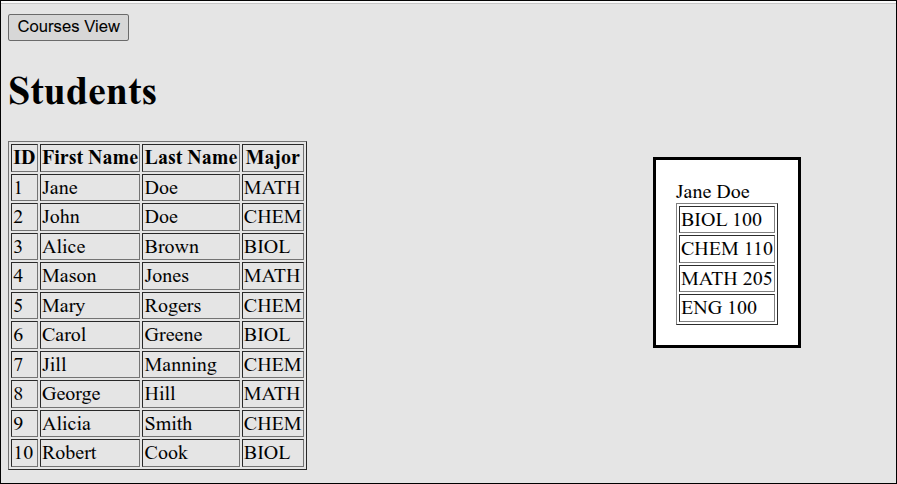
Handling the display of students for a given course
To handle the display of students enrolled in a given course, we need to modify index.html to add a <dialog> element that can be used to display the course name and the students that are enrolled in that course. Here is the new version of index.html
<!DOCTYPE html>
<html lang="en">
  <head>
    <meta charset="UTF-8" />
    <script type="module" src="index.mjs"></script>
    <title>Students and Courses</title>
  </head>
  <body>
    <div id="students_div">
      <button id="courses_button">Courses View</button>
      <h1>Students</h1>
      <table border="1">
        <thead>
          <tr>
            <th>ID</td>
            <th>First Name</th>
            <th>Last Name</th>
            <th>Major</th>
          </tr>
        </thead>
        <tbody id="students_tbody"></tbody>
      </table>
    </div>
    <div id="courses_div">
      <button id="students_button">Students View</button>
      <h1>Courses</h1>
      <table border="1">
        <thead>
          <tr>
            <th>ID</th>
            <th>Department</th>
            <th>Number</th>
            <th>Title</th>
            <th>Credits</th>
          </tr>
        </thead>
        <tbody id="courses_tbody"></tbody>
      </table>
    </div>
    <dialog id="student_courses_dlg">
      <label id="student_name_label"></label>
      <table border="1">
        <tbody id="student_courses_tbody"></tbody>
      </table>
    </dialog>
    <dialog id="course_students_dlg">
      <label id="course_name_label"></label>
      <table border="1">
        <tbody id="course_students_tbody"></tbody>
      </table>
    </dialog>
  </body>
</html>
The new lines are lines 46-51. These define a <dialog id="course_students_dlg"> element. Line 47 adds a <label id="course_name_label"> to the <dialog>. This is where the course name will be displayed. Lines 48-50 define a <table> element. Line 49 defines a <tbody id="course_students_tbody"> element. That <tbody> is where the names for the students enrolled in the course will be displayed.
Next, we can modify index.mjs so that we can do the following:
-
Get the students enrolled for a given course from the database. We can define a database API function called
getCourseStudents()to return an array of those students. -
Modify the
updateCoursesTable()helper function in the interface factory function so that the <tr> elements get an id and a "click" event handler. The "click" event handler will be namedshowCourseStudents(), and this will be a helper function in the interface factory function. -
The
showCourseStudents()function will call another helper functionshowCourseStudentsDlg()to actually display the <dialog> with the course students information.
Here is the new version of index.mjs:
import Dexie from "dexie";

if (document.readyState === "loading") {
  document.addEventListener('DOMContentLoaded', init);
} else {
  init();
}

function createInterfaceAPI(dbAPI) {
  // private values
  const self = {
    switchToCourses: switchToCourses,
    switchToStudents: switchToStudents
  };
  let students_array = [];
  let courses_array = [];
  const students_tbody = document.getElementById("students_tbody");
  const courses_tbody = document.getElementById("courses_tbody");
  const student_courses_dlg = document.getElementById("student_courses_dlg");
  const student_name_label = document.getElementById("student_name_label");
  let student_name;
  const course_students_dlg = document.getElementById("course_students_dlg");
  const course_name_label = document.getElementById("course_name_label");
  let course_name;

  // ========== API functions for the user-interface ===== //
  function switchToCourses(courses_div, students_div) {
    courses_div.style.display = "block";
    students_div.style.display = "none";
    updateCoursesTable();
  }

  function switchToStudents(courses_div, students_div) {
    courses_div.style.display = "none";
    students_div.style.display = "block";
    updateStudentsTable();
  }
  // =========== end of API functions for the user-interface === //

  // =========== helper functions for user-interface===========
  async function updateStudentsTable() {
    students_array = await dbAPI.getAllStudents();
    const fragment = document.createDocumentFragment();
    for (let student of students_array) {
      const tr = document.createElement('tr');
      tr.setAttribute("id", student.id);
      tr.addEventListener("click", showStudentCourses);
      for (let key of Object.keys(student)) {
        let td = document.createElement('td');
        let contents = document.createTextNode(student[key]);
        td.appendChild(contents);
        tr.appendChild(td);
      }
      fragment.appendChild(tr);
    }
    students_tbody.replaceChildren(fragment);
  }

  async function updateCoursesTable() {
    courses_array = await dbAPI.getAllCourses();
    const fragment = document.createDocumentFragment();
    for (let course of courses_array) {
      const tr = document.createElement('tr');
      tr.setAttribute("id", course.id);
      tr.addEventListener("click", showCourseStudents);
      for (let key of Object.keys(course)) {
        let td = document.createElement('td');
        let contents = document.createTextNode(course[key]);
        td.appendChild(contents);
        tr.appendChild(td);
      }
      fragment.appendChild(tr);
    }
    courses_tbody.replaceChildren(fragment);
  }

  async function showStudentCourses(event) {
    const row = event.currentTarget;
    const id = Number(row.id);
    student_name = row.childNodes[1].textContent +
      " " + row.childNodes[2].textContent;
    const courses = await dbAPI.getStudentCourses(id);
    console.log('courses', courses);
    showStudentCoursesDlg(courses);
  }

  async function showCourseStudents(event) {
    const row = event.currentTarget;
    const id = Number(row.id);
    course_name = row.childNodes[1].textContent +
      " " + row.childNodes[2].textContent;
    const students = await dbAPI.getCourseStudents(id);
    showCourseStudentsDlg(students);
  }

  function showStudentCoursesDlg(courses) {
    student_name_label.textContent = student_name;
    const fragment = document.createDocumentFragment();
    for (let course of courses) {
      console.log('course.dept', course.dept);
      const tr = document.createElement('tr');
      const td = document.createElement('td');
      const contents = document.createTextNode(course.dept +
        " " + course.number);
      td.appendChild(contents);
      tr.appendChild(td);
      fragment.appendChild(tr);
    }
    student_courses_tbody.replaceChildren(fragment);
    console.log(student_courses_dlg);
    student_courses_dlg.showModal();
  }

  function showCourseStudentsDlg(students) {
    course_name_label.textContent = course_name;
    const fragment = document.createDocumentFragment();
    for (let student of students) {
      const tr = document.createElement('tr');
      const td = document.createElement('td');
      const contents = document.createTextNode(student.first_name +
        " " + student.last_name);
      td.appendChild(contents);
      tr.appendChild(td);
      fragment.appendChild(tr);
    }
    course_students_tbody.replaceChildren(fragment);
    course_students_dlg.showModal();
  }
  // =========== end of helper functions for user-interface ====

  return self;
} // end of createInterfaceAPI factory function

function createDatabaseAPI() {
  // private values
  const self = {
    initDB: initDB,
    getAllStudents: getAllStudents,
    getAllCourses: getAllCourses,
    getStudentCourses: getStudentCourses,
    getCourseStudents: getCourseStudents
  };
  let db;

  // =========== API functions for database interaction ======
  async function initDB() {
    console.log('initDB called');
    db = new Dexie("EnrollmentDB");
    db.version(1).stores({
      students: '++id, first_name, last_name, major',
      courses: '++id, dept, number, title, credits',
      enrollments: '[student_id+course_id], student_id, course_id'
    });
    try {
      await db.open();
      console.log("database opened");
      db.students.bulkPut([
        {id: 1, first_name: 'Jane', last_name: 'Doe', major: 'MATH'},
        {id: 2, first_name: 'John', last_name: 'Doe', major: 'CHEM'},
        {id: 3, first_name: 'Alice', last_name: 'Brown', major: 'BIOL'},
        {id: 4, first_name: 'Mason', last_name: 'Jones', major: 'MATH'},
        {id: 5, first_name: 'Mary', last_name: 'Rogers', major: 'CHEM'},
        {id: 6, first_name: 'Carol', last_name: 'Greene', major: 'BIOL'},
        {id: 7, first_name: 'Jill', last_name: 'Manning', major: 'CHEM'},
        {id: 8, first_name: 'George', last_name: 'Hill', major: 'MATH'},
        {id: 9, first_name: 'Alicia', last_name: 'Smith', major: 'CHEM'},
        {id: 10, first_name: 'Robert', last_name: 'Cook', major: 'BIOL'}
      ]).catch (Dexie.BulkError, function (error) {
        console.log(error);
      });
      db.courses.bulkPut([
        {id: 1, dept: 'BIOL', number: '100',
        title: 'Intro to Biology', credits: 3},
        {id: 2, dept: 'BIOL', number: '200',
        title: 'Biology II', credits: 4},
        {id: 3, dept: 'CHEM', number: '100',
        title: 'Intro to Chemistry', credits: 3},
        {id: 4, dept: 'CHEM', number: '110',
        title: 'Chemistry for Non-majors', credits: 3},
        {id: 5, dept: 'MATH', number: '110',
        title: 'Math for Non-science majors', credits: 3},
        {id: 6, dept: 'MATH', number: '205',
        title: 'Calculus I', credits: 4},
        {id: 7, dept: 'MATH', number: '205a',
        title: 'Calculus for Chemistry majors', credits: 4},
        {id: 8, dept: 'MATH', number: '205b',
        title: 'Calculus for Biology majors', credits: 4},
        {id: 9, dept: 'MATH', number: '206',
        title: 'Calculus II', credits: 3},
        {id: 10, dept: 'ENG', number: '100',
        title: 'Expository Writing', credits: 3}
      ]).catch (Dexie.BulkError, function (error) {
        console.log(error);
      });
      db.enrollments.bulkPut([
        {student_id: 1, course_id: 1},
        {student_id: 1, course_id: 4},
        {student_id: 1, course_id: 6},
        {student_id: 1, course_id: 10},
        {student_id: 2, course_id: 1},
        {student_id: 2, course_id: 3},
        {student_id: 2, course_id: 7},
        {student_id: 3, course_id: 2},
        {student_id: 3, course_id: 4},
        {student_id: 3, course_id: 8},
        {student_id: 3, course_id: 10},
        {student_id: 4, course_id: 1},
        {student_id: 4, course_id: 4},
        {student_id: 4, course_id: 6},
        {student_id: 5, course_id: 1},
        {student_id: 5, course_id: 3},
        {student_id: 5, course_id: 7},
        {student_id: 5, course_id: 10},
        {student_id: 6, course_id: 2},
        {student_id: 6, course_id: 4},
        {student_id: 6, course_id: 8},
        {student_id: 6, course_id: 10},
        {student_id: 7, course_id: 1},
        {student_id: 7, course_id: 3},
        {student_id: 7, course_id: 7},
        {student_id: 8, course_id: 1},
        {student_id: 8, course_id: 4},
        {student_id: 8, course_id: 6},
        {student_id: 8, course_id: 10},
        {student_id: 9, course_id: 1},
        {student_id: 9, course_id: 3},
        {student_id: 9, course_id: 7},
        {student_id: 10, course_id: 1},
        {student_id: 10, course_id: 4},
        {student_id: 10, course_id: 6}
      ]).catch (Dexie.BulkError, function (error) {
        console.log(error);
      });
    } catch (error) {
      console.log(error);
    }
  }

  async function getAllStudents() {
    return await db.students.toArray();
  }

  async function getAllCourses() {
    return await db.courses.toArray();
  }

  async function getStudentCourses(id) {
    const enrollments = await db.enrollments
      .where('student_id')
      .equals(id)
      .toArray();
    let courseIds = [];
    for (let enrollment of enrollments) {
      const courseId = enrollment.course_id;
      courseIds.push(courseId);
    }
    const courses = await db.courses.bulkGet(courseIds);
    return courses;
  }

  async function getCourseStudents(id) {
    const enrollments = await db.enrollments
      .where('course_id')
      .equals(id)
      .toArray();
    const studentIds = enrollments.map(enrollment =>
      enrollment.student_id);
    const students = await db.students.bulkGet(studentIds);
    return students;
  }
  // =========== end of API functions for database interaction ===

  // =========== helper functions for database interaction ====

  // =========== end of helper functions for database interaction ==
  return self;
}

function init() {
  console.log('init called');
  const courses_div = document.getElementById("courses_div");
  courses_div.style.display = "none";
  const students_div = document.getElementById("students_div");
  const dbAPI = createDatabaseAPI();
  console.log('dbAPI', dbAPI);
  dbAPI.initDB();
  const uiAPI = createInterfaceAPI(dbAPI);
  const courses_button = document.getElementById("courses_button");
  courses_button.addEventListener("click", () => {
    uiAPI.switchToCourses(courses_div, students_div);
  });
  const students_button = document.getElementById("students_button");
  students_button.addEventListener("click", () => {
    uiAPI.switchToStudents(courses_div, students_div);
  });
  uiAPI.switchToStudents(courses_div, students_div);
}
The new lines are 22-24, 64-65, 87-94, 114-128 and 261-270. Lines 22-24 add more private values to the createInterfaceAPI() factory function. Line 22 gets a reference to the <dialog id="course_students_dlg"> element. Line 23 gets a reference to the <label id="course_name_label"> element inside course_students_dlg. This label is used to display the name of the course. Line 24 creates the variable course_name that is used to store the course name on lines 90-91.
Lines 64-65 modify the <tr> element inside the updateCoursesTable() helper function. Line 64 adds the id attribute to the <tr> element. This id is the id for the course in that table row. Line 65 makes it so that the "click" event handler will be the showCourseStudents() helper function.
Lines 87-94 define the showCourseStudents() helper function. This function is used to obtain the values that will be used to populate the <dialog id="course_students_dlg"> element. Line 88 gets the event.currentTarget, which is the <tr> element that the user clicked on. Line 89 obtains the id of that course. This is the id that must be passed to the call to dbAPI.getCourseStudents() on line 92. Lines 90-91 get the value for course_name, by getting the dept and combining this with the number with a space in between. Line 92 awaits the call to dbAPI.getCourseStudents(). Finally line 93 calls the showCourseStudentsDlg() helper function.
Lines 114-128 define the showCourseStudentsDlg() helper function. Line 115 sets course_name_label with course_name. Lines 116 creates an empty Document Fragment. Lines 117-125 define a for loop that iterates over all the students in the passed array. Line 118 creates a <tr> element, and line 119 creates a <td> element. Lines 120-121 create a Text Node that consists of the students first_name combined with their last_name, separated by a space. Line 122 appends that Text Node into <td>, and line 123 appends that <td> into <tr>. Line 124 appends the filled out <tr> to fragment. After the for loop completes, line 126 calls replaceChildren() to replace the <tbody> element’s contents with fragment. Finally, line 127 shows the <dialog> box. To close this box, the user must hit the ESC button at this point.
Lines 261-270 define the database API function, getCourseStudents(). Lines 262-265 perform the Dexie call to db.enrollments.where.equals, and then stores the results in an array. Lines 266-267 use the map() method for arrays, to create the studentIds array. Let’s go over those lines:
const studentIds = enrollments.map(enrollment =>
  enrollment.student_id);
The map() method is a shorthand way of setting up a for loop to generate an array that has replaced values from the original array. So, when you see this expression:
enrollments.map(enrollment => enrollment.student_id)this is saying to replace enrollment with enrollment.student_id. An enrollments record consists of (student_id, course_id). So for a given enrollment, like (4, 5), the map() method will replace this with just the number 4 (the student_id part).
Lines 266-267 is a shorthand way of doing the following:
let studentIds = [];
for (let enrollment of enrollments) {
  const id = enrollment.student_id;
  studentIds.push(id);
}
You could combine the two lines inside the for loop, so that code would look like this:
let studentIds = [];
for (let enrollment of enrollments) {
  studentIds.push(enrollment.student_id);
}
So, the map() method is a shorthand way of expressing a for-each style of for loop. Most commonly used programming languages have some form of map() method for arrays and array-like objects. It is fairly common for programmers to use map() instead of a for loop, especially if the for loop has a small number of lines and is being used just to come up with another array that is just a modified version of the original array.
Getting back to the getCourseStudents() database API function, line 268 uses the array studentIds in the Dexie call db.students.bulkGet(studentIds). This will return an array that consists of the students records for the passed student ids. Line 269 returns that array to the calling function, the showCourseStudents() function.
Here is a screen shot showing the students enrolled in BIOL 100:
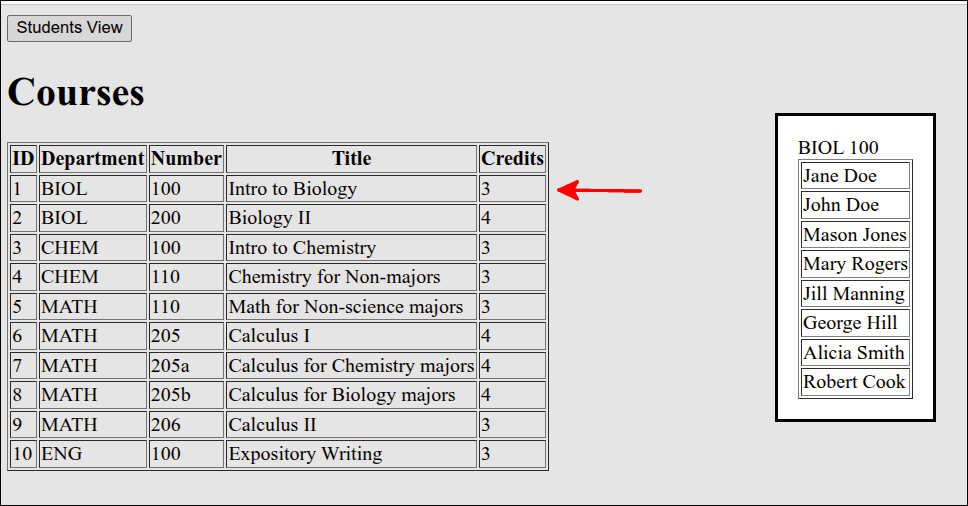
Adding Close buttons to close the dialogs
Rather than just using the ESC button to close the dialogs that show either the courses a student is enrolled in or the students enrolled in a course, we can add buttons to those dialog boxes for that purpose. To start, we can add modify index.html to add <button> elements for that purpose:
<!DOCTYPE html>
<html lang="en">
  <head>
    <meta charset="UTF-8" />
    <script type="module" src="index.mjs"></script>
    <title>Students and Courses</title>
  </head>
  <body>
    <div id="students_div">
      <button id="courses_button">Courses View</button>
      <h1>Students</h1>
      <table border="1">
        <thead>
          <tr>
            <th>ID</td>
            <th>First Name</th>
            <th>Last Name</th>
            <th>Major</th>
          </tr>
        </thead>
        <tbody id="students_tbody"></tbody>
      </table>
    </div>
    <div id="courses_div">
      <button id="students_button">Students View</button>
      <h1>Courses</h1>
      <table border="1">
        <thead>
          <tr>
            <th>ID</th>
            <th>Department</th>
            <th>Number</th>
            <th>Title</th>
            <th>Credits</th>
          </tr>
        </thead>
        <tbody id="courses_tbody"></tbody>
      </table>
    </div>
    <dialog id="student_courses_dlg">
      <label id="student_name_label"></label>
      <table border="1">
        <tbody id="student_courses_tbody"></tbody>
      </table>
      <br />
      <button id="close_student_courses_button">Close</button>
    </dialog>
    <dialog id="course_students_dlg">
      <label id="course_name_label"></label>
      <table border="1">
        <tbody id="course_students_tbody"></tbody>
      </table>
      <br />
      <button id="close_course_students_button">Close</button>
    </dialog>
  </body>
</html>
The new lines are 45-46 and 53-54. Line 45 puts in a break element to leave a blank line between the end of the <table> and the <button>. Line 46 adds a <button id="close_student_courses_button"> element. We will set things up so that this will close the dialog box.
Lines 53-54 do the same things as lines 45-46, except for the <dialog id="course_students_dlg"> element.
Next, we modify index.mjs to make the <button> elements actually close the dialogs.
import Dexie from "dexie";

if (document.readyState === "loading") {
  document.addEventListener('DOMContentLoaded', init);
} else {
  init();
}

function createInterfaceAPI(dbAPI) {
  // private values
  const self = {
    switchToCourses: switchToCourses,
    switchToStudents: switchToStudents
  };
  let students_array = [];
  let courses_array = [];
  const students_tbody = document.getElementById("students_tbody");
  const courses_tbody = document.getElementById("courses_tbody");
  const student_courses_dlg = document.getElementById("student_courses_dlg");
  const student_name_label = document.getElementById("student_name_label");
  let student_name;
  const course_students_dlg = document.getElementById("course_students_dlg");
  const course_name_label = document.getElementById("course_name_label");
  let course_name;
  const close_student_courses_button = document.getElementById("close_student_courses_button");
  close_student_courses_button.addEventListener("click", () => { student_courses_dlg.close(); });
  document.getElementById("close_course_students_button")
    .addEventListener("click", () => { course_students_dlg.close(); });

  // ========== API functions for the user-interface ===== //
  function switchToCourses(courses_div, students_div) {
    courses_div.style.display = "block";
    students_div.style.display = "none";
    updateCoursesTable();
  }

  function switchToStudents(courses_div, students_div) {
    courses_div.style.display = "none";
    students_div.style.display = "block";
    updateStudentsTable();
  }
  // =========== end of API functions for the user-interface === //

  // =========== helper functions for user-interface===========
  async function updateStudentsTable() {
    students_array = await dbAPI.getAllStudents();
    const fragment = document.createDocumentFragment();
    for (let student of students_array) {
      const tr = document.createElement('tr');
      tr.setAttribute("id", student.id);
      tr.addEventListener("click", showStudentCourses);
      for (let key of Object.keys(student)) {
        let td = document.createElement('td');
        let contents = document.createTextNode(student[key]);
        td.appendChild(contents);
        tr.appendChild(td);
      }
      fragment.appendChild(tr);
    }
    students_tbody.replaceChildren(fragment);
  }

  async function updateCoursesTable() {
    courses_array = await dbAPI.getAllCourses();
    const fragment = document.createDocumentFragment();
    for (let course of courses_array) {
      const tr = document.createElement('tr');
      tr.setAttribute("id", course.id);
      tr.addEventListener("click", showCourseStudents);
      for (let key of Object.keys(course)) {
        let td = document.createElement('td');
        let contents = document.createTextNode(course[key]);
        td.appendChild(contents);
        tr.appendChild(td);
      }
      fragment.appendChild(tr);
    }
    courses_tbody.replaceChildren(fragment);
  }

  async function showStudentCourses(event) {
    const row = event.currentTarget;
    const id = Number(row.id);
    student_name = row.childNodes[1].textContent +
      " " + row.childNodes[2].textContent;
    const courses = await dbAPI.getStudentCourses(id);
    console.log('courses', courses);
    showStudentCoursesDlg(courses);
  }

  async function showCourseStudents(event) {
    const row = event.currentTarget;
    const id = Number(row.id);
    course_name = row.childNodes[1].textContent +
      " " + row.childNodes[2].textContent;
    const students = await dbAPI.getCourseStudents(id);
    showCourseStudentsDlg(students);
  }

  function showStudentCoursesDlg(courses) {
    student_name_label.textContent = student_name;
    const fragment = document.createDocumentFragment();
    for (let course of courses) {
      console.log('course.dept', course.dept);
      const tr = document.createElement('tr');
      const td = document.createElement('td');
      const contents = document.createTextNode(course.dept +
        " " + course.number);
      td.appendChild(contents);
      tr.appendChild(td);
      fragment.appendChild(tr);
    }
    student_courses_tbody.replaceChildren(fragment);
    console.log(student_courses_dlg);
    student_courses_dlg.showModal();
  }

  function showCourseStudentsDlg(students) {
    course_name_label.textContent = course_name;
    const fragment = document.createDocumentFragment();
    for (let student of students) {
      const tr = document.createElement('tr');
      const td = document.createElement('td');
      const contents = document.createTextNode(student.first_name +
        " " + student.last_name);
      td.appendChild(contents);
      tr.appendChild(td);
      fragment.appendChild(tr);
    }
    course_students_tbody.replaceChildren(fragment);
    course_students_dlg.showModal();
  }
  // =========== end of helper functions for user-interface ====

  return self;
} // end of createInterfaceAPI factory function

function createDatabaseAPI() {
  // private values
  const self = {
    initDB: initDB,
    getAllStudents: getAllStudents,
    getAllCourses: getAllCourses,
    getStudentCourses: getStudentCourses,
    getCourseStudents: getCourseStudents
  };
  let db;

  // =========== API functions for database interaction ======
  async function initDB() {
    console.log('initDB called');
    db = new Dexie("EnrollmentDB");
    db.version(1).stores({
      students: '++id, first_name, last_name, major',
      courses: '++id, dept, number, title, credits',
      enrollments: '[student_id+course_id], student_id, course_id'
    });
    try {
      await db.open();
      console.log("database opened");
      db.students.bulkPut([
        {id: 1, first_name: 'Jane', last_name: 'Doe', major: 'MATH'},
        {id: 2, first_name: 'John', last_name: 'Doe', major: 'CHEM'},
        {id: 3, first_name: 'Alice', last_name: 'Brown', major: 'BIOL'},
        {id: 4, first_name: 'Mason', last_name: 'Jones', major: 'MATH'},
        {id: 5, first_name: 'Mary', last_name: 'Rogers', major: 'CHEM'},
        {id: 6, first_name: 'Carol', last_name: 'Greene', major: 'BIOL'},
        {id: 7, first_name: 'Jill', last_name: 'Manning', major: 'CHEM'},
        {id: 8, first_name: 'George', last_name: 'Hill', major: 'MATH'},
        {id: 9, first_name: 'Alicia', last_name: 'Smith', major: 'CHEM'},
        {id: 10, first_name: 'Robert', last_name: 'Cook', major: 'BIOL'}
      ]).catch (Dexie.BulkError, function (error) {
        console.log(error);
      });
      db.courses.bulkPut([
        {id: 1, dept: 'BIOL', number: '100',
        title: 'Intro to Biology', credits: 3},
        {id: 2, dept: 'BIOL', number: '200',
        title: 'Biology II', credits: 4},
        {id: 3, dept: 'CHEM', number: '100',
        title: 'Intro to Chemistry', credits: 3},
        {id: 4, dept: 'CHEM', number: '110',
        title: 'Chemistry for Non-majors', credits: 3},
        {id: 5, dept: 'MATH', number: '110',
        title: 'Math for Non-science majors', credits: 3},
        {id: 6, dept: 'MATH', number: '205',
        title: 'Calculus I', credits: 4},
        {id: 7, dept: 'MATH', number: '205a',
        title: 'Calculus for Chemistry majors', credits: 4},
        {id: 8, dept: 'MATH', number: '205b',
        title: 'Calculus for Biology majors', credits: 4},
        {id: 9, dept: 'MATH', number: '206',
        title: 'Calculus II', credits: 3},
        {id: 10, dept: 'ENG', number: '100',
        title: 'Expository Writing', credits: 3}
      ]).catch (Dexie.BulkError, function (error) {
        console.log(error);
      });
      db.enrollments.bulkPut([
        {student_id: 1, course_id: 1},
        {student_id: 1, course_id: 4},
        {student_id: 1, course_id: 6},
        {student_id: 1, course_id: 10},
        {student_id: 2, course_id: 1},
        {student_id: 2, course_id: 3},
        {student_id: 2, course_id: 7},
        {student_id: 3, course_id: 2},
        {student_id: 3, course_id: 4},
        {student_id: 3, course_id: 8},
        {student_id: 3, course_id: 10},
        {student_id: 4, course_id: 1},
        {student_id: 4, course_id: 4},
        {student_id: 4, course_id: 6},
        {student_id: 5, course_id: 1},
        {student_id: 5, course_id: 3},
        {student_id: 5, course_id: 7},
        {student_id: 5, course_id: 10},
        {student_id: 6, course_id: 2},
        {student_id: 6, course_id: 4},
        {student_id: 6, course_id: 8},
        {student_id: 6, course_id: 10},
        {student_id: 7, course_id: 1},
        {student_id: 7, course_id: 3},
        {student_id: 7, course_id: 7},
        {student_id: 8, course_id: 1},
        {student_id: 8, course_id: 4},
        {student_id: 8, course_id: 6},
        {student_id: 8, course_id: 10},
        {student_id: 9, course_id: 1},
        {student_id: 9, course_id: 3},
        {student_id: 9, course_id: 7},
        {student_id: 10, course_id: 1},
        {student_id: 10, course_id: 4},
        {student_id: 10, course_id: 6}
      ]).catch (Dexie.BulkError, function (error) {
        console.log(error);
      });
    } catch (error) {
      console.log(error);
    }
  }

  async function getAllStudents() {
    return await db.students.toArray();
  }

  async function getAllCourses() {
    return await db.courses.toArray();
  }

  async function getStudentCourses(id) {
    const enrollments = await db.enrollments
      .where('student_id')
      .equals(id)
      .toArray();
    let courseIds = [];
    for (let enrollment of enrollments) {
      const courseId = enrollment.course_id;
      courseIds.push(courseId);
    }
    const courses = await db.courses.bulkGet(courseIds);
    return courses;
  }

  async function getCourseStudents(id) {
    const enrollments = await db.enrollments
      .where('course_id')
      .equals(id)
      .toArray();
    const studentIds = enrollments.map(enrollment =>
      enrollment.student_id);
    const students = await db.students.bulkGet(studentIds);
    return students;
  }
  // =========== end of API functions for database interaction ===

  // =========== helper functions for database interaction ====

  // =========== end of helper functions for database interaction ==
  return self;
}

function init() {
  console.log('init called');
  const courses_div = document.getElementById("courses_div");
  courses_div.style.display = "none";
  const students_div = document.getElementById("students_div");
  const dbAPI = createDatabaseAPI();
  console.log('dbAPI', dbAPI);
  dbAPI.initDB();
  const uiAPI = createInterfaceAPI(dbAPI);
  const courses_button = document.getElementById("courses_button");
  courses_button.addEventListener("click", () => {
    uiAPI.switchToCourses(courses_div, students_div);
  });
  const students_button = document.getElementById("students_button");
  students_button.addEventListener("click", () => {
    uiAPI.switchToStudents(courses_div, students_div);
  });
  uiAPI.switchToStudents(courses_div, students_div);
}
The new lines are 25-28. Line 25 gets a reference to the <button id="close_student_courses_button"> element. Line 26 makes it so that the "click" handler for this button is student_courses_dlg.close(). Lines 27-28 do the same thing for the <button id="close_course_students_button"> element. But, this is done without storing the reference to that button.
If you tried out the application now, you would find that the dialogs close when the Close button is hit.
Reducing repeated code in index.mjs
If you look at index.mjs, you can find places where some code is repeated. For example, the updateStudentsTable() function and updateCoursesTable() function have a number of similar lines. The showStudentCoursesDlg() and showCourseStudentsDlg() functions also have a number of similar lines. So, we can create some other helper functions to reduce the number of repeated lines. Here is a new version of index.mjs that does that.
import Dexie from "dexie";

if (document.readyState === "loading") {
  document.addEventListener('DOMContentLoaded', init);
} else {
  init();
}

function createInterfaceAPI(dbAPI) {
  // private values
  const self = {
    switchToCourses: switchToCourses,
    switchToStudents: switchToStudents
  };
  let students_array = [];
  let courses_array = [];
  const students_tbody = document.getElementById("students_tbody");
  const courses_tbody = document.getElementById("courses_tbody");
  const student_courses_dlg = document.getElementById("student_courses_dlg");
  const student_name_label = document.getElementById("student_name_label");
  let student_name;
  const course_students_dlg = document.getElementById("course_students_dlg");
  const course_name_label = document.getElementById("course_name_label");
  let course_name;
  const close_student_courses_button = document.getElementById("close_student_courses_button");
  close_student_courses_button.addEventListener("click", () => { student_courses_dlg.close(); });
  document.getElementById("close_course_students_button")
    .addEventListener("click", () => { course_students_dlg.close(); });

  // ========== API functions for the user-interface ===== //
  function switchToCourses(courses_div, students_div) {
    courses_div.style.display = "block";
    students_div.style.display = "none";
    updateCoursesTable();
  }

  function switchToStudents(courses_div, students_div) {
    courses_div.style.display = "none";
    students_div.style.display = "block";
    updateStudentsTable();
  }
  // =========== end of API functions for the user-interface === //

  // =========== helper functions for user-interface===========
  function makeTableFragment(data_array, click_handler) {
    const fragment = document.createDocumentFragment();
    for (let obj of data_array) {
      const tr = document.createElement('tr');
      tr.setAttribute("id", obj.id);
      tr.addEventListener("click", click_handler);
      for (let key of Object.keys(obj)) {
        const td = document.createElement('td');
        const contents = document.createTextNode(obj[key]);
        td.appendChild(contents);
        tr.appendChild(td);
      }
      fragment.appendChild(tr);
    }
    return fragment;
  }

  async function updateStudentsTable() {
    students_array = await dbAPI.getAllStudents();
    const fragment = makeTableFragment(students_array, showStudentCourses);
    students_tbody.replaceChildren(fragment);
  }

  async function updateCoursesTable() {
    courses_array = await dbAPI.getAllCourses();
    const fragment = makeTableFragment(courses_array, showCourseStudents);
    courses_tbody.replaceChildren(fragment);
  }

  async function showStudentCourses(event) {
    const row = event.currentTarget;
    const id = Number(row.id);
    student_name = row.childNodes[1].textContent +
      " " + row.childNodes[2].textContent;
    const courses = await dbAPI.getStudentCourses(id);
    console.log('courses', courses);
    showStudentCoursesDlg(courses);
  }

  async function showCourseStudents(event) {
    const row = event.currentTarget;
    const id = Number(row.id);
    course_name = row.childNodes[1].textContent +
      " " + row.childNodes[2].textContent;
    const students = await dbAPI.getCourseStudents(id);
    showCourseStudentsDlg(students);
  }

  function makeDlgFragment(data_array, key1, key2) {
    const fragment = document.createDocumentFragment();
    for (let obj of data_array) {
      const tr = document.createElement('tr');
      const td = document.createElement('td');
      const contents = document.createTextNode(obj[key1] + " " + obj[key2]);
      td.appendChild(contents);
      tr.appendChild(td);
      fragment.appendChild(tr);
    }
    return fragment;
  }

  function showStudentCoursesDlg(courses) {
    student_name_label.textContent = student_name;
    const fragment = makeDlgFragment(courses,'dept','number')
    student_courses_tbody.replaceChildren(fragment);
    student_courses_dlg.showModal();
  }

  function showCourseStudentsDlg(students) {
    course_name_label.textContent = course_name;
    const fragment = makeDlgFragment(students,'first_name','last_name');
    course_students_tbody.replaceChildren(fragment);
    course_students_dlg.showModal();
  }
  // =========== end of helper functions for user-interface ====

  return self;
} // end of createInterfaceAPI factory function

function createDatabaseAPI() {
  // private values
  const self = {
    initDB: initDB,
    getAllStudents: getAllStudents,
    getAllCourses: getAllCourses,
    getStudentCourses: getStudentCourses,
    getCourseStudents: getCourseStudents
  };
  let db;

  // =========== API functions for database interaction ======
  async function initDB() {
    console.log('initDB called');
    db = new Dexie("EnrollmentDB");
    db.version(1).stores({
      students: '++id, first_name, last_name, major',
      courses: '++id, dept, number, title, credits',
      enrollments: '[student_id+course_id], student_id, course_id'
    });
    try {
      await db.open();
      console.log("database opened");
      db.students.bulkPut([
        {id: 1, first_name: 'Jane', last_name: 'Doe', major: 'MATH'},
        {id: 2, first_name: 'John', last_name: 'Doe', major: 'CHEM'},
        {id: 3, first_name: 'Alice', last_name: 'Brown', major: 'BIOL'},
        {id: 4, first_name: 'Mason', last_name: 'Jones', major: 'MATH'},
        {id: 5, first_name: 'Mary', last_name: 'Rogers', major: 'CHEM'},
        {id: 6, first_name: 'Carol', last_name: 'Greene', major: 'BIOL'},
        {id: 7, first_name: 'Jill', last_name: 'Manning', major: 'CHEM'},
        {id: 8, first_name: 'George', last_name: 'Hill', major: 'MATH'},
        {id: 9, first_name: 'Alicia', last_name: 'Smith', major: 'CHEM'},
        {id: 10, first_name: 'Robert', last_name: 'Cook', major: 'BIOL'}
      ]).catch (Dexie.BulkError, function (error) {
        console.log(error);
      });
      db.courses.bulkPut([
        {id: 1, dept: 'BIOL', number: '100',
        title: 'Intro to Biology', credits: 3},
        {id: 2, dept: 'BIOL', number: '200',
        title: 'Biology II', credits: 4},
        {id: 3, dept: 'CHEM', number: '100',
        title: 'Intro to Chemistry', credits: 3},
        {id: 4, dept: 'CHEM', number: '110',
        title: 'Chemistry for Non-majors', credits: 3},
        {id: 5, dept: 'MATH', number: '110',
        title: 'Math for Non-science majors', credits: 3},
        {id: 6, dept: 'MATH', number: '205',
        title: 'Calculus I', credits: 4},
        {id: 7, dept: 'MATH', number: '205a',
        title: 'Calculus for Chemistry majors', credits: 4},
        {id: 8, dept: 'MATH', number: '205b',
        title: 'Calculus for Biology majors', credits: 4},
        {id: 9, dept: 'MATH', number: '206',
        title: 'Calculus II', credits: 3},
        {id: 10, dept: 'ENG', number: '100',
        title: 'Expository Writing', credits: 3}
      ]).catch (Dexie.BulkError, function (error) {
        console.log(error);
      });
      db.enrollments.bulkPut([
        {student_id: 1, course_id: 1},
        {student_id: 1, course_id: 4},
        {student_id: 1, course_id: 6},
        {student_id: 1, course_id: 10},
        {student_id: 2, course_id: 1},
        {student_id: 2, course_id: 3},
        {student_id: 2, course_id: 7},
        {student_id: 3, course_id: 2},
        {student_id: 3, course_id: 4},
        {student_id: 3, course_id: 8},
        {student_id: 3, course_id: 10},
        {student_id: 4, course_id: 1},
        {student_id: 4, course_id: 4},
        {student_id: 4, course_id: 6},
        {student_id: 5, course_id: 1},
        {student_id: 5, course_id: 3},
        {student_id: 5, course_id: 7},
        {student_id: 5, course_id: 10},
        {student_id: 6, course_id: 2},
        {student_id: 6, course_id: 4},
        {student_id: 6, course_id: 8},
        {student_id: 6, course_id: 10},
        {student_id: 7, course_id: 1},
        {student_id: 7, course_id: 3},
        {student_id: 7, course_id: 7},
        {student_id: 8, course_id: 1},
        {student_id: 8, course_id: 4},
        {student_id: 8, course_id: 6},
        {student_id: 8, course_id: 10},
        {student_id: 9, course_id: 1},
        {student_id: 9, course_id: 3},
        {student_id: 9, course_id: 7},
        {student_id: 10, course_id: 1},
        {student_id: 10, course_id: 4},
        {student_id: 10, course_id: 6}
      ]).catch (Dexie.BulkError, function (error) {
        console.log(error);
      });
    } catch (error) {
      console.log(error);
    }
  }

  async function getAllStudents() {
    return await db.students.toArray();
  }

  async function getAllCourses() {
    return await db.courses.toArray();
  }

  async function getStudentCourses(id) {
    const enrollments = await db.enrollments
      .where('student_id')
      .equals(id)
      .toArray();
    const courseIds = enrollments.map(enrollment => enrollment.course_id);
    const courses = await db.courses.bulkGet(courseIds);
    return courses;
  }

  async function getCourseStudents(id) {
    const enrollments = await db.enrollments
      .where('course_id')
      .equals(id)
      .toArray();
    const studentIds = enrollments.map(enrollment => enrollment.student_id);
    const students = await db.students.bulkGet(studentIds);
    return students;
  }
  // =========== end of API functions for database interaction ===

  // =========== helper functions for database interaction ====

  // =========== end of helper functions for database interaction ==
  return self;
}

function init() {
  console.log('init called');
  const courses_div = document.getElementById("courses_div");
  courses_div.style.display = "none";
  const students_div = document.getElementById("students_div");
  const dbAPI = createDatabaseAPI();
  console.log('dbAPI', dbAPI);
  dbAPI.initDB();
  const uiAPI = createInterfaceAPI(dbAPI);
  const courses_button = document.getElementById("courses_button");
  courses_button.addEventListener("click", () => {
    uiAPI.switchToCourses(courses_div, students_div);
  });
  const students_button = document.getElementById("students_button");
  students_button.addEventListener("click", () => {
    uiAPI.switchToStudents(courses_div, students_div);
  });
  uiAPI.switchToStudents(courses_div, students_div);
}
The new lines are 45-60, 64, 70, 93-104, 108, 115 and 242. Lines 45-60 define the makeTableFragment() helper function. This function takes the repeated lines from the previous versions of updateStudentsTable() and updateCoursesTable(), and puts those lines into makeTableFragment(). The only changes are that you need to specify the data_array (array you are iterating over) and the click_handler (the "click" event handler for the table rows).
Using the makeTableFragment() function shortens the code for updateStudentsTable() and updateCoursesTable(). So, the call to makeTableFragment() on line 64 and line 70, does most of the work in creating the table rows for those functions.
Lines 93-104 define the makeDlgFragment() function. This function creates the table rows for the dialog boxes that are shown when you click on a row in either the students HTML table or the courses HTML table. You just need to pass the data_array that contains the objects you need to iterate over, and key1 and key2, the properties that you need to construct the name for the dialog <label> element.
Using makeDlgFragment() shortens both the showStudentCoursesDlg() and showCourseStudentsDlg() functions. Now, all those functions have to do is call makeDlgFragment(), on lines 108 and 115, respectively to generate the table rows needed.
Line 242 condenses down the previous for loop to get the courseIds, by using the map() method. This replaces 4 lines with just that one line. You can see why some programmers, will use map() to come up with arrays that are modified from an original array. But, you do have to get used to the syntax of using map().
You can check to see that the application still runs correctly.
Breaking index.mjs into modules
Now that we have our application working okay, let’s break index.mjs into modules. We currently have two factory functions, createInterfaceAPI() and createDatabaseAPI(). So, we can take the code in each of those factory functions and place them into separate files. So, we will create a file called user_interface.mjs that contains the createInterfaceAPI() factory function, and another file, dexie_database.mjs that contains the `createDatabaseAPI()`factory function. Here is the code for user_interface.mjs:
export default function createInterfaceAPI(dbAPI) {
  // private values
  const self = {
    switchToCourses: switchToCourses,
    switchToStudents: switchToStudents
  };
  let students_array = [];
  let courses_array = [];
  const students_tbody = document.getElementById("students_tbody");
  const courses_tbody = document.getElementById("courses_tbody");
  const student_courses_dlg = document.getElementById("student_courses_dlg");
  const student_name_label = document.getElementById("student_name_label");
  let student_name;
  const course_students_dlg = document.getElementById("course_students_dlg");
  const course_name_label = document.getElementById("course_name_label");
  let course_name;
  const close_student_courses_button = document.getElementById("close_student_courses_button");
  close_student_courses_button.addEventListener("click", () => { student_courses_dlg.close(); });
  document.getElementById("close_course_students_button")
    .addEventListener("click", () => { course_students_dlg.close(); });

  // ========== API functions for the user-interface ===== //
  function switchToCourses(courses_div, students_div) {
    courses_div.style.display = "block";
    students_div.style.display = "none";
    updateCoursesTable();
  }

  function switchToStudents(courses_div, students_div) {
    courses_div.style.display = "none";
    students_div.style.display = "block";
    updateStudentsTable();
  }
  // =========== end of API functions for the user-interface === //

  // =========== helper functions for user-interface===========
  function makeTableFragment(data_array, click_handler) {
    const fragment = document.createDocumentFragment();
    for (let obj of data_array) {
      const tr = document.createElement('tr');
      tr.setAttribute("id", obj.id);
      tr.addEventListener("click", click_handler);
      for (let key of Object.keys(obj)) {
        const td = document.createElement('td');
        const contents = document.createTextNode(obj[key]);
        td.appendChild(contents);
        tr.appendChild(td);
      }
      fragment.appendChild(tr);
    }
    return fragment;
  }

  async function updateStudentsTable() {
    students_array = await dbAPI.getAllStudents();
    const fragment = makeTableFragment(students_array, showStudentCourses);
    students_tbody.replaceChildren(fragment);
  }

  async function updateCoursesTable() {
    courses_array = await dbAPI.getAllCourses();
    const fragment = makeTableFragment(courses_array, showCourseStudents);
    courses_tbody.replaceChildren(fragment);
  }

  async function showStudentCourses(event) {
    const row = event.currentTarget;
    const id = Number(row.id);
    student_name = row.childNodes[1].textContent +
      " " + row.childNodes[2].textContent;
    const courses = await dbAPI.getStudentCourses(id);
    console.log('courses', courses);
    showStudentCoursesDlg(courses);
  }

  async function showCourseStudents(event) {
    const row = event.currentTarget;
    const id = Number(row.id);
    course_name = row.childNodes[1].textContent +
      " " + row.childNodes[2].textContent;
    const students = await dbAPI.getCourseStudents(id);
    showCourseStudentsDlg(students);
  }

  function makeDlgFragment(data_array, key1, key2) {
    const fragment = document.createDocumentFragment();
    for (let obj of data_array) {
      const tr = document.createElement('tr');
      const td = document.createElement('td');
      const contents = document.createTextNode(obj[key1] + " " + obj[key2]);
      td.appendChild(contents);
      tr.appendChild(td);
      fragment.appendChild(tr);
    }
    return fragment;
  }

  function showStudentCoursesDlg(courses) {
    student_name_label.textContent = student_name;
    const fragment = makeDlgFragment(courses,'dept','number')
    student_courses_tbody.replaceChildren(fragment);
    student_courses_dlg.showModal();
  }

  function showCourseStudentsDlg(students) {
    course_name_label.textContent = course_name;
    const fragment = makeDlgFragment(students,'first_name','last_name');
    course_students_tbody.replaceChildren(fragment);
    course_students_dlg.showModal();
  }
  // =========== end of helper functions for user-interface ====

  return self;
} // end of createInterfaceAPI factory function
The only changed line is line 1. Note the export default function declaration. This means that the createInterfaceAPI() function is the default function that is exported. This means that we can use this line to import this function:
import createInterfaceApi from "./user_interface.mjs";when we want to import this function from within index.mjs.
Here is the code for dexie_database.mjs:
import Dexie from "dexie";

export default function createDatabaseAPI() {
  // private values
  const self = {
  initDB: initDB,
  getAllStudents: getAllStudents,
  getAllCourses: getAllCourses,
  getStudentCourses: getStudentCourses,
  getCourseStudents: getCourseStudents
  };
  let db;

  // =========== API functions for database interaction ======
  async function initDB() {
  console.log('initDB called');
  db = new Dexie("EnrollmentDB");
  db.version(1).stores({
      students: '++id, first_name, last_name, major',
      courses: '++id, dept, number, title, credits',
      enrollments: '[student_id+course_id], student_id, course_id'
  });
  try {
      await db.open();
      console.log("database opened");
      db.students.bulkPut([
      {id: 1, first_name: 'Jane', last_name: 'Doe', major: 'MATH'},
      {id: 2, first_name: 'John', last_name: 'Doe', major: 'CHEM'},
      {id: 3, first_name: 'Alice', last_name: 'Brown', major: 'BIOL'},
      {id: 4, first_name: 'Mason', last_name: 'Jones', major: 'MATH'},
      {id: 5, first_name: 'Mary', last_name: 'Rogers', major: 'CHEM'},
      {id: 6, first_name: 'Carol', last_name: 'Greene', major: 'BIOL'},
      {id: 7, first_name: 'Jill', last_name: 'Manning', major: 'CHEM'},
      {id: 8, first_name: 'George', last_name: 'Hill', major: 'MATH'},
      {id: 9, first_name: 'Alicia', last_name: 'Smith', major: 'CHEM'},
      {id: 10, first_name: 'Robert', last_name: 'Cook', major: 'BIOL'}
      ]).catch (Dexie.BulkError, function (error) {
      console.log(error);
      });
      db.courses.bulkPut([
        {id: 1, dept: 'BIOL', number: '100',
        title: 'Intro to Biology', credits: 3},
        {id: 2, dept: 'BIOL', number: '200',
        title: 'Biology II', credits: 4},
        {id: 3, dept: 'CHEM', number: '100',
        title: 'Intro to Chemistry', credits: 3},
        {id: 4, dept: 'CHEM', number: '110',
        title: 'Chemistry for Non-majors', credits: 3},
        {id: 5, dept: 'MATH', number: '110',
        title: 'Math for Non-science majors', credits: 3},
        {id: 6, dept: 'MATH', number: '205',
        title: 'Calculus I', credits: 4},
        {id: 7, dept: 'MATH', number: '205a',
        title: 'Calculus for Chemistry majors', credits: 4},
        {id: 8, dept: 'MATH', number: '205b',
        title: 'Calculus for Biology majors', credits: 4},
        {id: 9, dept: 'MATH', number: '206',
        title: 'Calculus II', credits: 3},
        {id: 10, dept: 'ENG', number: '100',
        title: 'Expository Writing', credits: 3}
      ]).catch (Dexie.BulkError, function (error) {
        console.log(error);
      });
      db.enrollments.bulkPut([
      {student_id: 1, course_id: 1},
      {student_id: 1, course_id: 4},
      {student_id: 1, course_id: 6},
      {student_id: 1, course_id: 10},
      {student_id: 2, course_id: 1},
      {student_id: 2, course_id: 3},
      {student_id: 2, course_id: 7},
      {student_id: 3, course_id: 2},
      {student_id: 3, course_id: 4},
      {student_id: 3, course_id: 8},
      {student_id: 3, course_id: 10},
      {student_id: 4, course_id: 1},
      {student_id: 4, course_id: 4},
      {student_id: 4, course_id: 6},
      {student_id: 5, course_id: 1},
      {student_id: 5, course_id: 3},
      {student_id: 5, course_id: 7},
      {student_id: 5, course_id: 10},
      {student_id: 6, course_id: 2},
      {student_id: 6, course_id: 4},
      {student_id: 6, course_id: 8},
      {student_id: 6, course_id: 10},
      {student_id: 7, course_id: 1},
      {student_id: 7, course_id: 3},
      {student_id: 7, course_id: 7},
      {student_id: 8, course_id: 1},
      {student_id: 8, course_id: 4},
      {student_id: 8, course_id: 6},
      {student_id: 8, course_id: 10},
      {student_id: 9, course_id: 1},
      {student_id: 9, course_id: 3},
      {student_id: 9, course_id: 7},
      {student_id: 10, course_id: 1},
      {student_id: 10, course_id: 4},
      {student_id: 10, course_id: 6}
      ]).catch (Dexie.BulkError, function (error) {
      console.log(error);
      });
  } catch (error) {
      console.log(error);
  }
  }

  async function getAllStudents() {
  return await db.students.toArray();
  }

  async function getAllCourses() {
  return await db.courses.toArray();
  }

  async function getStudentCourses(id) {
  const enrollments = await db.enrollments
      .where('student_id')
      .equals(id)
      .toArray();
  const courseIds = enrollments.map(enrollment => enrollment.course_id);
  const courses = await db.courses.bulkGet(courseIds);
  return courses;
  }

  async function getCourseStudents(id) {
  const enrollments = await db.enrollments
      .where('course_id')
      .equals(id)
      .toArray();
  const studentIds = enrollments.map(enrollment => enrollment.student_id);
  const students = await db.students.bulkGet(studentIds);
  return students;
  }
  // =========== end of API functions for database interaction ===

  // =========== helper functions for database interaction ====

  // =========== end of helper functions for database interaction ==
  return self;
}
The new lines are 1 and 3. Line 1 makes Dexie available. Line 3 declares the function as export default function, so that we can import it like this:
import createDatabaseAPI from "./dexie_database.mjs";With those changes, here is the revised version of index.mjs:
import createInterfaceAPI from "./user_interface.mjs";
import createDatabaseAPI from "./dexie_database.mjs";

if (document.readyState === "loading") {
  document.addEventListener('DOMContentLoaded', init);
} else {
  init();
}

function init() {
  console.log('init called');
  const courses_div = document.getElementById("courses_div");
  courses_div.style.display = "none";
  const students_div = document.getElementById("students_div");
  const dbAPI = createDatabaseAPI();
  console.log('dbAPI', dbAPI);
  dbAPI.initDB();
  const uiAPI = createInterfaceAPI(dbAPI);
  const courses_button = document.getElementById("courses_button");
  courses_button.addEventListener("click", () => {
    uiAPI.switchToCourses(courses_div, students_div);
  });
  const students_button = document.getElementById("students_button");
  students_button.addEventListener("click", () => {
    uiAPI.switchToStudents(courses_div, students_div);
  });
  uiAPI.switchToStudents(courses_div, students_div);
}
Make tables sortable by columns
Before putting in any changes to the code, here is a little sidebar:
Modifying index.html to make columns sortable
We need to modify index.html to make the HTML tables sortable by columns. Here is the new version of index.html:
<!DOCTYPE html>
<html lang="en">
  <head>
    <meta charset="UTF-8" />
    <script type="module" src="index.mjs"></script>
    <title>Students and Courses</title>
  </head>
  <body>
    <div id="students_div">
      <button id="courses_button">Courses View</button>
      <h1>Students</h1>
      <table border="1">
        <thead>
          <tr>
            <th id="id" aria-sort="none">ID</td>
            <th id="first_name" aria-sort="none">First Name</th>
            <th id="last_name" aria-sort="none">Last Name</th>
            <th id="major" aria-sort="none">Major</th>
          </tr>
        </thead>
        <tbody id="students_tbody"></tbody>
      </table>
    </div>
    <div id="courses_div">
      <button id="students_button">Students View</button>
      <h1>Courses</h1>
      <table border="1">
        <thead>
          <tr>
            <th id="id" aria-sort="none">ID</th>
            <th id="dept" aria-sort="none">Department</th>
            <th id="number" aria-sort="none">Number</th>
            <th id="title" aria-sort="none">Title</th>
            <th id="credits" aria-sort="none">Credits</th>
          </tr>
        </thead>
        <tbody id="courses_tbody"></tbody>
      </table>
    </div>
    <dialog id="student_courses_dlg">
      <label id="student_name_label"></label>
      <table border="1">
        <tbody id="student_courses_tbody"></tbody>
      </table>
      <br />
      <button id="close_student_courses_button">Close</button>
    </dialog>
    <dialog id="course_students_dlg">
      <label id="course_name_label"></label>
      <table border="1">
        <tbody id="course_students_tbody"></tbody>
      </table>
      <br />
      <button id="close_course_students_button">Close</button>
    </dialog>
  </body>
</html>
The modified lines are 15-18 and 30-34. Lines 15-18 gives the <th> elements for the students HTML table attributes. The id attribute is set to the property (field) name for the students objects. The aria-sort attribute is set to "none" to signify that the column is not sorted yet.
Lines 30-34 do the same thing as lines 15-18, except they do this for the courses HTML table.
Modifying the user_interface.mjs module
Now that we have put all the HTML table rendering into the user_interface.mjs module, that file is what we want to modify to perform the sorting. We will do this in several steps to make it easier to understand the changes. You also may want to look at this kind of sorting that was done in Gathering input for a table - Adding a handler function to sort the table by column, as that goes over many of the same details we will be looking at here.
Here is the first modification of user_interface.mjs:
export default function createInterfaceAPI(dbAPI) {
  // private values
  const self = {
    switchToCourses: switchToCourses,
    switchToStudents: switchToStudents,
    initHeaders: initHeaders
  };
  let students_array = [];
  let courses_array = [];
  const students_tbody = document.getElementById("students_tbody");
  const courses_tbody = document.getElementById("courses_tbody");
  const student_courses_dlg = document.getElementById("student_courses_dlg");
  const student_name_label = document.getElementById("student_name_label");
  let student_name;
  const course_students_dlg = document.getElementById("course_students_dlg");
  const course_name_label = document.getElementById("course_name_label");
  let course_name;
  const close_student_courses_button = document.getElementById("close_student_courses_button");
  close_student_courses_button.addEventListener("click", () => { student_courses_dlg.close(); });
  document.getElementById("close_course_students_button")
    .addEventListener("click", () => { course_students_dlg.close(); });

  // ========== API functions for the user-interface ===== //
  function switchToCourses(courses_div, students_div) {
    courses_div.style.display = "block";
    students_div.style.display = "none";
    updateCoursesTable();
  }

  function switchToStudents(courses_div, students_div) {
    courses_div.style.display = "none";
    students_div.style.display = "block";
    updateStudentsTable();
  }

  function initHeaders(courses_div, students_div) {
    const student_headers = students_div.getElementsByTagName('th');
    const course_headers = courses_div.getElementsByTagName('th');
    for (let header of student_headers) {
      header.addEventListener("click", sortStudents);
    }
    for (let header of course_headers) {
      header.addEventListener("click", sortCourses);
    }
  }
  // =========== end of API functions for the user-interface === //

  // =========== helper functions for user-interface===========
  function makeTableFragment(data_array, click_handler) {
    const fragment = document.createDocumentFragment();
    for (let obj of data_array) {
      const tr = document.createElement('tr');
      tr.setAttribute("id", obj.id);
      tr.addEventListener("click", click_handler);
      for (let key of Object.keys(obj)) {
        const td = document.createElement('td');
        const contents = document.createTextNode(obj[key]);
        td.appendChild(contents);
        tr.appendChild(td);
      }
      fragment.appendChild(tr);
    }
    return fragment;
  }

  async function updateStudentsTable() {
    students_array = await dbAPI.getAllStudents();
    const fragment = makeTableFragment(students_array, showStudentCourses);
    students_tbody.replaceChildren(fragment);
  }

  async function updateCoursesTable() {
    courses_array = await dbAPI.getAllCourses();
    const fragment = makeTableFragment(courses_array, showCourseStudents);
    courses_tbody.replaceChildren(fragment);
  }

  async function showStudentCourses(event) {
    const row = event.currentTarget;
    const id = Number(row.id);
    student_name = row.childNodes[1].textContent +
      " " + row.childNodes[2].textContent;
    const courses = await dbAPI.getStudentCourses(id);
    console.log('courses', courses);
    showStudentCoursesDlg(courses);
  }

  async function showCourseStudents(event) {
    const row = event.currentTarget;
    const id = Number(row.id);
    course_name = row.childNodes[1].textContent +
      " " + row.childNodes[2].textContent;
    const students = await dbAPI.getCourseStudents(id);
    showCourseStudentsDlg(students);
  }

  function makeDlgFragment(data_array, key1, key2) {
    const fragment = document.createDocumentFragment();
    for (let obj of data_array) {
      const tr = document.createElement('tr');
      const td = document.createElement('td');
      const contents = document.createTextNode(obj[key1] + " " + obj[key2]);
      td.appendChild(contents);
      tr.appendChild(td);
      fragment.appendChild(tr);
    }
    return fragment;
  }

  function showStudentCoursesDlg(courses) {
    student_name_label.textContent = student_name;
    const fragment = makeDlgFragment(courses,'dept','number')
    student_courses_tbody.replaceChildren(fragment);
    student_courses_dlg.showModal();
  }

  function showCourseStudentsDlg(students) {
    course_name_label.textContent = course_name;
    const fragment = makeDlgFragment(students,'first_name','last_name');
    course_students_tbody.replaceChildren(fragment);
    course_students_dlg.showModal();
  }

  function sortStudents(event) {
    console.log(event.target);
  }

  function sortCourses(event) {
    console.log(event.target);
  }
  // =========== end of helper functions for user-interface ====

  return self;
} // end of createInterfaceAPI factory function
The new lines are 5-6, 36-45, 124-126 and 128-130. Line 5 was changed to add a comma to the end of the line, as another API function, initHeaders() was added on line 6.
Lines 36-45 define the initHeaders() API function. Line 37 gets an array of all the <th> elements in students_div. Line 38 gets an array of all the <th> elements in courses_div. Lines 39-41 define a for loop that iterates over all the <th> elements in students_div to add a "click" event handler called sortStudents(). Lines 42-44 define a for loop that iterates over all the <th> elements in courses_div, to add a "click" event handler called sortCourses().
Lines 124-126 define the sortStudents() helper function. At this point, all this function does is print the <th> element that the user clicks on to the Console. Lines 128-130 define the sortCourses() helper function. This function also just prints the <th> element the user clicks on to the Console.
For this to work, we need to make a change to index.mjs. Here is the new version of index.mjs:
import createInterfaceAPI from "./user_interface.mjs";
import createDatabaseAPI from "./dexie_database.mjs";

if (document.readyState === "loading") {
  document.addEventListener('DOMContentLoaded', init);
} else {
  init();
}

function init() {
  console.log('init called');
  const courses_div = document.getElementById("courses_div");
  courses_div.style.display = "none";
  const students_div = document.getElementById("students_div");
  const dbAPI = createDatabaseAPI();
  console.log('dbAPI', dbAPI);
  dbAPI.initDB();
  const uiAPI = createInterfaceAPI(dbAPI);
  const courses_button = document.getElementById("courses_button");
  courses_button.addEventListener("click", () => {
    uiAPI.switchToCourses(courses_div, students_div);
  });
  const students_button = document.getElementById("students_button");
  students_button.addEventListener("click", () => {
    uiAPI.switchToStudents(courses_div, students_div);
  });
  uiAPI.initHeaders(courses_div, students_div);
  uiAPI.switchToStudents(courses_div, students_div);
}
The one new line is line 27, where the initHeaders() function just added to user_interface.mjs is called to assign click handlers to the headers.
If you run the application, you can see that clicking on a <th> element will show up in the Console. Here is a screen shot showing the Console after clicking on some <th> elements:
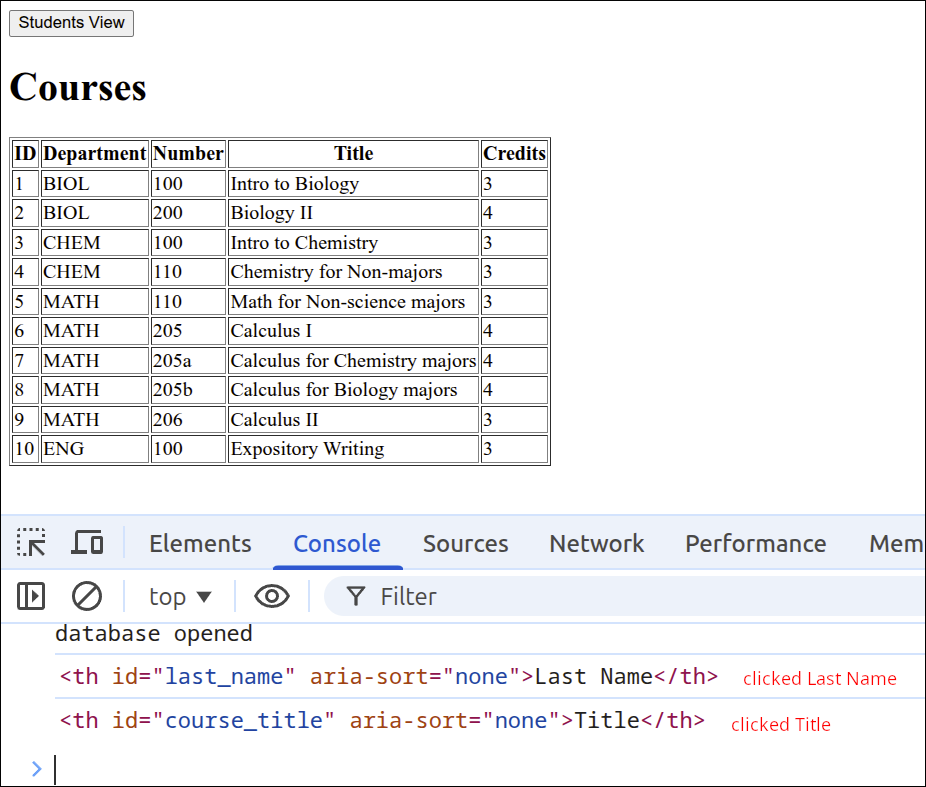
Next, we can modify the sortStudents() to start the sort process:
export default function createInterfaceAPI(dbAPI) {
  // private values
  const self = {
    switchToCourses: switchToCourses,
    switchToStudents: switchToStudents,
    initHeaders: initHeaders
  };
  let students_array = [];
  let courses_array = [];
  const students_tbody = document.getElementById("students_tbody");
  const courses_tbody = document.getElementById("courses_tbody");
  const student_courses_dlg = document.getElementById("student_courses_dlg");
  const student_name_label = document.getElementById("student_name_label");
  let student_name;
  const course_students_dlg = document.getElementById("course_students_dlg");
  const course_name_label = document.getElementById("course_name_label");
  let course_name;
  const close_student_courses_button = document.getElementById("close_student_courses_button");
  close_student_courses_button.addEventListener("click", () => { student_courses_dlg.close(); });
  document.getElementById("close_course_students_button")
    .addEventListener("click", () => { course_students_dlg.close(); });

  // ========== API functions for the user-interface ===== //
  function switchToCourses(courses_div, students_div) {
    courses_div.style.display = "block";
    students_div.style.display = "none";
    updateCoursesTable();
  }

  function switchToStudents(courses_div, students_div) {
    courses_div.style.display = "none";
    students_div.style.display = "block";
    updateStudentsTable();
  }

  function initHeaders(courses_div, students_div) {
    const student_headers = students_div.getElementsByTagName('th');
    const course_headers = courses_div.getElementsByTagName('th');
    for (let header of student_headers) {
      header.addEventListener("click", sortStudents);
    }
    for (let header of course_headers) {
      header.addEventListener("click", sortCourses);
    }
  }
  // =========== end of API functions for the user-interface === //

  // =========== helper functions for user-interface===========
  function makeTableFragment(data_array, click_handler) {
    const fragment = document.createDocumentFragment();
    for (let obj of data_array) {
      const tr = document.createElement('tr');
      tr.setAttribute("id", obj.id);
      tr.addEventListener("click", click_handler);
      for (let key of Object.keys(obj)) {
        const td = document.createElement('td');
        const contents = document.createTextNode(obj[key]);
        td.appendChild(contents);
        tr.appendChild(td);
      }
      fragment.appendChild(tr);
    }
    return fragment;
  }

  async function updateStudentsTable() {
    students_array = await dbAPI.getAllStudents();
    const fragment = makeTableFragment(students_array, showStudentCourses);
    students_tbody.replaceChildren(fragment);
  }

  async function updateCoursesTable() {
    courses_array = await dbAPI.getAllCourses();
    const fragment = makeTableFragment(courses_array, showCourseStudents);
    courses_tbody.replaceChildren(fragment);
  }

  async function showStudentCourses(event) {
    const row = event.currentTarget;
    const id = Number(row.id);
    student_name = row.childNodes[1].textContent +
      " " + row.childNodes[2].textContent;
    const courses = await dbAPI.getStudentCourses(id);
    console.log('courses', courses);
    showStudentCoursesDlg(courses);
  }

  async function showCourseStudents(event) {
    const row = event.currentTarget;
    const id = Number(row.id);
    course_name = row.childNodes[1].textContent +
      " " + row.childNodes[2].textContent;
    const students = await dbAPI.getCourseStudents(id);
    showCourseStudentsDlg(students);
  }

  function makeDlgFragment(data_array, key1, key2) {
    const fragment = document.createDocumentFragment();
    for (let obj of data_array) {
      const tr = document.createElement('tr');
      const td = document.createElement('td');
      const contents = document.createTextNode(obj[key1] + " " + obj[key2]);
      td.appendChild(contents);
      tr.appendChild(td);
      fragment.appendChild(tr);
    }
    return fragment;
  }

  function showStudentCoursesDlg(courses) {
    student_name_label.textContent = student_name;
    const fragment = makeDlgFragment(courses,'dept','number')
    student_courses_tbody.replaceChildren(fragment);
    student_courses_dlg.showModal();
  }

  function showCourseStudentsDlg(students) {
    course_name_label.textContent = course_name;
    const fragment = makeDlgFragment(students,'first_name','last_name');
    course_students_tbody.replaceChildren(fragment);
    course_students_dlg.showModal();
  }

  function sortStudents(event) {
    const property = event.target.id;
    const aria_value = event.target.getAttribute("aria-sort");
    if (property === "id") {
      sortStudentsByNumber(property, aria_value);
    } else {
      sortStudentsByString(property, aria_value);
    }
  }

  function sortCourses(event) {
    console.log(event.target);
  }

  function sortStudentsByNumber(property, aria_value) {
    students_array.sort((a,b) => a[property] - b[property]);
    const fragment = makeTableFragment(students_array, showStudentCourses);
    students_tbody.replaceChildren(fragment);
  }

  function sortStudentsByString(property, aria_value) {
    students_array.sort((a,b) => a[property].localeCompare(b[property]));
    const fragment = makeTableFragment(students_array, showStudentCourses);
    students_tbody.replaceChildren(fragment);
  }
  // =========== end of helper functions for user-interface ====

  return self;
} // end of createInterfaceAPI factory function
The new lines are 125-131, 138-142 and 144-148. Lines 125-131 are the new lines within the sortStudents() helper function. Line 125 stores the id for the <th> element as property. The value of property should match one of the properties for an object the students database table. That is, property will be one of id, first_name, last_name or major. Line 126 will get the value of the aria-sort attribute and store this as aria_value. Lines 127-131 define a selection statement that tests to see if property is "id" or not. That is because only the id property is a numeric value. The other properties are all strings. So, if property is "id", then line 128 calls the sortStudentsByNumber() function. Otherwise, line 130 will call the sortStudentsByString() function.
Lines 138-142 define the sortStudentsByNumber() function. Right now, this function just sorts by the passed property in ascending order. We are not making use of the aria_value yet. Line 139 performs an ascending sort for a numeric type of data. Line 140 makes the <tbody> contents using the makeTableFragment() function. Line 141 replaces student_tbody's contents with that fragment.
Lines 144-148 define the sortStudentsByString() function. Just as with the sortStudentsByNumber() function, this function just does an ascending sort. Line 145 performs an ascending sort assuming the property being sorted by is a string. Lines 146-147 take the sorted array and convert that into the table rows for students_tbody.
These are only some of the functions we will need. But, they are enough to test out to see if we can sort the students HTML table by the column we click on in ascending order.
The following animated gif shows the sorting that can be done so far:
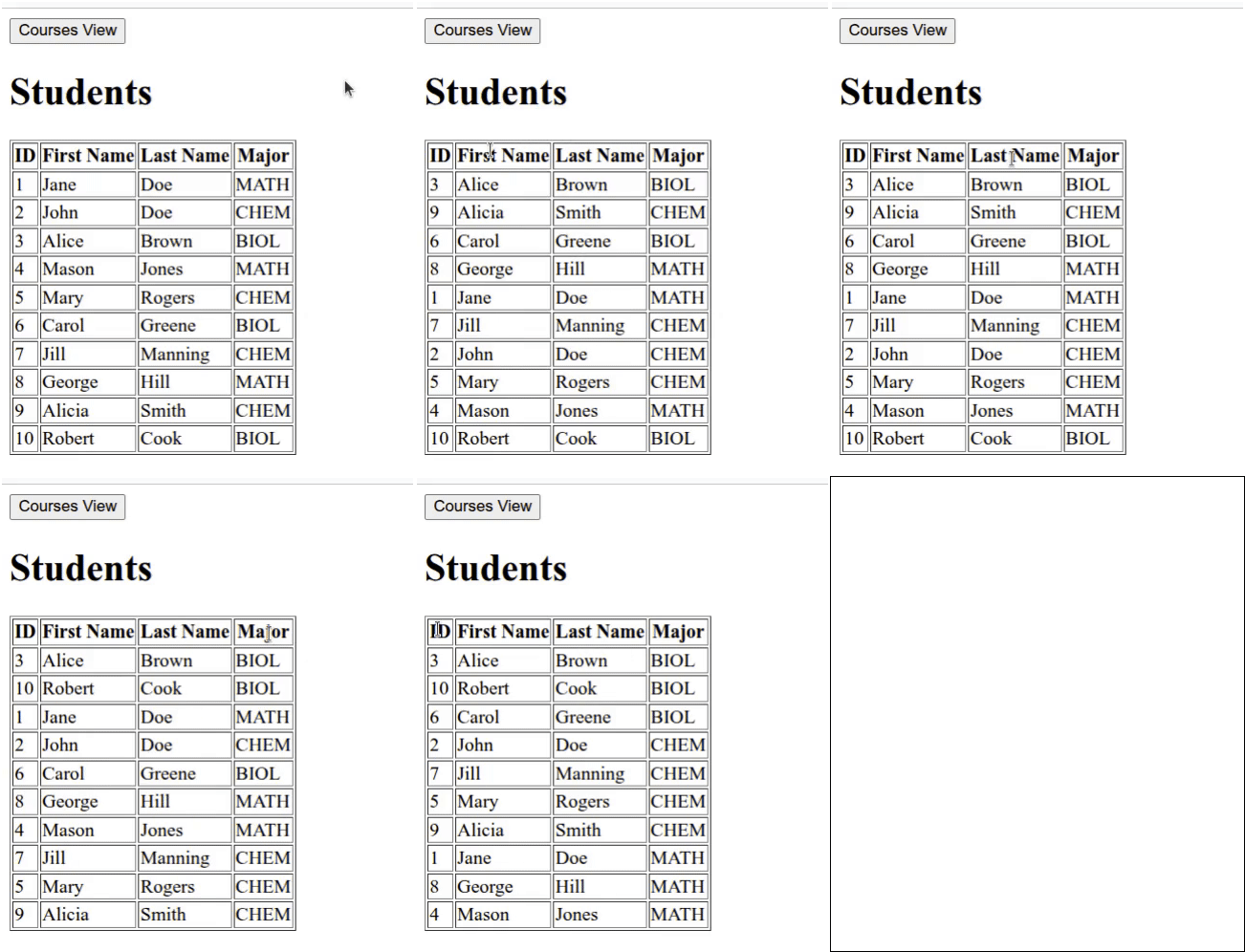
Click on Reload gif to replay animation.
Next, we can add functions that sort the courses HTML table by column in ascending order only. So, we will modify the sortCourses() helper function that is the "click" event handler for clicking on a <th> element in the courses HTML table. To support that function, we will create the functions sortCoursesByNumber() and sortCoursesByString(). These functions will be very similar to the their counterparts for sorting the students HTML table. Here is the next version of user_interface.mjs:
export default function createInterfaceAPI(dbAPI) {
  // private values
  const self = {
    switchToCourses: switchToCourses,
    switchToStudents: switchToStudents,
    initHeaders: initHeaders
  };
  let students_array = [];
  let courses_array = [];
  const students_tbody = document.getElementById("students_tbody");
  const courses_tbody = document.getElementById("courses_tbody");
  const student_courses_dlg = document.getElementById("student_courses_dlg");
  const student_name_label = document.getElementById("student_name_label");
  let student_name;
  const course_students_dlg = document.getElementById("course_students_dlg");
  const course_name_label = document.getElementById("course_name_label");
  let course_name;
  const close_student_courses_button = document.getElementById("close_student_courses_button");
  close_student_courses_button.addEventListener("click", () => { student_courses_dlg.close(); });
  document.getElementById("close_course_students_button")
    .addEventListener("click", () => { course_students_dlg.close(); });

  // ========== API functions for the user-interface ===== //
  function switchToCourses(courses_div, students_div) {
    courses_div.style.display = "block";
    students_div.style.display = "none";
    updateCoursesTable();
  }

  function switchToStudents(courses_div, students_div) {
    courses_div.style.display = "none";
    students_div.style.display = "block";
    updateStudentsTable();
  }

  function initHeaders(courses_div, students_div) {
    const student_headers = students_div.getElementsByTagName('th');
    const course_headers = courses_div.getElementsByTagName('th');
    for (let header of student_headers) {
      header.addEventListener("click", sortStudents);
    }
    for (let header of course_headers) {
      header.addEventListener("click", sortCourses);
    }
  }
  // =========== end of API functions for the user-interface === //

  // =========== helper functions for user-interface===========
  function makeTableFragment(data_array, click_handler) {
    const fragment = document.createDocumentFragment();
    for (let obj of data_array) {
      const tr = document.createElement('tr');
      tr.setAttribute("id", obj.id);
      tr.addEventListener("click", click_handler);
      for (let key of Object.keys(obj)) {
        const td = document.createElement('td');
        const contents = document.createTextNode(obj[key]);
        td.appendChild(contents);
        tr.appendChild(td);
      }
      fragment.appendChild(tr);
    }
    return fragment;
  }

  async function updateStudentsTable() {
    students_array = await dbAPI.getAllStudents();
    const fragment = makeTableFragment(students_array, showStudentCourses);
    students_tbody.replaceChildren(fragment);
  }

  async function updateCoursesTable() {
    courses_array = await dbAPI.getAllCourses();
    const fragment = makeTableFragment(courses_array, showCourseStudents);
    courses_tbody.replaceChildren(fragment);
  }

  async function showStudentCourses(event) {
    const row = event.currentTarget;
    const id = Number(row.id);
    student_name = row.childNodes[1].textContent +
      " " + row.childNodes[2].textContent;
    const courses = await dbAPI.getStudentCourses(id);
    console.log('courses', courses);
    showStudentCoursesDlg(courses);
  }

  async function showCourseStudents(event) {
    const row = event.currentTarget;
    const id = Number(row.id);
    course_name = row.childNodes[1].textContent +
      " " + row.childNodes[2].textContent;
    const students = await dbAPI.getCourseStudents(id);
    showCourseStudentsDlg(students);
  }

  function makeDlgFragment(data_array, key1, key2) {
    const fragment = document.createDocumentFragment();
    for (let obj of data_array) {
      const tr = document.createElement('tr');
      const td = document.createElement('td');
      const contents = document.createTextNode(obj[key1] + " " + obj[key2]);
      td.appendChild(contents);
      tr.appendChild(td);
      fragment.appendChild(tr);
    }
    return fragment;
  }

  function showStudentCoursesDlg(courses) {
    student_name_label.textContent = student_name;
    const fragment = makeDlgFragment(courses,'dept','number')
    student_courses_tbody.replaceChildren(fragment);
    student_courses_dlg.showModal();
  }

  function showCourseStudentsDlg(students) {
    course_name_label.textContent = course_name;
    const fragment = makeDlgFragment(students,'first_name','last_name');
    course_students_tbody.replaceChildren(fragment);
    course_students_dlg.showModal();
  }

  function sortStudents(event) {
    const property = event.target.id;
    const aria_value = event.target.getAttribute("aria-sort");
    if (property === "id") {
      sortStudentsByNumber(property, aria_value);
    } else {
      sortStudentsByString(property, aria_value);
    }
  }

  function sortCourses(event) {
    const property = event.target.id;
    const aria_value = event.target.getAttribute("aria-sort");
    if (property === "id" || property === "credits") {
      sortCoursesByNumber(property, aria_value);
    } else {
      sortCoursesByString(property, aria_value);
    }
  }

  function sortStudentsByNumber(property, aria_value) {
    students_array.sort((a,b) => a[property] - b[property]);
    const fragment = makeTableFragment(students_array, showStudentCourses);
    students_tbody.replaceChildren(fragment);
  }

  function sortStudentsByString(property, aria_value) {
    students_array.sort((a,b) => a[property].localeCompare(b[property]));
    const fragment = makeTableFragment(students_array, showStudentCourses);
    students_tbody.replaceChildren(fragment);
  }

  function sortCoursesByNumber(property, aria_value) {
    courses_array.sort((a,b) => a[property] - b[property]);
    const fragment = makeTableFragment(courses_array, showCourseStudents);
    courses_tbody.replaceChildren(fragment);
  }

  function sortCoursesByString(property, aria_value) {
    courses_array.sort((a,b) => a[property].localeCompare(b[property]));
    const fragment = makeTableFragment(courses_array, showCourseStudents);
    courses_tbody.replaceChildren(fragment);
  }
  // =========== end of helper functions for user-interface ====

  return self;
} // end of createInterfaceAPI factory function
The new lines are 135-141, 156-160 and 162-166. Lines 135-141 are the new lines inside the sortCourses() function. Line 135 gets the id from the <th> element that the user clicked on, and stores this as property. The values for property would be id, course_dept, course_number, course_title, or course_credits. LIne 136 gets the value of the aria-sort attribute, and stores this as aria_value. The two numerical properties are id and course_credits. So, the selection statement defined on lines 137-141 check to see if either of those are the property selected. If so, then line 138 calls the sortCoursesByNumber() function to do the sorting. Otherwise, line 140 calls the sortCoursesByString() function to sort the array of courses.
Lines 156-160 define the sortCoursesByNumber() function. Line 157 sortes courses_array assuming property is a numeric value. Line 158 takes the sorted array and creates a fragment consisting of table rows by calling the makeTableFragment() function. Line 159 replaces the contents of courses_tbody with that fragment. At this point, only ascending sorts are performed, and the aria_value is not yet used.
Lines 162-166 define the sortCoursesByString() function. This is very similar to the sortCoursesByNumber() function, with the only difference being line 163, where courses_array is sorted in ascending order assuming that property is for a string value.
The following animated gif file shows that the courses HTML table can be sorted in ascending order by clicking on any column:
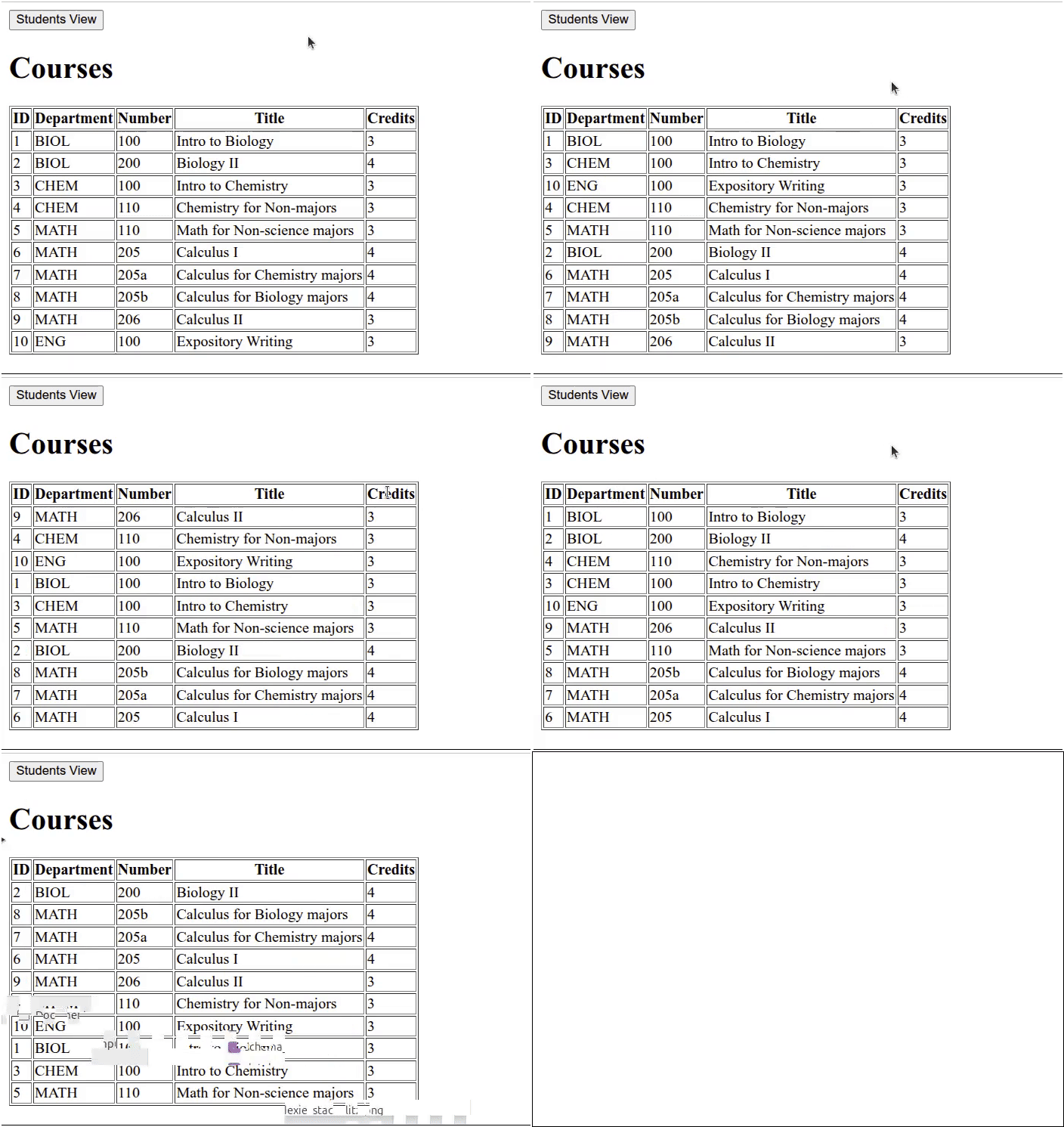
Click on Reload gif to replay animation.
Making use of the "aria-sort" attribute
We want to make it so that if we click on the same column consecutively, it will sort by that column but reverse the order of the sorting. To do this, we can make use of the aria-sort attribute value. We save that value in the variable aria_value. So, if aria-value is "none" or "descending", then we perform an ascending sort. Otherwise, if the aria_value is "ascending", we perform a descending sort. To make this work properly, we need a function that will reset the aria-sort attribute for all the other columns not being sorted by, so that their aria-sort attribute has a value of "none". We will create a function called resetHeadings() that will be used to reset the aria-sort attribute for each <th> besides the one the user clicked on, to "none".
Here is the new version of user_interface.mjs that does this.
export default function createInterfaceAPI(dbAPI) {
  // private values
  const self = {
    switchToCourses: switchToCourses,
    switchToStudents: switchToStudents,
    initHeaders: initHeaders
  };
  let students_array = [];
  let courses_array = [];
  const students_tbody = document.getElementById("students_tbody");
  const courses_tbody = document.getElementById("courses_tbody");
  const student_courses_dlg = document.getElementById("student_courses_dlg");
  const student_name_label = document.getElementById("student_name_label");
  let student_name;
  const course_students_dlg = document.getElementById("course_students_dlg");
  const course_name_label = document.getElementById("course_name_label");
  let course_name;
  const close_student_courses_button = document.getElementById("close_student_courses_button");
  close_student_courses_button.addEventListener("click", () => { student_courses_dlg.close(); });
  document.getElementById("close_course_students_button")
    .addEventListener("click", () => { course_students_dlg.close(); });

  // ========== API functions for the user-interface ===== //
  function switchToCourses(courses_div, students_div) {
    courses_div.style.display = "block";
    students_div.style.display = "none";
    updateCoursesTable();
  }

  function switchToStudents(courses_div, students_div) {
    courses_div.style.display = "none";
    students_div.style.display = "block";
    updateStudentsTable();
  }

  function initHeaders(courses_div, students_div) {
    const student_headers = students_div.getElementsByTagName('th');
    const course_headers = courses_div.getElementsByTagName('th');
    for (let header of student_headers) {
      header.addEventListener("click", sortStudents);
    }
    for (let header of course_headers) {
      header.addEventListener("click", sortCourses);
    }
  }
  // =========== end of API functions for the user-interface === //

  // =========== helper functions for user-interface===========
  function makeTableFragment(data_array, click_handler) {
    const fragment = document.createDocumentFragment();
    for (let obj of data_array) {
      const tr = document.createElement('tr');
      tr.setAttribute("id", obj.id);
      tr.addEventListener("click", click_handler);
      for (let key of Object.keys(obj)) {
        const td = document.createElement('td');
        const contents = document.createTextNode(obj[key]);
        td.appendChild(contents);
        tr.appendChild(td);
      }
      fragment.appendChild(tr);
    }
    return fragment;
  }

  async function updateStudentsTable() {
    students_array = await dbAPI.getAllStudents();
    const fragment = makeTableFragment(students_array, showStudentCourses);
    students_tbody.replaceChildren(fragment);
  }

  async function updateCoursesTable() {
    courses_array = await dbAPI.getAllCourses();
    const fragment = makeTableFragment(courses_array, showCourseStudents);
    courses_tbody.replaceChildren(fragment);
  }

  async function showStudentCourses(event) {
    const row = event.currentTarget;
    const id = Number(row.id);
    student_name = row.childNodes[1].textContent +
      " " + row.childNodes[2].textContent;
    const courses = await dbAPI.getStudentCourses(id);
    console.log('courses', courses);
    showStudentCoursesDlg(courses);
  }

  async function showCourseStudents(event) {
    const row = event.currentTarget;
    const id = Number(row.id);
    course_name = row.childNodes[1].textContent +
      " " + row.childNodes[2].textContent;
    const students = await dbAPI.getCourseStudents(id);
    showCourseStudentsDlg(students);
  }

  function makeDlgFragment(data_array, key1, key2) {
    const fragment = document.createDocumentFragment();
    for (let obj of data_array) {
      const tr = document.createElement('tr');
      const td = document.createElement('td');
      const contents = document.createTextNode(obj[key1] + " " + obj[key2]);
      td.appendChild(contents);
      tr.appendChild(td);
      fragment.appendChild(tr);
    }
    return fragment;
  }

  function showStudentCoursesDlg(courses) {
    student_name_label.textContent = student_name;
    const fragment = makeDlgFragment(courses,'dept','number')
    student_courses_tbody.replaceChildren(fragment);
    student_courses_dlg.showModal();
  }

  function showCourseStudentsDlg(students) {
    course_name_label.textContent = course_name;
    const fragment = makeDlgFragment(students,'first_name','last_name');
    course_students_tbody.replaceChildren(fragment);
    course_students_dlg.showModal();
  }

  function sortStudents(event) {
    const property = event.target.id;
    const aria_value = event.target.getAttribute("aria-sort");
    if (property === "id") {
      sortStudentsByNumber(property, aria_value);
    } else {
      sortStudentsByString(property, aria_value);
    }
  }

  function sortCourses(event) {
    const property = event.target.id;
    const aria_value = event.target.getAttribute("aria-sort");
    if (property === "id" || property === "credits") {
      sortCoursesByNumber(property, aria_value);
    } else {
      sortCoursesByString(property, aria_value);
    }
  }

  function sortStudentsByNumber(property, aria_value) {
    if (aria_value === "none" || aria_value === "descending") {
      students_array.sort((a,b) => a[property] - b[property]);
      document.getElementById(property).setAttribute("aria-sort", "ascending");
    } else if (aria_value === "ascending") {
      students_array.sort((a,b) => b[property] - a[property]);
      document.getElementById(property).setAttribute("aria-sort", "descending");
    }
    const fragment = makeTableFragment(students_array, showStudentCourses);
    students_tbody.replaceChildren(fragment);
    resetHeadings(property);
  }

  function sortStudentsByString(property, aria_value) {
    if (aria_value === "none" || aria_value === "descending") {
      students_array.sort((a,b) => a[property].localeCompare(b[property]));
      document.getElementById(property).setAttribute("aria-sort", "ascending");
    } else if (aria_value === "ascending") {
      students_array.sort((a,b) => b[property].localeCompare(a[property]));
      document.getElementById(property).setAttribute("aria-sort", "descending");
    }
    const fragment = makeTableFragment(students_array, showStudentCourses);
    students_tbody.replaceChildren(fragment);
    resetHeadings(property);
  }

  function sortCoursesByNumber(property, aria_value) {
    if (aria_value === "none" || aria_value === "descending") {
      courses_array.sort((a,b) => a[property] - b[property]);
      document.getElementById(property).setAttribute("aria-sort", "ascending");
    } else if (aria_value === "ascending") {
      courses_array.sort((a,b) => b[property] - a[property]);
      document.getElementById(property).setAttribute("aria-sort", "descending");
    }
    const fragment = makeTableFragment(courses_array, showCourseStudents);
    courses_tbody.replaceChildren(fragment);
    resetHeadings(property);
  }

  function sortCoursesByString(property, aria_value) {
    if (aria_value === "none" || aria_value === "descending") {
      courses_array.sort((a,b) => a[property].localeCompare(b[property]));
      document.getElementById(property).setAttribute("aria-sort", "ascending");
    } else if (aria_value === "ascending") {
      courses_array.sort((a,b) => b[property].localeCompare(a[property]));
      document.getElementById(property).setAttribute("aria-sort", "descending");
    }
    const fragment = makeTableFragment(courses_array, showCourseStudents);
    courses_tbody.replaceChildren(fragment);
    resetHeadings(property);
  }

  function resetHeadings(property) {
    const headers = document.getElementsByTagName('th');
    for (let header of headers) {
      if (header.id !== property) {
        header.setAttribute("aria-sort", "none");
      }
    }
  }
  // =========== end of helper functions for user-interface ====

  return self;
} // end of createInterfaceAPI factory function
The new lines are 145-151, 154, 158-164, 167, 171-177, 180, 184-190, 193 and 196-203. Lines 145-151 and line 154, are changes made to the sortStudentByNumber() function. Lines 145-151 define a selection statement that tests to see if aria_value is "none" or "descending". If that is the case, line 146 will sort the students HTML table in ascending order, and reset aria-sort to "ascending". Otherwise, if aria_value is "ascending", line 149 performs a descending sort. Line 150 then sets the aria-sort attribute to "descending". Line 154 calls the resetHeadings() function to reset all the other <th> elements' aria-sort attribute to "none".
Lines 158-164 and line 167 are the changes made to the sortStudentsByString() function. Those changes are very similar to what was done for the sortStudentsByNumber() function, except tht on line 159 and line 162, the sorts are done assuming that the property is for a string value.
Lines 171-177 and 180 are the changes made to the sortCoursesByNumber() function. This function is very similar to the sortStudentsByNumber() function, except on lines 172 and 175, the courses_array is sorted (instead of students_array), and on line 178-179. On line 178, courses_array is used to make the fragment, and on line 179 the courses_tbody is the <tbody> whose contents are being replaced.
Lines 184-190 and 193 are the changes made to the sortCoursesByString() function. These changes are similar to what was done to the sorCoursesByNumber() function, except that on lines 185 and 188, the sort is for a property for a string value, not a numeric value.
Could those four functions just defined have been combined into two functions? Yes, but you would have to be passing both the data array (courses_array vs students_array), as well as the tbody (courses_tbody vs students_tbody). That would be okay, but would involve more selection statements. So, it is probably less confusing to keep them as 4 separate functions.
Lines 196-203 define the resetHeadings() function. This is the function that will set the aria-sort attribute to "none" for every column except the column the user just clicked on. This will make it so that if the user clicks on a different column from the last one, an ascending sort will be performed. Note on line 197 that all the <th> elements in the document are selected. That means even the HTML table that is not visible. This is not a problem, as when the view is switched to go to the other table, the table is rendered using updateCoursesTable() or updateStudentsTable() and both of those functions get the data from the database. So, the tables will always be in the default order when the user switches views.
The following animated gif shows the current sorting behavior. Clicking on the same column more than once will just reverse the order the table is sorted by. Clicking on any column different from the previously clicked one, will result in an ascending sort by that column.
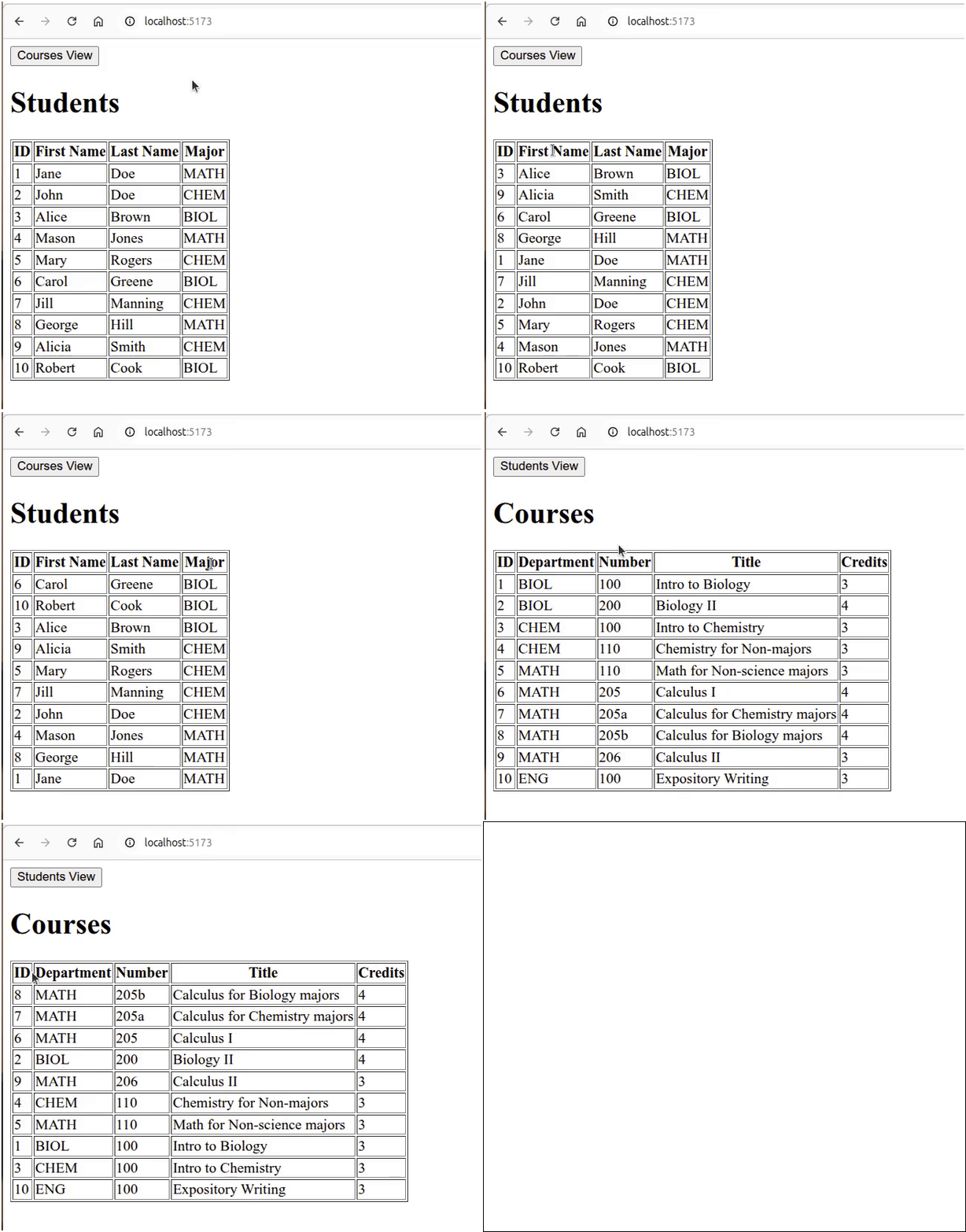
Click on Reload gif to replay animation.
That’s the end of this lesson. It was an involved lesson, as this was the first lesson that used an actual database.
Summary
-
We made use of the Dexie.js library, that provides a wrapper around IndexedDB. Unlike localStorage, IndexedDB is an actual database that can store more complex data than JavaScript objects. Using Dexie.js makes it easier to deal with an IndexedDB database. So, using Dexie.js is recommended if you want to use IndexedDB.
-
One similarity with IndexedDB and localStorage, is that both store the data on the client’s computer and work with just about any modern web browser.
-
We created a Single Page Application (SPA) where we just hid parts of the page and made other parts visible, to give the appearance that the application has more than one page. A SPA is simpler to build and maintain than a true multi-page application.
-
We got exposed to an actual database by using the Dexie.js wrapper around IndexedDB. So, this was a brief look at how a simple database could be set up and queried. So, we talked some about Database Management Systems and different types of databases.
-
We used two factory functions to build our application. One factory function,
createInterfaceAPI(), was used to supply functions that are responsible for creating the user interface for the application. The other factory function,createDatabaseAPI()was used to provide functions that are responsible for putting data into a database, and getting data out of that database. Two factory functions were used, because those functions are really for different processes. So, keeping them separate can help to organize the code. -
We eventually moved each factory function into a separate file, and turned them into modules that can be imported by the main JavaScript file, index.mjs. This makes the amount of code in a give file smaller, and potentially easier to modify and maintain. This also makes it possible to reuse those factory functions in other applications.
-
The term query was introduced in this lesson. A query is an instruction that can insert data into a database, retrieve data from a database, modify data in a database or delete data from a database. It may be a good idea for you to learn more about databases, as practically all applications that are used to help run a business uses some sort of database.
-
When you are going to display data, tables are often a good choice for any kind of tabular data. Knowing some of the basics of how to sort those tables is a practical thing to know about. For any kind of production application, you will probably rely on a library like Tabulator. But, it is nice to know some of the things involved in the kinds of features that library can provide.