Using Sqlite3 and OPFS
Storing the Sqlite database locally using OPFS
You could use Sqlite as an external database as done in the Beginner Module.(NEED LINK HERE) This would require a backend database server. This could be done using the Node.js package express. That is a good way to connect to any external database. But, with Sqlite, we can also run Sqlite in the browser using a WebAssembly version of Sqlite. This means that the Sqlite Database Management System (DBMS) has been converted from the C programming language to the WebAssembly language. This has the advantage of not needing a backend database server such as Express.js. So, this is the approach we will take for this lesson.
For SQLite Wasm, there is a way to store the data in a persistent fashion. So, reloading the page will leave the data intact. This is similar to both localStorage and IndexedDB. The advantage with SQLite Wasm, is that this uses a relational database model. The system that allows the persistent storage is called the Origin Private File System (OPFS). Without making use of OPFS, the data stored by SQLite Wasm would only be in memory, and would be lost if you reloaded the page. Since we want the data to persist, just like it would if we were using localStorage or IndexedDB (Dexie), we will use SQLite Wasm in a way that works with the OPFS.
The OPFS is supported by most modern browsers, but for what we want to do, you should be using Chrome or Chromium, or a chrome-based browser, like Brave for example.
Official version of SQLite Wasm
The Node.js package that is the official release for SQLite Wasm is @sqlite.org/sqlite-wasm. This package does not work well with a Vite build. So, we will use the @sqliteai/sqlite-wasm package instead, as this does not have the same compatibility problems as the official version. Here is the link to the GitHub page for SQLite WASM - ES Module which uses the ES module style we have been using for all of our lessons. In my testing of the official release version, which does not use ES module style, I had incompatibility problems that I could not resolve. So, we will use the ported version that does not have this issue.
Getting started
Getting started using StackBlitz
Just as with the last two lessons, we can start using one of StackBlitz’s standard templates, the JS Vanilla template. This was shown in some detail in the first lesson from the Beginner module and this can be reviewed here: Starting the lesson in StackBlitz. The steps followed were:
-
Login to your StackBlitz account.
-
Click on the New project button, and click on the Popular templates.
-
Look for the JS Vanilla template and click on that template.
-
Edit the project info and change the Title to something like using_sqlite3.
-
Right-click and delete the public and src folders.
-
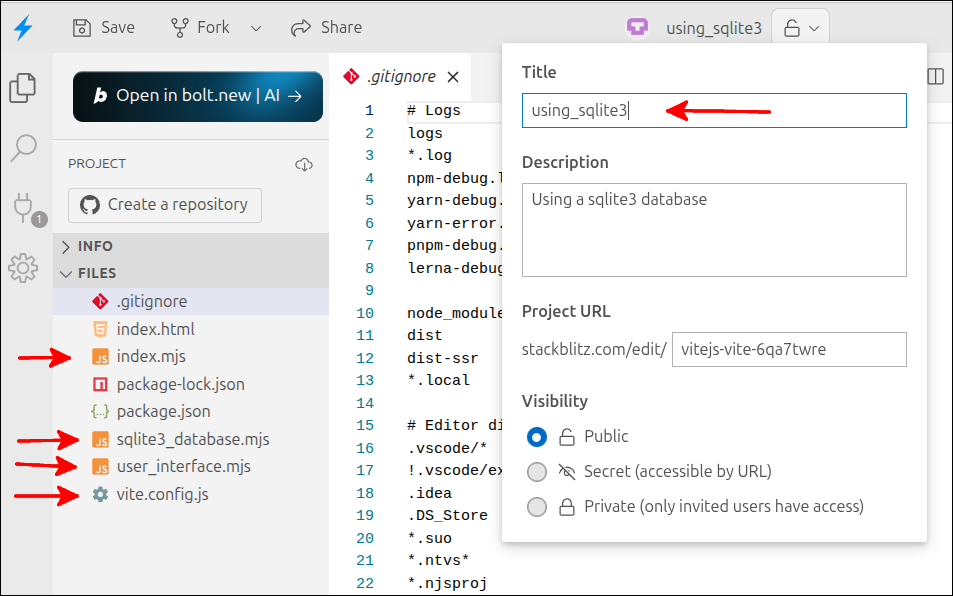
You will have to create a number of new files. Here are the names of the files to create: index.mjs, user_interface.mjs, sqlite3_database.mjs and vite.config.js.
This is what the PROJECT section should look like to start:
Getting started using Vite locally
Here are the commands to start using Vite locally for this lesson:
$ cd ~/Documents
$ mkdir using_sqlite3
$ cd using_sqlite3
$ touch index.html index.mjs user_interface.mjs sqlite3_database.mjs vite.config.js package.json
Line 1 changes into the directory where we have been saving all our lesson projects. Line 2 makes a directory called using_sqlite3. Line 3 changes into the using_sqlite3 directory. Line 4 uses the touch utility to create empty files with those names: index.html, index.mjs, user_interface.mjs, sqlite3_database.mjs, vite.config.js and package.json.
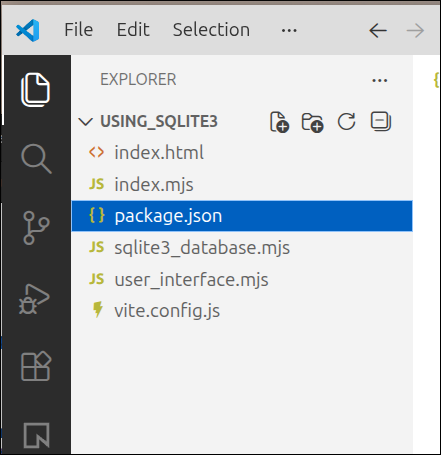
Open VS Code to the ~/Documents/using_sqlite3 directory. The EXPLORER area should look like this:
Start by copying the following into the package.json file:
{
  "name": "vite-template-my-template",
  "private": true,
  "version": "0.0.0",
  "type": "module",
  "scripts": {
    "dev": "vite",
    "build": "vite build",
    "preview": "vite preview"
  },
  "devDependencies": {
    "vite": "^7.3.1"
  }
}
Source files to start the lesson
The package.json file above is only for the local Vite project. The StackBlitz project already has this file. The rest of the files shown below, will be used for both the StackBlitz project and the local Vite project.
Copy the following into the vite.config.js file.
import { defineConfig } from 'vite';

export default defineConfig({
  server: {
    headers: {
      'Cross-Origin-Opener-Policy': 'same-origin',
      'Cross-Origin-Embedder-Policy': 'require-corp',
    },
  },
  optimizeDeps: {
    exclude: ['@sqliteai/sqlite-wasm'],
  },
  worker: {
    format: 'es',
  },
});The source files we will start with were developed in a lesson from the Beginner Module, An application using IndexedDB through Dexie.js. So, the files index.html, user_interface.mjs and index.mjs are taken from that lesson. This will save us time, and also will be used to demonstrate reuse of modules.
Here is the contents of index.html. Copy and replace the contents of the index.html on StackBlitz. The file for the local Vite project starts off empty:
<!DOCTYPE html>
<html lang="en">
  <head>
    <meta charset="UTF-8" />
    <script type="module" src="index.mjs"></script>
    <title>Students and Courses</title>
  </head>
  <body>
    <div id="students_div">
      <button id="courses_button">Courses View</button>
      <h1>Students</h1>
      <table border="1">
        <thead>
          <tr>
            <th id="id" aria-sort="none">ID</td>
            <th id="first_name" aria-sort="none">First Name</th>
            <th id="last_name" aria-sort="none">Last Name</th>
            <th id="major" aria-sort="none">Major</th>
          </tr>
        </thead>
        <tbody id="students_tbody"></tbody>
      </table>
    </div>
    <div id="courses_div">
      <button id="students_button">Students View</button>
      <h1>Courses</h1>
      <table border="1">
        <thead>
          <tr>
            <th id="id" aria-sort="none">ID</th>
            <th id="dept" aria-sort="none">Department</th>
            <th id="number" aria-sort="none">Number</th>
            <th id="title" aria-sort="none">Title</th>
            <th id="credits" aria-sort="none">Credits</th>
          </tr>
        </thead>
        <tbody id="courses_tbody"></tbody>
      </table>
    </div>
    <dialog id="student_courses_dlg">
      <label id="student_name_label"></label>
      <table border="1">
        <tbody id="student_courses_tbody"></tbody>
      </table>
      <br />
      <button id="close_student_courses_button">Close</button>
    </dialog>
    <dialog id="course_students_dlg">
      <label id="course_name_label"></label>
      <table border="1">
        <tbody id="course_students_tbody"></tbody>
      </table>
      <br />
      <button id="close_course_students_button">Close</button>
    </dialog>
  </body>
</html>
Here is the contents for user_interface.mjs.
export default function createInterfaceAPI(dbAPI) {
  // private values
  const self = {
    switchToCourses: switchToCourses,
    switchToStudents: switchToStudents,
    initHeaders: initHeaders
  };
  let students_array = [];
  let courses_array = [];
  const students_tbody = document.getElementById("students_tbody");
  const courses_tbody = document.getElementById("courses_tbody");
  const student_courses_dlg = document.getElementById("student_courses_dlg");
  const student_name_label = document.getElementById("student_name_label");
  let student_name;
  const course_students_dlg = document.getElementById("course_students_dlg");
  const course_name_label = document.getElementById("course_name_label");
  let course_name;
  const close_student_courses_button = document.getElementById("close_student_courses_button");
  close_student_courses_button.addEventListener("click", () => { student_courses_dlg.close(); });
  document.getElementById("close_course_students_button")
    .addEventListener("click", () => { course_students_dlg.close(); });

  // ========== API functions for the user-interface ===== //
  function switchToCourses(courses_div, students_div) {
    courses_div.style.display = "block";
    students_div.style.display = "none";
    updateCoursesTable();
  }

  function switchToStudents(courses_div, students_div) {
    courses_div.style.display = "none";
    students_div.style.display = "block";
    updateStudentsTable();
  }

  function initHeaders(courses_div, students_div) {
    const student_headers = students_div.getElementsByTagName('th');
    const course_headers = courses_div.getElementsByTagName('th');
    for (let header of student_headers) {
      header.addEventListener("click", sortStudents);
    }
    for (let header of course_headers) {
      header.addEventListener("click", sortCourses);
    }
  }
  // =========== end of API functions for the user-interface === //

  // =========== helper functions for user-interface===========
  function makeTableFragment(data_array, click_handler) {
    const fragment = document.createDocumentFragment();
    for (let obj of data_array) {
      const tr = document.createElement('tr');
      tr.setAttribute("id", obj.id);
      tr.addEventListener("click", click_handler);
      for (let key of Object.keys(obj)) {
        const td = document.createElement('td');
        const contents = document.createTextNode(obj[key]);
        td.appendChild(contents);
        tr.appendChild(td);
      }
      fragment.appendChild(tr);
    }
    return fragment;
  }

  async function updateStudentsTable() {
    students_array = await dbAPI.getAllStudents();
    const fragment = makeTableFragment(students_array, showStudentCourses);
    students_tbody.replaceChildren(fragment);
  }

  async function updateCoursesTable() {
    courses_array = await dbAPI.getAllCourses();
    const fragment = makeTableFragment(courses_array, showCourseStudents);
    courses_tbody.replaceChildren(fragment);
  }

  async function showStudentCourses(event) {
    const row = event.currentTarget;
    const id = Number(row.id);
    student_name = row.childNodes[1].textContent +
      " " + row.childNodes[2].textContent;
    const courses = await dbAPI.getStudentCourses(id);
    console.log('courses', courses);
    showStudentCoursesDlg(courses);
  }

  async function showCourseStudents(event) {
    const row = event.currentTarget;
    const id = Number(row.id);
    course_name = row.childNodes[1].textContent +
      " " + row.childNodes[2].textContent;
    const students = await dbAPI.getCourseStudents(id);
    showCourseStudentsDlg(students);
  }

  function makeDlgFragment(data_array, key1, key2) {
    const fragment = document.createDocumentFragment();
    for (let obj of data_array) {
      const tr = document.createElement('tr');
      const td = document.createElement('td');
      const contents = document.createTextNode(obj[key1] + " " + obj[key2]);
      td.appendChild(contents);
      tr.appendChild(td);
      fragment.appendChild(tr);
    }
    return fragment;
  }

  function showStudentCoursesDlg(courses) {
    student_name_label.textContent = student_name;
    const fragment = makeDlgFragment(courses,'dept','number')
    student_courses_tbody.replaceChildren(fragment);
    student_courses_dlg.showModal();
  }

  function showCourseStudentsDlg(students) {
    course_name_label.textContent = course_name;
    const fragment = makeDlgFragment(students,'first_name','last_name');
    course_students_tbody.replaceChildren(fragment);
    course_students_dlg.showModal();
  }

  function sortStudents(event) {
    const property = event.target.id;
    const aria_value = event.target.getAttribute("aria-sort");
    if (property === "id") {
      sortStudentsByNumber(property, aria_value);
    } else {
      sortStudentsByString(property, aria_value);
    }
  }

  function sortCourses(event) {
    const property = event.target.id;
    const aria_value = event.target.getAttribute("aria-sort");
    if (property === "id" || property === "credits") {
      sortCoursesByNumber(property, aria_value);
    } else {
      sortCoursesByString(property, aria_value);
    }
  }

  function sortStudentsByNumber(property, aria_value) {
    if (aria_value === "none" || aria_value === "descending") {
      students_array.sort((a,b) => a[property] - b[property]);
      document.getElementById(property).setAttribute("aria-sort", "ascending");
    } else if (aria_value === "ascending") {
      students_array.sort((a,b) => b[property] - a[property]);
      document.getElementById(property).setAttribute("aria-sort", "descending");
    }
    const fragment = makeTableFragment(students_array, showStudentCourses);
    students_tbody.replaceChildren(fragment);
    resetHeadings(property);
  }

  function sortStudentsByString(property, aria_value) {
    if (aria_value === "none" || aria_value === "descending") {
      students_array.sort((a,b) => a[property].localeCompare(b[property]));
      document.getElementById(property).setAttribute("aria-sort", "ascending");
    } else if (aria_value === "ascending") {
      students_array.sort((a,b) => b[property].localeCompare(a[property]));
      document.getElementById(property).setAttribute("aria-sort", "descending");
    }
    const fragment = makeTableFragment(students_array, showStudentCourses);
    students_tbody.replaceChildren(fragment);
    resetHeadings(property);
  }

  function sortCoursesByNumber(property, aria_value) {
    if (aria_value === "none" || aria_value === "descending") {
      courses_array.sort((a,b) => a[property] - b[property]);
      document.getElementById(property).setAttribute("aria-sort", "ascending");
    } else if (aria_value === "ascending") {
      courses_array.sort((a,b) => b[property] - a[property]);
      document.getElementById(property).setAttribute("aria-sort", "descending");
    }
    const fragment = makeTableFragment(courses_array, showCourseStudents);
    courses_tbody.replaceChildren(fragment);
    resetHeadings(property);
  }

  function sortCoursesByString(property, aria_value) {
    if (aria_value === "none" || aria_value === "descending") {
      courses_array.sort((a,b) => a[property].localeCompare(b[property]));
      document.getElementById(property).setAttribute("aria-sort", "ascending");
    } else if (aria_value === "ascending") {
      courses_array.sort((a,b) => b[property].localeCompare(a[property]));
      document.getElementById(property).setAttribute("aria-sort", "descending");
    }
    const fragment = makeTableFragment(courses_array, showCourseStudents);
    courses_tbody.replaceChildren(fragment);
    resetHeadings(property);
  }

  function resetHeadings(property) {
    const headers = document.getElementsByTagName('th');
    for (let header of headers) {
      if (header.id !== property) {
        header.setAttribute("aria-sort", "none");
      }
    }
  }
  // =========== end of helper functions for user-interface ====

  return self;
} // end of createInterfaceAPI factory function
Here is the contents of index.mjs. The line referring to the dexie_database.mjs module has been removed.
import createInterfaceAPI from "./user_interface.mjs";

if (document.readyState === "loading") {
  document.addEventListener('DOMContentLoaded', init);
} else {
  init();
}

function init() {
  console.log('init called');
  const courses_div = document.getElementById("courses_div");
  courses_div.style.display = "none";
  const students_div = document.getElementById("students_div");
  const dbAPI = createDatabaseAPI();
  console.log('dbAPI', dbAPI);
  dbAPI.initDB();
  const uiAPI = createInterfaceAPI(dbAPI);
  const courses_button = document.getElementById("courses_button");
  courses_button.addEventListener("click", () => {
    uiAPI.switchToCourses(courses_div, students_div);
  });
  const students_button = document.getElementById("students_button");
  students_button.addEventListener("click", () => {
    uiAPI.switchToStudents(courses_div, students_div);
  });
  uiAPI.initHeaders(courses_div, students_div);
  uiAPI.switchToStudents(courses_div, students_div);
}
Using a Terminal to run npm
Running the Terminal on StackBlitz
In the Terminal section below the code editor area, click on the + sign to open a new terminal. In that new terminal run the following command npm install @sqliteai/sqlite-wasm:
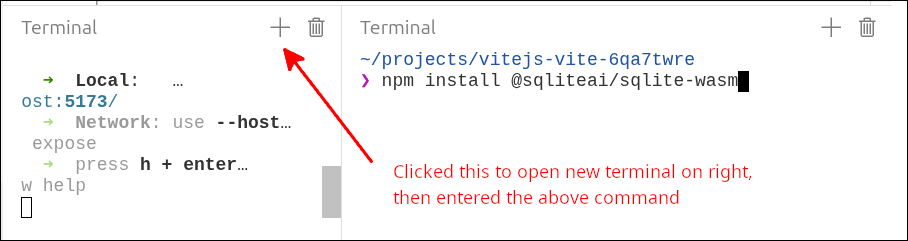
As you can see in the screen shot above, I clicked on the + sign to open the new terminal shown to the right. Then, in that terminal, I ran the following command:
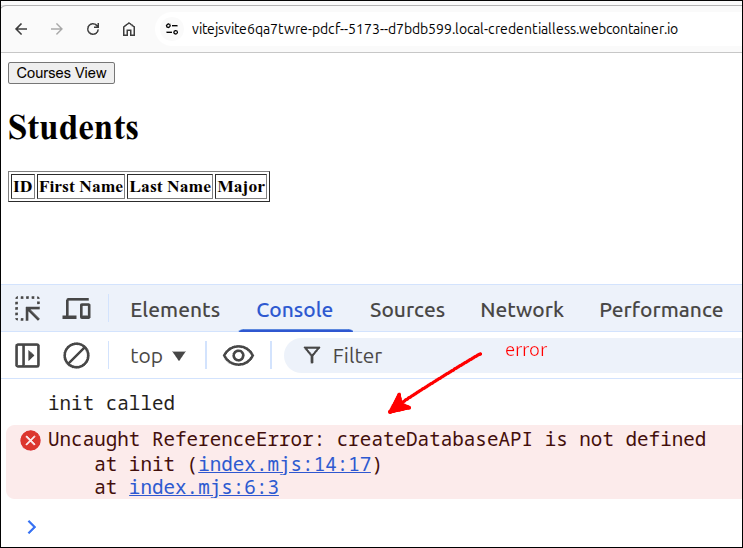
> npm install @sqliteai/sqlite-wasmAfter this, click on the Open Preview in new tab icon above the preview area, to open the application in another tab. You will be asked to click on the Connect to Project button. After that, you will see the application. Click on F12 to open the DevTools console. You should see something like this:
Running the Terminal inside VS Code for local Vite project
To start a Terminal inside VS Code, you can use the following keyboard shortcut: CTRL-SHIFT-`
That’s a backtick at the end of those keystrokes. You can also select the kabob (…) in the top menu, select Terminal ⇒ New Terminal as shown in the screen shot below:
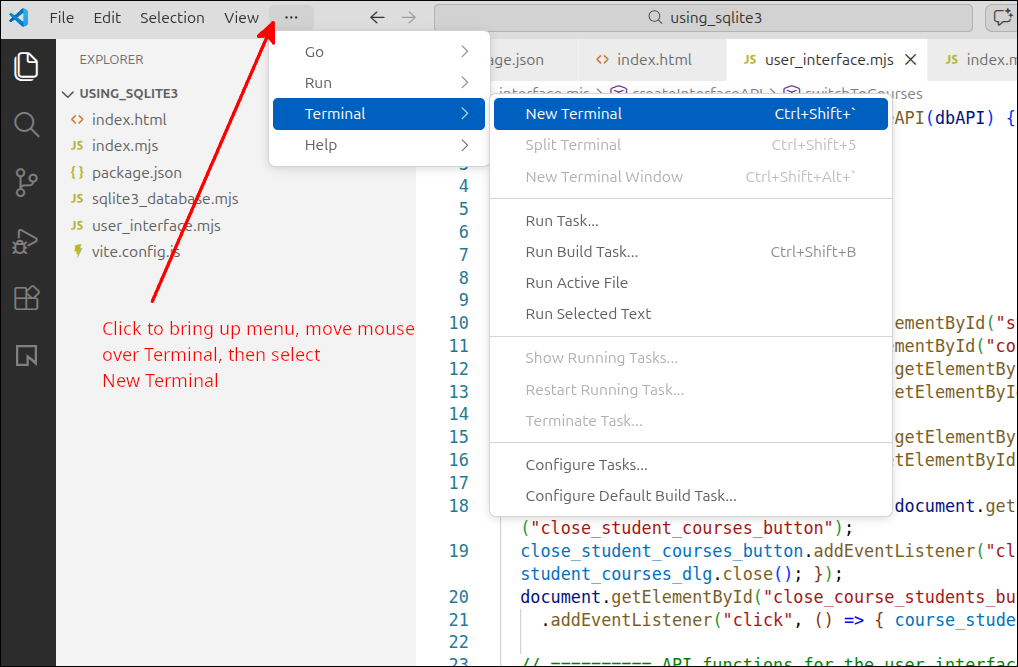
Once the terminal is opened, run the following commands:
$ npm install
$ npm install @sqliteai/sqlite-wasm
$ npm run dev
Line 1 does the basic installation for Vite. Line 2 installs the @sqliteai/sqlite-wasm package. Finally, line 3 will run the Vite server on port 5173. So, opening your browser to localhost:5173 will show the application running. You should see something like this:
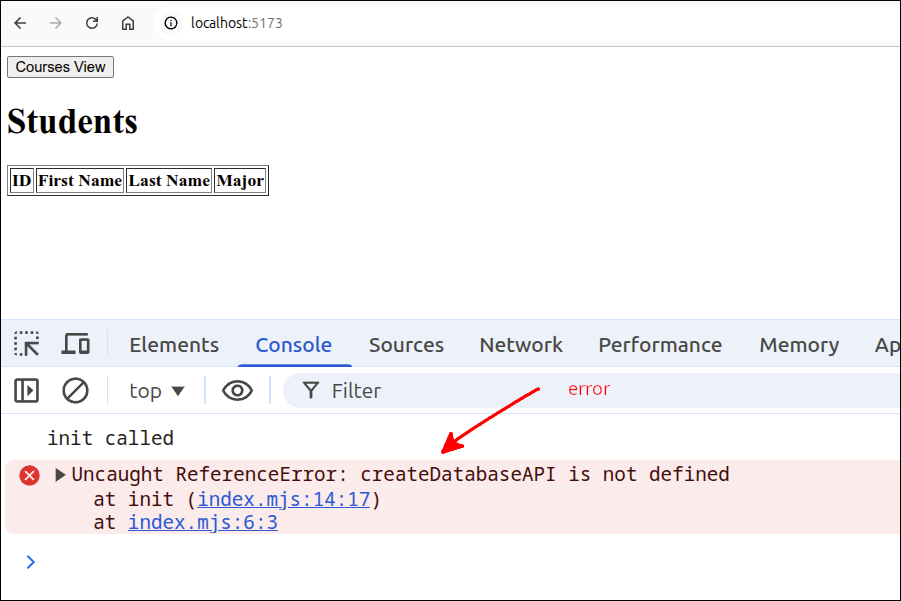
As you can see, there is an error saying createDatabaseAPI is not defined. That is to be expected because we have not yet defined this factory function. This is the function we will create inside the sqlite3_database.mjs module. That is what we will work on next.
Working on the sqlite3_database.mjs module
Now we work on the sqlite3_database.mjs module. This is the module we need to complete to get the application working. Here is a start to the sqlite3_database.mjs module. I took the dexie_database.mjs module from, An application using IndexedDB through Dexie.js, to obtain all the function names. This would help ensure that we have all the correct functions to work properly with the other modules.
import { sqlite3Worker1Promiser } from "@sqliteai/sqlite-wasm";

export default function createDatabaseAPI() {
  // private values
  const self = {
    initDB: initDB,
    getAllStudents: getAllStudents,
    getAllCourses: getAllCourses,
    getStudentCourses: getStudentCourses,
    getCourseStudents: getCourseStudents
  };

  // =========== API functions for database interaction ======
  async function initDB() {

  }

  async function getAllStudents() {
  }

  async function getAllCourses() {
  }

  async function getStudentCourses(id) {
  }

  async function getCourseStudents(id) {
  }
  // =========== end of API functions for database interaction ===

  // =========== helper functions ================================

  // =========== end of helper functions =========================

  return self;
}
The source code for sqlite3_database.mjs now contains all the functions that will be required to get our application to work. Before we start working on completing these functions, we need to add a line to index.mjs:
import createInterfaceAPI from './user_interface.mjs';
import createDatabaseAPI from './sqlite3_database.mjs';

if (document.readyState === 'loading') {
  document.addEventListener('DOMContentLoaded', init);
} else {
  init();
}

function init() {
  console.log('init called');
  const courses_div = document.getElementById('courses_div');
  courses_div.style.display = 'none';
  const students_div = document.getElementById('students_div');
  const dbAPI = createDatabaseAPI();
  console.log('dbAPI', dbAPI);
  dbAPI.initDB();
  const uiAPI = createInterfaceAPI(dbAPI);
  const courses_button = document.getElementById('courses_button');
  courses_button.addEventListener('click', () => {
    uiAPI.switchToCourses(courses_div, students_div);
  });
  const students_button = document.getElementById('students_button');
  students_button.addEventListener('click', () => {
    uiAPI.switchToStudents(courses_div, students_div);
  });
  uiAPI.initHeaders(courses_div, students_div);
  uiAPI.switchToStudents(courses_div, students_div);
}
If you look in the Console, the error message will change. You will see something like this:
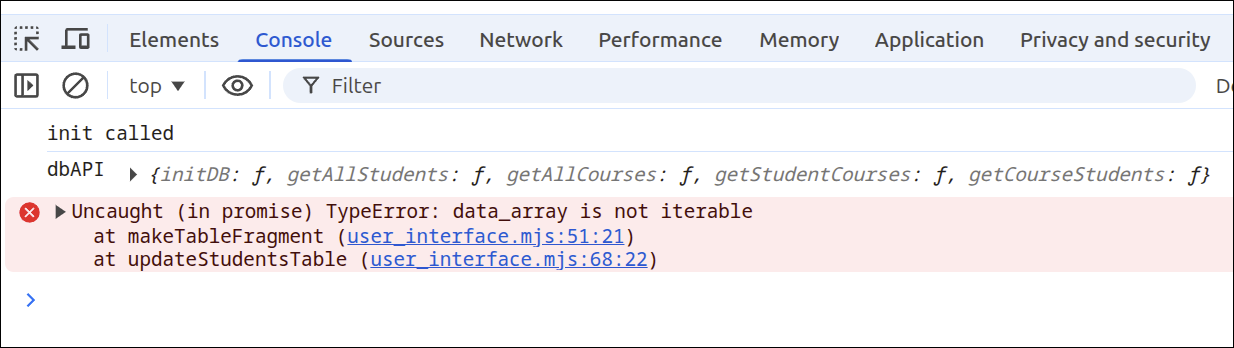
This error is because there is no data in the database yet. In fact, the database has not yet been created. So, we want to work on the initDB() API function inside of sqlite3_database.mjs:
import { sqlite3Worker1Promiser } from "@sqliteai/sqlite-wasm";

export default function createDatabaseAPI() {
  // private values
  const self = {
    initDB: initDB,
    getAllStudents: getAllStudents,
    getAllCourses: getAllCourses,
    getStudentCourses: getStudentCourses,
    getCourseStudents: getCourseStudents
  };
  let promiser;
  let dbId;

  // =========== API functions for database interaction ======
  async function initDB() {
    try {
      if (!promiser) {
        promiser = await new Promise((resolve) => {
          const workerPromiser = sqlite3Worker1Promiser({
            onready: () => resolve(workerPromiser),
          });
        });
      }

      const openResponse = await promiser('open', {
        filename: 'file:testsqlite.sqlite3?vfs=opfs',
      });
      dbId = openResponse.result.dbId;
      console.log('dbId', dbId);
    } catch (error) { console.error("init failed:", error.message); }
  }

  async function getAllStudents() {
  }

  async function getAllCourses() {
  }

  async function getStudentCourses(id) {
  }

  async function getCourseStudents(id) {
  }
  // =========== end of API functions for database interaction ===

  // =========== helper functions ================================

  // =========== end of helper functions =========================

  return self;
}
The new lines are 12-13 and 17-31. Line 12 declares a variable called promiser. When we create the database, promiser will be the object we use to execute any queries on the database. Line 13 declares a variable called dbId. When the database is created, dbId will store the id for the database. This id is also required when we are going to execute a query on the database.
Lines 17-31 define the initDB() database API function. Lines 17-31 define a try/catch block that will try to obtain a sqlite3Worker1Promiser object. That object is an example of a web worker.
Line 18 checks to see if promiser already exists and has a value. If promiser does not yet have a value, lines 19-23 will be executed. Lines 19-23 create a Promise that will resolve when the worker is ready. So, line 21 will wait for the worker to be ready, then complete the Promise. At that point, promiser, is now a web worker that can be used to interact with the database.
Lines 26-28 are used to open a sqlite3 database file called testsqlite.sqlite3. Towards the end of this lesson, we will look at how this file, testsqlite.sqlite3 can be downloaded and saved to the local computer. That allows this file to be used in another application that can process sqlite database files.
When creating that database file, the const openResponse is used to store the returned value from creating that file. Line 29 obtains the id for dbId from openResponse.result.dbId. Line 30 prints dbId to the console, to show that the database has actually been created.
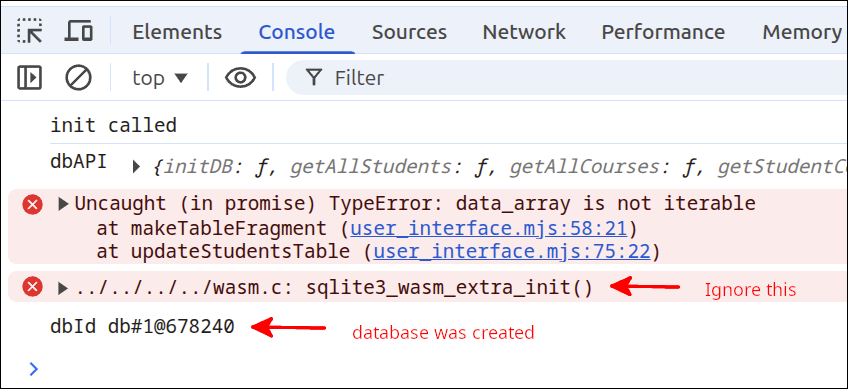
As you can see, dbId exists as has an id number. Also, the error message showing sqlite3_wasm_extra_init() can be safely ignored.
Adding some helper functions to create the database tables and insert data
Now that we can create the database, we can create some helper functions to create the database tables, and then insert some data into the tables. Here is the new version of sqlite3_database.mjs that does this:
import { sqlite3Worker1Promiser } from "@sqliteai/sqlite-wasm";

export default function createDatabaseAPI() {
  // private values
  const self = {
    initDB: initDB,
    getAllStudents: getAllStudents,
    getAllCourses: getAllCourses,
    getStudentCourses: getStudentCourses,
    getCourseStudents: getCourseStudents
  };
  let promiser;
  let dbId;

  // =========== API functions for database interaction ======
  async function initDB() {
    try {
      if (!promiser) {
        promiser = await new Promise((resolve) => {
          const workerPromiser = sqlite3Worker1Promiser({
            onready: () => resolve(workerPromiser),
          });
        });
      }

      const openResponse = await promiser('open', {
        filename: 'file:testsqlite.sqlite3?vfs=opfs',
      });
      dbId = openResponse.result.dbId;
      console.log('dbId', dbId);

      await createTables();
      await insertData();

    } catch (error) { console.error("init failed:", error.message); }
  }

  async function getAllStudents() {
  }

  async function getAllCourses() {
  }

  async function getStudentCourses(id) {
  }

  async function getCourseStudents(id) {
  }
  // =========== end of API functions for database interaction ===

  // =========== helper functions ================================
  async function createTables() {
    const resetQuery = `
      PRAGMA foreign_keys = OFF;
      drop table if exists enrollments;
      drop table if exists students;
      drop table if exists courses;
      drop view if exists student_enrollments_view;
      drop view if exists course_enrollments_view;
      PRAGMA foreign_keys = ON;
    `;
    await promiser('exec', {dbId, sql: resetQuery });

    let query = `
      create table students(
        id integer primary key autoincrement,
        first_name text,
        last_name text,
        major text
      );
      create table courses(
        id integer primary key autoincrement,
        dept text,
        number text,
        title text,
        credits integer
      );
      create table enrollments (
        student_id integer references students(id),
        course_id integer references courses(id),
        primary key (student_id, course_id)
      );
      create view student_enrollments_view as
        select S.id as sid, S.first_name, S.last_name, S.major,
        C.id as cid, C.dept, C.number, C.title, C.credits
        from students as S join enrollments as E on S.id=E.student_id
        join courses as C on E.course_id=C.id;
      create view course_enrollments_view as
        select C.id as cid, C.dept, C.number, C.title, C.credits,
        S.id as sid, S.first_name, S.last_name, S.major
        from courses as C join enrollments as E on C.id=E.course_id
        join students as S on E.student_id=S.id;
    `;
    try {
      await promiser('exec', {
        dbId,
        sql: query,
      });
    } catch(error) { console.error(error.message); }
  }

  async function insertData() {
    console.log('insertData called');
    let query = `
      insert into students (first_name, last_name, major) values
        ('Jane', 'Doe', 'MATH'),
        ('John', 'Doe', 'CHEM'),
        ('Alice', 'Brown', 'BIOL'),
        ('Mason', 'Jones', 'MATH'),
        ('Mary', 'Rogers', 'CHEM'),
        ('Carol', 'Greene', 'BIOL'),
        ('Jill', 'Manning', 'CHEM'),
        ('George', 'Hill', 'MATH'),
        ('Alicia', 'Smith', 'CHEM'),
        ('Robert', 'Cook', 'BIOL');

      insert into courses (dept, number, title, credits) values
        ('BIOL', '100', 'Intro to Biology', 3),
        ('BIOL', '200', 'Biology II', 4),
        ('CHEM', '100', 'Intro to Chemistry', 3),
        ('CHEM', '110', 'Chemistry for Non-majors', 3),
        ('MATH', '110', 'Math for Non-science majors', 3),
        ('MATH', '205', 'Calculus I', 4),
        ('MATH', '205a', 'Calculus for Chemistry majors', 4),
        ('MATH', '205b', 'Calculus for Biology majors', 4),
        ('MATH', '206', 'Calculus II', 3),
        ('ENG', '100', 'Expository Writing', 3);

      insert into enrollments (student_id, course_id) values
        (1, 1),
        (1, 4),
        (1, 6),
        (1, 10),
        (2, 1),
        (2, 3),
        (2, 7),
        (3, 2),
        (3, 4),
        (3, 8),
        (3, 10),
        (4, 1),
        (4, 4),
        (4, 6),
        (5, 1),
        (5, 3),
        (5, 7),
        (5, 10),
        (6, 2),
        (6, 4),
        (6, 8),
        (6, 10),
        (7, 1),
        (7, 3),
        (7, 7),
        (8, 1),
        (8, 4),
        (8, 6),
        (8, 10),
        (9, 1),
        (9, 3),
        (9, 7),
        (10, 1),
        (10, 4),
        (10, 6);
    `;
    try {
      await promiser('exec', {
        dbId,
        sql: query,
      });
    } catch(error) { console.error(error.message); }
  }
  // =========== end of helper functions =========================

  return self;
}
The new lines are 32-33, 52-100 and 102-172. Line 32 calls the createTables() helper function that is defined on lines 52-100. Line 33 calls the insertData() helper function that is defined on lines 102-172.
Lines 52-100 define the createTables() function. Lines 55-59 are SQL instructions that will drop all the tables and views we will be creating. Line 54 and line 60 are PRAGMA statements that are unique to sqlite3. Line 54 makes it so that foreign_key constraints are ignored. This allows dropping the tables and views in any order. Most other relational databases have a cascade qualifier that will automatically drop tables and views that depend on the table being dropped. With that constraint removed, lines 55-59 drop all of those tables if they exist. That would be something you might want to do if you had edited some of the data, but wanted to reset the database. This is also something you would do if you wanted to be able to change the database schema easily. Line 60 turns the foreign key constraints back on, before we insert any data into the tables.
Line 62 executes resetQuery so all the tables and views are gone.
Lines 64-93 set up a query that is used to create the tables. When the students, courses and enrollments tables are created with SQL statements, this defines the database schema. The schema sets the fields (properties) for each table and specifies the data type for each field. In the case of the enrollments table, lines 79 and 80 specify foreign_key constraints. These constraints will prevent the insertion of an enrollment record that uses a student id or a course id that don’t already exist in those two tables. This makes logical sense. You should not have an enrollment that uses a student id for a student that does not exist in the students table. Likewise, you should not have an enrollment that uses a course id for a course that does not exist in the courses table. This is an important feature of a relational database. You can specify constraints like this, to protect the integrity of the data in the database.
Lines 83-87 and lines 88-92 define views for the database. For a relational database, a view is often used to join several tables together. The view makes it much simpler to perform select queries, and so you should always set up views to join the tables that are related. The instructions for creating those views use a number of aliases. So, for the student_enrollments_view, the S, C and E are used as aliases for the students, courses and enrollments tables, respectively. This makes the statements shorter and easier to understand.
Lines 94-99 set up a try block that will run the query that creates the tables and views.
Lines 102-172 define the insertData() helper function. The variable query is just a number of SQL INSERT statements that insert data into the tables. The tables must exist before this data can be inserted. Note how you can insert multiple records at the same time, by using the notation you see on lines 106-115, 118-127 and 130-164. If you are going to perform the same insert query, then putting the data inside parentheses and separating those parentheses with a comma make it so you don’t have to repeat the first part of the insert query. That is, you don’t need to do something like this:
insert into students (first_name, last_name, major) values ('Jane','Doe', 'MATH');
insert into students (first_name, last_name, major) values ('John','Doe', 'CHEM');
insert into students (first_name, last_name, major) values ('Alice','Brown', 'BIOL');
...
Note that we need to insert the data into the students and courses table, before we insert data into the enrollments table. This is because the ids for each student and each course, must already be in the records for those tables, or none of the enrollments records can be inserted.
Lines 166-171 form a try block that performs those insert queries.
Making the getAllStudents() and getAllCourses() functions operational
Now that we have the tables created and data inserted into the tables, we can work on getting the getAllStudents() and getAllCourses() functions to work. Here is the next version of sqlite3_database.mjs:
import { sqlite3Worker1Promiser } from "@sqliteai/sqlite-wasm";

export default function createDatabaseAPI() {
  // private values
  const self = {
    initDB: initDB,
    getAllStudents: getAllStudents,
    getAllCourses: getAllCourses,
    getStudentCourses: getStudentCourses,
    getCourseStudents: getCourseStudents
  };
  let promiser;
  let dbId;

  // =========== API functions for database interaction ======
  async function initDB() {
    try {
      if (!promiser) {
        promiser = await new Promise((resolve) => {
          const workerPromiser = sqlite3Worker1Promiser({
            onready: () => resolve(workerPromiser),
          });
        });
      }

      const openResponse = await promiser('open', {
        filename: 'file:testsqlite.sqlite3?vfs=opfs',
      });
      dbId = openResponse.result.dbId;
      console.log('dbId', dbId);

      await createTables();
      await insertData();

    } catch (error) { console.error("init failed:", error.message); }
  }

  async function getAllStudents() {
    try {
      const results = await promiser('exec', {
        dbId,
        sql: 'select * from students',
        rowMode: 'object',
        returnValue: 'resultRows'
      });
      console.log('students', results.result.resultRows);
      return results.result.resultRows;
    } catch(error) { console.error(error.message); }
  }

  async function getAllCourses() {
    try {
      const results = await promiser('exec', {
        dbId,
        sql: 'select * from courses',
        rowMode: 'object',
        returnValue: 'resultRows'
      });
      return results.result.resultRows;
    } catch(error) { console.error(error.message); }
  }

  async function getStudentCourses(id) {
  }

  async function getCourseStudents(id) {
  }
  // =========== end of API functions for database interaction ===

  // =========== helper functions ================================
  async function createTables() {
    const resetQuery = `
      PRAGMA foreign_keys = OFF;
      drop table if exists enrollments;
      drop table if exists students;
      drop table if exists courses;
      drop view if exists student_enrollments_view;
      drop view if exists course_enrollments_view;
      PRAGMA foreign_keys = ON;
    `;
    await promiser('exec', {dbId, sql: resetQuery });

    let query = `
      create table students(
        id integer primary key autoincrement,
        first_name text,
        last_name text,
        major text
      );
      create table courses(
        id integer primary key autoincrement,
        dept text,
        number text,
        title text,
        credits integer
      );
      create table enrollments (
        student_id integer references students(id),
        course_id integer references courses(id),
        primary key (student_id, course_id)
      );
      create view student_enrollments_view as
        select S.id as sid, S.first_name, S.last_name, S.major,
        C.id as cid, C.dept, C.number, C.title, C.credits
        from students as S join enrollments as E on S.id=E.student_id
        join courses as C on E.course_id=C.id;
      create view course_enrollments_view as
        select C.id as cid, C.dept, C.number, C.title, C.credits,
        S.id as sid, S.first_name, S.last_name, S.major
        from courses as C join enrollments as E on C.id=E.course_id
        join students as S on E.student_id=S.id;
    `;
    try {
      await promiser('exec', {
        dbId,
        sql: query,
      });
    } catch(error) { console.error(error.message); }
  }

  async function insertData() {
    console.log('insertData called');
    let query = `
      insert into students (first_name, last_name, major) values
        ('Jane', 'Doe', 'MATH'),
        ('John', 'Doe', 'CHEM'),
        ('Alice', 'Brown', 'BIOL'),
        ('Mason', 'Jones', 'MATH'),
        ('Mary', 'Rogers', 'CHEM'),
        ('Carol', 'Greene', 'BIOL'),
        ('Jill', 'Manning', 'CHEM'),
        ('George', 'Hill', 'MATH'),
        ('Alicia', 'Smith', 'CHEM'),
        ('Robert', 'Cook', 'BIOL');

      insert into courses (dept, number, title, credits) values
        ('BIOL', '100', 'Intro to Biology', 3),
        ('BIOL', '200', 'Biology II', 4),
        ('CHEM', '100', 'Intro to Chemistry', 3),
        ('CHEM', '110', 'Chemistry for Non-majors', 3),
        ('MATH', '110', 'Math for Non-science majors', 3),
        ('MATH', '205', 'Calculus I', 4),
        ('MATH', '205a', 'Calculus for Chemistry majors', 4),
        ('MATH', '205b', 'Calculus for Biology majors', 4),
        ('MATH', '206', 'Calculus II', 3),
        ('ENG', '100', 'Expository Writing', 3);

      insert into enrollments (student_id, course_id) values
        (1, 1),
        (1, 4),
        (1, 6),
        (1, 10),
        (2, 1),
        (2, 3),
        (2, 7),
        (3, 2),
        (3, 4),
        (3, 8),
        (3, 10),
        (4, 1),
        (4, 4),
        (4, 6),
        (5, 1),
        (5, 3),
        (5, 7),
        (5, 10),
        (6, 2),
        (6, 4),
        (6, 8),
        (6, 10),
        (7, 1),
        (7, 3),
        (7, 7),
        (8, 1),
        (8, 4),
        (8, 6),
        (8, 10),
        (9, 1),
        (9, 3),
        (9, 7),
        (10, 1),
        (10, 4),
        (10, 6);
    `;
    try {
      await promiser('exec', {
        dbId,
        sql: query,
      });
    } catch(error) { console.error(error.message); }
  }
  // =========== end of helper functions =========================

  return self;
}
The new lines are 39-48 and 52-60. Lines 39-48 are the new lines inside the getAllStudents() API function. Lines 39-48 define a try block that will attempt to do a select query to get all the records in the students table. Lines 40-45 use the promiser object to 'exec' a query. Lines 41-44 specify the parameters needed for the query to be run. Line 41 specifies the id of the database, dbId. Line 42 specifies the select query to be run. In this case, the query is saying to use all the fields and return all the records from the students table. Line 43 sets rowMode to be of type 'object'. That is, we want each student record to be an object that has values for each of its fields. Line 44, specifies the returnValue, which is the name of record set that will be returned. Line 46 is a debugging line that will print out what this function returns to the calling program. Line 47 returns those values.
Lines 52-60 are the new lines inside the getAllCourses() API function. Lines 52-60 define a try block that will attempt to perform a select query to get all the records from the courses table. Lines 53-58 use the promiser object to execute a query. Lines 54-57 specify the parameters needed to run this query. Line 54 specifies the id of the database, dbId. Line 55 specifies the select query to be run. In this case the query is saying to use all fields and return all the records from the courses table. Line 56 sets rowMode to be 'object'. This will make each returned row (record) an object with all of the fields as its properties. Line 57 specifies the name of the returned result as 'resultRows'. So on line 59 results.result.resultRows will be returned as the record set to the calling program.
With these changes, we expect that the HTML tables for students and courses should get populated. However, when we run the application, this is what is seen in the Console:
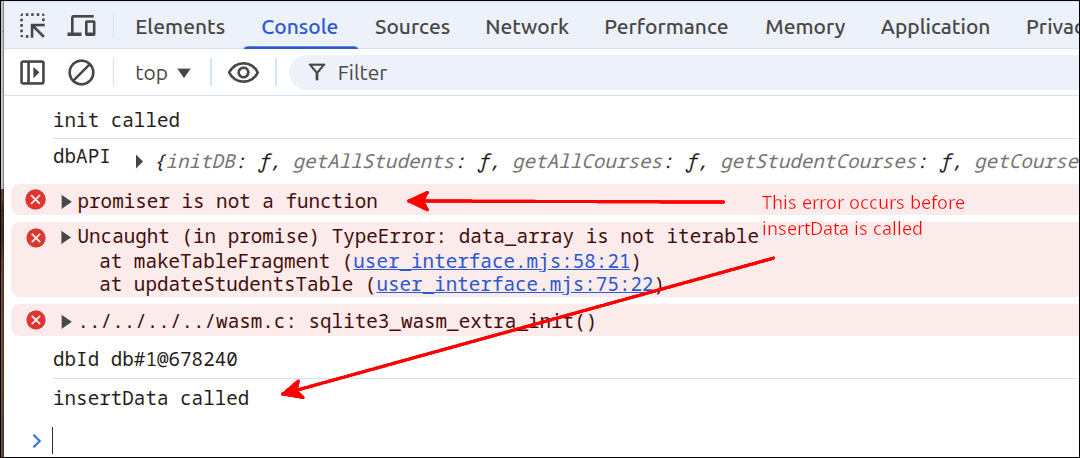
Note that the error message saying promiser is not a function shows up well before insertData called is displayed. The data_array is not iterable is showing up because if promiser is not a function, then the select query to get the students cannot be carried out.
The key thing to notice, is that the application is trying to use promiser before the database has even been populated (when insertData()) has been called. This suggests that some instructions are not running in the order we think they should be running. If we look at index.mjs, we see the reason and this turns out to be a relatively easy fix. Here is the fixed version of index.mjs:
import createInterfaceAPI from './user_interface.mjs';
import createDatabaseAPI from './sqlite3_database.mjs';

if (document.readyState === 'loading') {
  document.addEventListener('DOMContentLoaded', init);
} else {
  init();
}

async function init() {
  console.log('init called');
  const courses_div = document.getElementById('courses_div');
  courses_div.style.display = 'none';
  const students_div = document.getElementById('students_div');
  const dbAPI = createDatabaseAPI();
  console.log('dbAPI', dbAPI);
  await dbAPI.initDB();
  const uiAPI = createInterfaceAPI(dbAPI);
  const courses_button = document.getElementById('courses_button');
  courses_button.addEventListener('click', () => {
    uiAPI.switchToCourses(courses_div, students_div);
  });
  const students_button = document.getElementById('students_button');
  students_button.addEventListener('click', () => {
    uiAPI.switchToStudents(courses_div, students_div);
  });
  uiAPI.initHeaders(courses_div, students_div);
  uiAPI.switchToStudents(courses_div, students_div);
}
The new lines are 10 and 17. Line 10 declares init() to be async. This allows line 17 to use await to make sure that the program execution halts until initDB() completes running. So, on line 28 when switchToStudents() is called, the database has already been initialized and promiser is already set to run queries.
The animated gif shown below demonstrates that we can display the students HTML table and courses HTML table.
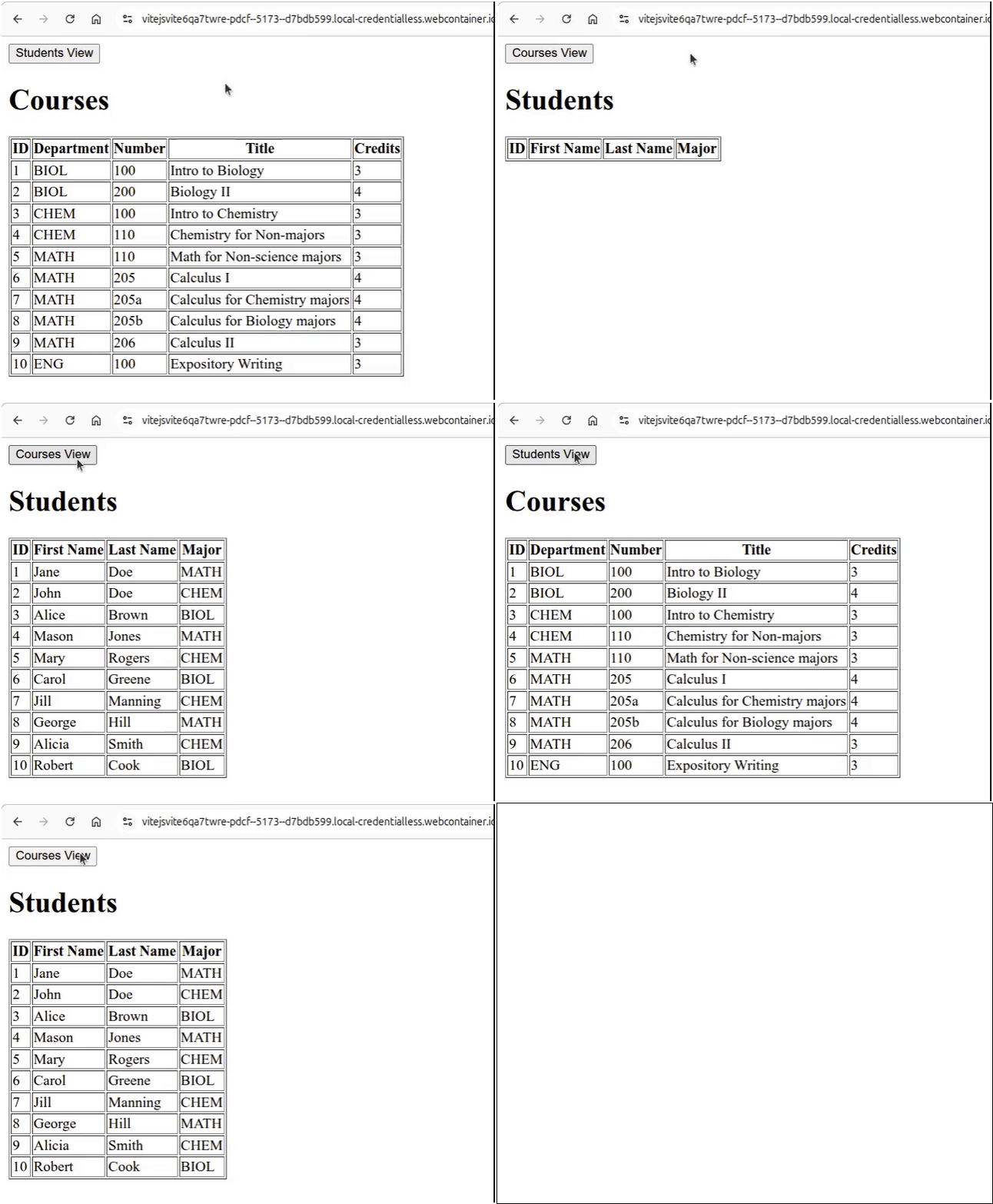
Click on Reload gif to replay animation.
Troubleshooting: If you don’t see the HTML tables getting populated and you see errors in the DevTools Console, one way that this can happen is if the headers defined in vite.config.js were not included the first time you tried to use the application. So, double check your vite.config.js to make sure it included these headers:
import { defineConfig } from 'vite';

export default defineConfig({
  server: {
    headers: {
      'Cross-Origin-Opener-Policy': 'same-origin',
      'Cross-Origin-Embedder-Policy': 'require-corp',
    },
  },
  optimizeDeps: {
    exclude: ['@sqliteai/sqlite-wasm'],
  },
  worker: {
    format: 'es',
  },
});
If you had to fix your vite.config.js, you need to get rid of a cache that so that the headers get correctly used. To remove that cache, go to a terminal and run the following commands:
$ cd ~/Documents/using_sqlite3
$ rm -r node_modules/.vite
This assumes you are running locally using Vite. If you are on StackBlitz, you need to open another terminal and run the last command above:

Making the getStudentCourses() and getCourseStudents() functions operational
Now that we can show all the students and all the courses, we need to make getStudentCourses() and getCourseStudents() working, so that clicking on a table row will bring up the dialog box showing the courses for a student, or the students for a course. Here is the new version of sqlite3_database.mjs:
import { sqlite3Worker1Promiser } from "@sqliteai/sqlite-wasm";

export default function createDatabaseAPI() {
  // private values
  const self = {
    initDB: initDB,
    getAllStudents: getAllStudents,
    getAllCourses: getAllCourses,
    getStudentCourses: getStudentCourses,
    getCourseStudents: getCourseStudents
  };
  let promiser;
  let dbId;

  // =========== API functions for database interaction ======
  async function initDB() {
    try {
      if (!promiser) {
        promiser = await new Promise((resolve) => {
          const workerPromiser = sqlite3Worker1Promiser({
            onready: () => resolve(workerPromiser),
          });
        });
      }

      const openResponse = await promiser('open', {
        filename: 'file:testsqlite.sqlite3?vfs=opfs',
      });
      dbId = openResponse.result.dbId;
      console.log('dbId', dbId);

      await createTables();
      await insertData();

    } catch (error) { console.error("init failed:", error.message); }
  }

  async function getAllStudents() {
    try {
      const results = await promiser('exec', {
        dbId,
        sql: 'select * from students',
        rowMode: 'object',
        returnValue: 'resultRows'
      });
      console.log('students', results.result.resultRows);
      return results.result.resultRows;
    } catch(error) { console.error(error.message); }
  }

  async function getAllCourses() {
    try {
      const results = await promiser('exec', {
        dbId,
        sql: 'select * from courses',
        rowMode: 'object',
        returnValue: 'resultRows'
      });
      return results.result.resultRows;
    } catch(error) { console.error(error.message); }
  }

  async function getStudentCourses(id) {
    try {
      const results = await promiser('exec', {
        dbId,
        sql: 'select * from student_enrollments_view where sid=:id',
        bind: { ':id': id },
        rowMode: 'object',
        returnValue: 'resultRows'
      });
      return results.result.resultRows;
    } catch(error) { console.error(error.message); }
  }

  async function getCourseStudents(id) {
    try {
      const results = await promiser('exec', {
        dbId,
        sql: 'select * from course_enrollments_view where cid=:id',
        bind: { ':id': id },
        rowMode: 'object',
        returnValue: 'resultRows'
      });
      return results.result.resultRows;
    } catch(error) { console.error(error.message); }
  }
  // =========== end of API functions for database interaction ===

  // =========== helper functions ================================
  async function createTables() {
    const resetQuery = `
      PRAGMA foreign_keys = OFF;
      drop table if exists enrollments;
      drop table if exists students;
      drop table if exists courses;
      drop view if exists student_enrollments_view;
      drop view if exists course_enrollments_view;
      PRAGMA foreign_keys = ON;
    `;
    await promiser('exec', {dbId, sql: resetQuery });

    let query = `
      create table students(
        id integer primary key autoincrement,
        first_name text,
        last_name text,
        major text
      );
      create table courses(
        id integer primary key autoincrement,
        dept text,
        number text,
        title text,
        credits integer
      );
      create table enrollments (
        student_id integer references students(id),
        course_id integer references courses(id),
        primary key (student_id, course_id)
      );
      create view student_enrollments_view as
        select S.id as sid, S.first_name, S.last_name, S.major,
        C.id as cid, C.dept, C.number, C.title, C.credits
        from students as S join enrollments as E on S.id=E.student_id
        join courses as C on E.course_id=C.id;
      create view course_enrollments_view as
        select C.id as cid, C.dept, C.number, C.title, C.credits,
        S.id as sid, S.first_name, S.last_name, S.major
        from courses as C join enrollments as E on C.id=E.course_id
        join students as S on E.student_id=S.id;
    `;
    try {
      await promiser('exec', {
        dbId,
        sql: query,
      });
    } catch(error) { console.error(error.message); }
  }

  async function insertData() {
    console.log('insertData called');
    let query = `
      insert into students (first_name, last_name, major) values
        ('Jane', 'Doe', 'MATH'),
        ('John', 'Doe', 'CHEM'),
        ('Alice', 'Brown', 'BIOL'),
        ('Mason', 'Jones', 'MATH'),
        ('Mary', 'Rogers', 'CHEM'),
        ('Carol', 'Greene', 'BIOL'),
        ('Jill', 'Manning', 'CHEM'),
        ('George', 'Hill', 'MATH'),
        ('Alicia', 'Smith', 'CHEM'),
        ('Robert', 'Cook', 'BIOL');

      insert into courses (dept, number, title, credits) values
        ('BIOL', '100', 'Intro to Biology', 3),
        ('BIOL', '200', 'Biology II', 4),
        ('CHEM', '100', 'Intro to Chemistry', 3),
        ('CHEM', '110', 'Chemistry for Non-majors', 3),
        ('MATH', '110', 'Math for Non-science majors', 3),
        ('MATH', '205', 'Calculus I', 4),
        ('MATH', '205a', 'Calculus for Chemistry majors', 4),
        ('MATH', '205b', 'Calculus for Biology majors', 4),
        ('MATH', '206', 'Calculus II', 3),
        ('ENG', '100', 'Expository Writing', 3);

      insert into enrollments (student_id, course_id) values
        (1, 1),
        (1, 4),
        (1, 6),
        (1, 10),
        (2, 1),
        (2, 3),
        (2, 7),
        (3, 2),
        (3, 4),
        (3, 8),
        (3, 10),
        (4, 1),
        (4, 4),
        (4, 6),
        (5, 1),
        (5, 3),
        (5, 7),
        (5, 10),
        (6, 2),
        (6, 4),
        (6, 8),
        (6, 10),
        (7, 1),
        (7, 3),
        (7, 7),
        (8, 1),
        (8, 4),
        (8, 6),
        (8, 10),
        (9, 1),
        (9, 3),
        (9, 7),
        (10, 1),
        (10, 4),
        (10, 6);
    `;
    try {
      await promiser('exec', {
        dbId,
        sql: query,
      });
    } catch(error) { console.error(error.message); }
  }
  // =========== end of helper functions =========================

  return self;
}
The new lines are 64-73 and 77-86. Lines 64-73 are the new lines in the getStudentCourses() API function. Note that this function muste be pass the id, which is the id of the student that we are getting the enrolled courses for. Lines 64-73 define a try block which will attempt to return all the records from the student_enrollments_view where the sid matches the passed id. The use of the view makes this select query much simpler to run. Without the view, we would have to do this instead:
select S.id as sid, S.first_name, S.last_name, S.major, C.id as cid, C.dept,
  C.number, C.title, C.credits from students as S join enrollments as E
  on S.id=E.student_id join courses as C on E.course_id=C.id
  where sid=:id
I think you will agree that the following is much simpler:
select * from student_enrollments_view where sid=:idSo, getting back to lines 66-70, those lines specify the parameters that must be used to run the query. Line 66 specifies the database id, line 67 specifies the select query, line 68 substitutes the passed id into the query where the placeholder :id is located. This substition is known as data binding. Line 69 specifies the the returned row (record) will be an object. That object’s properties will be the fields for that record. Line 70 specifies that the name of the recordset obtained will be resultRows. So, line 72 will return that recordset to the calling program.
Lines 77-86 are the new lines inside the getCourseStudents() API function. This function works very similarly to the getStudentCourses() function. The main difference is that the query gets all records from the course_enrollments_view where cid matches the passed course id.
With these two functions implemented, the application now can display the courses a student is enrolled in, as well as the students enrolled in a course. In addition, since the sorting by column is implemented in the user_interface.mjs module, that sorting also already works. Hopefully, this shows you why putting factory functions inside modules, can make it easier to reuse code. We reused just about all the code for index.mjs and user_interface.mjs for this project. All we needed to do was take care of was the functions for interacting with the sqlite3 database.
Downloading the sqlite database file
We are using the sqlite database internally. It is certainly possible to interact with an external sqlite database. But, for this lesson we used an internal sqlite database that was made persistent using OFPS. Using OFPS is a good thing to know, and by using this we have substituted our IndexedDB (Dexie.js) database with an sqlite database. Using sqlite, we get exposure to using a relational database. For the type of data we have stored, a relational database is a more powerful type of database. As mentioned previously, most of the databases used to help run a business have traditionally been relational databases. So, it is nice to see an example of a relational database.
But, what if you wanted to take your database and move it to another computer, or store a copy for backup purposes. This is where being able to download an exported version of the database comes in handy. To do this, we can start by modifying sqlite3_database.mjs:
import { sqlite3Worker1Promiser } from "@sqliteai/sqlite-wasm";

export default function createDatabaseAPI() {
  // private values
  const self = {
    initDB: initDB,
    getAllStudents: getAllStudents,
    getAllCourses: getAllCourses,
    getStudentCourses: getStudentCourses,
    getCourseStudents: getCourseStudents,
    downloadDatabase: downloadDatabase
  };
  let promiser;
  let dbId;

  // =========== API functions for database interaction ======
  async function initDB() {
    try {
      if (!promiser) {
        promiser = await new Promise((resolve) => {
          const workerPromiser = sqlite3Worker1Promiser({
            onready: () => resolve(workerPromiser),
          });
        });
      }

      const openResponse = await promiser('open', {
        filename: 'file:testsqlite.sqlite3?vfs=opfs',
      });
      dbId = openResponse.result.dbId;
      console.log('dbId', dbId);

      await createTables();
      await insertData();

    } catch (error) { console.error("init failed:", error.message); }
  }

  async function getAllStudents() {
    try {
      const results = await promiser('exec', {
        dbId,
        sql: 'select * from students',
        rowMode: 'object',
        returnValue: 'resultRows'
      });
      console.log('students', results.result.resultRows);
      return results.result.resultRows;
    } catch(error) { console.error(error.message); }
  }

  async function getAllCourses() {
    try {
      const results = await promiser('exec', {
        dbId,
        sql: 'select * from courses',
        rowMode: 'object',
        returnValue: 'resultRows'
      });
      return results.result.resultRows;
    } catch(error) { console.error(error.message); }
  }

  async function getStudentCourses(id) {
    try {
      const results = await promiser('exec', {
        dbId,
        sql: 'select * from student_enrollments_view where sid=:id',
        bind: { ':id': id },
        rowMode: 'object',
        returnValue: 'resultRows'
      });
      return results.result.resultRows;
    } catch(error) { console.error(error.message); }
  }

  async function getCourseStudents(id) {
    try {
      const results = await promiser('exec', {
        dbId,
        sql: 'select * from course_enrollments_view where cid=:id',
        bind: { ':id': id },
        rowMode: 'object',
        returnValue: 'resultRows'
      });
      return results.result.resultRows;
    } catch(error) { console.error(error.message); }
  }

  async function downloadDatabase() {
    try {
      await promiser('close', { dbId});
      await new Promise(resolve => setTimeout(resolve,200));
      const opfsRoot = await navigator.storage.getDirectory();
      const fileHandle = await opfsRoot.getFileHandle('testsqlite.sqlite3');
      const file = await fileHandle.getFile();
      const url = URL.createObjectURL(file);
      const anchor = document.createElement('a');
      anchor.href= url;
      anchor.download = 'testsqlite.sqlite3';
      anchor.click();
      URL.revokeObjectURL(url);
    } catch (error) { console.error("export failed", error); }
  }
  // =========== end of API functions for database interaction ===

  // =========== helper functions ================================
  async function createTables() {
    const resetQuery = `
      PRAGMA foreign_keys = OFF;
      drop table if exists enrollments;
      drop table if exists students;
      drop table if exists courses;
      drop view if exists student_enrollments_view;
      drop view if exists course_enrollments_view;
      PRAGMA foreign_keys = ON;
    `;
    await promiser('exec', {dbId, sql: resetQuery });

    let query = `
      create table students(
        id integer primary key autoincrement,
        first_name text,
        last_name text,
        major text
      );
      create table courses(
        id integer primary key autoincrement,
        dept text,
        number text,
        title text,
        credits integer
      );
      create table enrollments (
        student_id integer references students(id),
        course_id integer references courses(id),
        primary key (student_id, course_id)
      );
      create view student_enrollments_view as
        select S.id as sid, S.first_name, S.last_name, S.major,
        C.id as cid, C.dept, C.number, C.title, C.credits
        from students as S join enrollments as E on S.id=E.student_id
        join courses as C on E.course_id=C.id;
      create view course_enrollments_view as
        select C.id as cid, C.dept, C.number, C.title, C.credits,
        S.id as sid, S.first_name, S.last_name, S.major
        from courses as C join enrollments as E on C.id=E.course_id
        join students as S on E.student_id=S.id;
    `;
    try {
      await promiser('exec', {
        dbId,
        sql: query,
      });
    } catch(error) { console.error(error.message); }
  }

  async function insertData() {
    console.log('insertData called');
    let query = `
      insert into students (first_name, last_name, major) values
        ('Jane', 'Doe', 'MATH'),
        ('John', 'Doe', 'CHEM'),
        ('Alice', 'Brown', 'BIOL'),
        ('Mason', 'Jones', 'MATH'),
        ('Mary', 'Rogers', 'CHEM'),
        ('Carol', 'Greene', 'BIOL'),
        ('Jill', 'Manning', 'CHEM'),
        ('George', 'Hill', 'MATH'),
        ('Alicia', 'Smith', 'CHEM'),
        ('Robert', 'Cook', 'BIOL');

      insert into courses (dept, number, title, credits) values
        ('BIOL', '100', 'Intro to Biology', 3),
        ('BIOL', '200', 'Biology II', 4),
        ('CHEM', '100', 'Intro to Chemistry', 3),
        ('CHEM', '110', 'Chemistry for Non-majors', 3),
        ('MATH', '110', 'Math for Non-science majors', 3),
        ('MATH', '205', 'Calculus I', 4),
        ('MATH', '205a', 'Calculus for Chemistry majors', 4),
        ('MATH', '205b', 'Calculus for Biology majors', 4),
        ('MATH', '206', 'Calculus II', 3),
        ('ENG', '100', 'Expository Writing', 3);

      insert into enrollments (student_id, course_id) values
        (1, 1),
        (1, 4),
        (1, 6),
        (1, 10),
        (2, 1),
        (2, 3),
        (2, 7),
        (3, 2),
        (3, 4),
        (3, 8),
        (3, 10),
        (4, 1),
        (4, 4),
        (4, 6),
        (5, 1),
        (5, 3),
        (5, 7),
        (5, 10),
        (6, 2),
        (6, 4),
        (6, 8),
        (6, 10),
        (7, 1),
        (7, 3),
        (7, 7),
        (8, 1),
        (8, 4),
        (8, 6),
        (8, 10),
        (9, 1),
        (9, 3),
        (9, 7),
        (10, 1),
        (10, 4),
        (10, 6);
    `;
    try {
      await promiser('exec', {
        dbId,
        sql: query,
      });
    } catch(error) { console.error(error.message); }
  }
  // =========== end of helper functions =========================

  return self;
}
The new lines are 10-11 and 90-104. Line 10 adds a comma at the end of the line, so that we can add a new API function on line 11. Line 11 adds the downloadDatabase() function that is defined on lines 90-104.
The downloadDatabase() function will be used to export the internal sqlite database and make it available to be downloaded. Line 91-103 define a try block that attempts to export the internal sqlite database, and turn this into a file that can be downloaded. If that fails, the catch statement on line 103 will signal the error that occurred. Line 92 closes the database. This is important to do before trying to export the database. Line 93 just puts in a delay of 200 milliseconds. This is to give a little time for the database to properly close. Line 94 uses navigator.storage.getDirectory() to get to the root directory of where the internal sqlite database(s) are stored. Unlike localStorage or IndexedDB, the OPFS files are stored in that special area. Line 95 uses that root directory to get a file handle to the file testsqlite.sqlite3. That is the name that we gave to the database when we ran initDB(). Line 96 uses the file handle, to obtain the actual file that we want to make available for downloading.
Line 97 creates a URL for the file to be downloaded. line 98 creates an <a> element. Line 99 sets the href attribute of the <a> element to be the URL created on line 97. Line 100 makes it so that when the user is going to download the file, that file is given the name 'testsqlite.sqlite3'. The user can change that name when the file dialog box shows up. Line 101 causes the <a> to be clicked. That will cause the file dialog to download the file to be displayed.
Line 102 cleans up the URL after the user has closed the file dialog box.
Modifying index.html to add a download button
We need to add a <button> element to index.html, that the user can click on to initiate the download process. Here is the new version of index.html that does this:
<!DOCTYPE html>
<html lang="en">
  <head>
    <meta charset="UTF-8" />
    <script type="module" src="index.mjs"></script>
    <title>Students and Courses</title>
  </head>
  <body>
    <button id="download_button">Download database file</button>
    <br /><br />
    <div id="students_div">
      <button id="courses_button">Courses View</button>
      <h1>Students</h1>
      <table border="1">
        <thead>
          <tr>
            <th id="id" aria-sort="none">ID</td>
            <th id="first_name" aria-sort="none">First Name</th>
            <th id="last_name" aria-sort="none">Last Name</th>
            <th id="major" aria-sort="none">Major</th>
          </tr>
        </thead>
        <tbody id="students_tbody"></tbody>
      </table>
    </div>
    <div id="courses_div">
      <button id="students_button">Students View</button>
      <h1>Courses</h1>
      <table border="1">
        <thead>
          <tr>
            <th id="id" aria-sort="none">ID</th>
            <th id="dept" aria-sort="none">Department</th>
            <th id="number" aria-sort="none">Number</th>
            <th id="title" aria-sort="none">Title</th>
            <th id="credits" aria-sort="none">Credits</th>
          </tr>
        </thead>
        <tbody id="courses_tbody"></tbody>
      </table>
    </div>
    <dialog id="student_courses_dlg">
      <label id="student_name_label"></label>
      <table border="1">
        <tbody id="student_courses_tbody"></tbody>
      </table>
      <br />
      <button id="close_student_courses_button">Close</button>
    </dialog>
    <dialog id="course_students_dlg">
      <label id="course_name_label"></label>
      <table border="1">
        <tbody id="course_students_tbody"></tbody>
      </table>
      <br />
      <button id="close_course_students_button">Close</button>
    </dialog>
  </body>
</html>
The new lines are 9-10. Line 9 adds a <button id="download_button"> to the markup. This button will be displayed with Download database file for the label of that button. Line 10 just adds a blank line between that button and the <div> elements below it.
Modifying index.mjs to provide a listener for the download button
Now that we have a download button, we can modify index.mjs so that we add a "click" event handler for that button, that will call the dbAPI.downloadDatabase() function. Here is the new version of index.mjs:
import createInterfaceAPI from './user_interface.mjs';
import createDatabaseAPI from './sqlite3_database.mjs';

if (document.readyState === 'loading') {
  document.addEventListener('DOMContentLoaded', init);
} else {
  init();
}

async function init() {
  console.log('init called');
  const courses_div = document.getElementById('courses_div');
  courses_div.style.display = 'none';
  const students_div = document.getElementById('students_div');
  const dbAPI = createDatabaseAPI();
  console.log('dbAPI', dbAPI);
  await dbAPI.initDB();
  const uiAPI = createInterfaceAPI(dbAPI);
  const courses_button = document.getElementById('courses_button');
  courses_button.addEventListener('click', () => {
    uiAPI.switchToCourses(courses_div, students_div);
  });
  const students_button = document.getElementById('students_button');
  students_button.addEventListener('click', () => {
    uiAPI.switchToStudents(courses_div, students_div);
  });
  uiAPI.initHeaders(courses_div, students_div);
  uiAPI.switchToStudents(courses_div, students_div);
  document.getElementById("download_button").addEventListener("click", () => {
    dbAPI.downloadDatabase();
  });
}
The new lines are 29-31. Lines 29-31 get a reference to the <button id="download_button"> element and add a "click" event handler to this element on lines 29-30.
With these changes, the user can now download a copy of the sqlite database file. The following animated gif shows this in action:
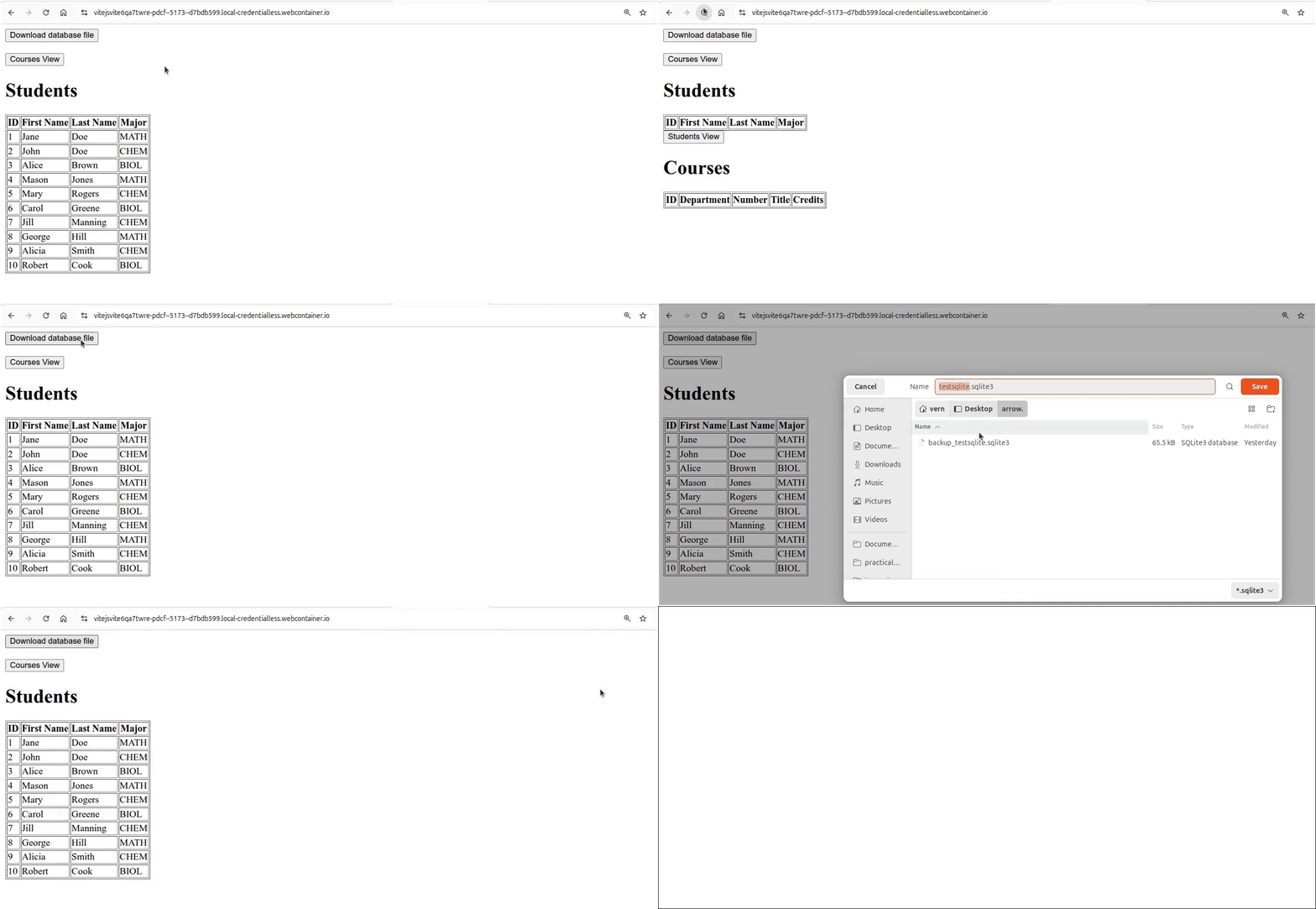
Click on Reload gif to replay animation.
Opening the downloaded database file in another application
Now that we can download the sqlite database file, we can open this file in another application that can read this type of file. A very good application for doing this can be found at ExtendsClass SQLite browser online.
The following animated gif shows using this application with our database file:
Click on Reload gif to replay animation.
As you can see, we can open our download sqlite file in this application. This application is nice, because it can show the views that have been created. You can see the queries that were run. Finally, if you chose to, you could even save the database file, as it has that option. If we made changes to the database, we could save that as a sqlite database file.
Using the persistent data
Right now, our application recreates the tables and inserts the data every time the browser is reloaded. So, we are not making use of the persistent data. That was the main point of using OPFS. So, let’s modify sqlite3_database.mjs so that we use the data in a persistent fashion.
import { sqlite3Worker1Promiser } from "@sqliteai/sqlite-wasm";

export default function createDatabaseAPI() {
  // private values
  const self = {
    initDB: initDB,
    getAllStudents: getAllStudents,
    getAllCourses: getAllCourses,
    getStudentCourses: getStudentCourses,
    getCourseStudents: getCourseStudents,
    downloadDatabase: downloadDatabase
  };
  let promiser;
  let dbId;

  // =========== API functions for database interaction ======
  async function initDB() {
    try {
      if (!promiser) {
        promiser = await new Promise((resolve) => {
          const workerPromiser = sqlite3Worker1Promiser({
            onready: () => resolve(workerPromiser),
          });
        });
      }

      const openResponse = await promiser('open', {
        filename: 'file:testsqlite.sqlite3?vfs=opfs',
      });
      dbId = openResponse.result.dbId;
      console.log('dbId', dbId);

      const res = await promiser('exec', {
        dbId,
        sql: 'PRAGMA user_version',
        rowMode: 'array',
        returnValue: 'resultRows'
      });
      const current_version = res.result.resultRows[0][0];
      if (current_version === 0) {
        await createTables();
        await insertData();
        await promiser('exec', { dbId, sql:'PRAGMA user_version = 1'});
      } else {
        console.log('database exists, using stored values');
      }

      await promiser('exec', { dbId, sql: 'PRAGMA foreign_keys = ON'});
      return true;
    } catch (error) { console.error("init failed:", error.message); }
  }

  async function getAllStudents() {
    try {
      const results = await promiser('exec', {
        dbId,
        sql: 'select * from students',
        rowMode: 'object',
        returnValue: 'resultRows'
      });
      console.log('students', results.result.resultRows);
      return results.result.resultRows;
    } catch(error) { console.error(error.message); }
  }

  async function getAllCourses() {
    try {
      const results = await promiser('exec', {
        dbId,
        sql: 'select * from courses',
        rowMode: 'object',
        returnValue: 'resultRows'
      });
      return results.result.resultRows;
    } catch(error) { console.error(error.message); }
  }

  async function getStudentCourses(id) {
    try {
      const results = await promiser('exec', {
        dbId,
        sql: 'select * from student_enrollments_view where sid=:id',
        bind: { ':id': id },
        rowMode: 'object',
        returnValue: 'resultRows'
      });
      return results.result.resultRows;
    } catch(error) { console.error(error.message); }
  }

  async function getCourseStudents(id) {
    try {
      const results = await promiser('exec', {
        dbId,
        sql: 'select * from course_enrollments_view where cid=:id',
        bind: { ':id': id },
        rowMode: 'object',
        returnValue: 'resultRows'
      });
      return results.result.resultRows;
    } catch(error) { console.error(error.message); }
  }

  async function downloadDatabase() {
    try {
      await promiser('close', { dbId});
      await new Promise(resolve => setTimeout(resolve,200));
      const opfsRoot = await navigator.storage.getDirectory();
      const fileHandle = await opfsRoot.getFileHandle('testsqlite.sqlite3');
      const file = await fileHandle.getFile();
      const url = URL.createObjectURL(file);
      const anchor = document.createElement('a');
      anchor.href= url;
      anchor.download = 'testsqlite.sqlite3';
      anchor.click();
      URL.revokeObjectURL(url);
    } catch (error) { console.error("export failed", error); }
  }
  // =========== end of API functions for database interaction ===

  // =========== helper functions ================================
  async function createTables() {
    const resetQuery = `
      PRAGMA foreign_keys = OFF;
      drop table if exists enrollments;
      drop table if exists students;
      drop table if exists courses;
      drop view if exists student_enrollments_view;
      drop view if exists course_enrollments_view;
      PRAGMA foreign_keys = ON;
    `;
    await promiser('exec', {dbId, sql: resetQuery });

    let query = `
      create table students(
        id integer primary key autoincrement,
        first_name text,
        last_name text,
        major text
      );
      create table courses(
        id integer primary key autoincrement,
        dept text,
        number text,
        title text,
        credits integer
      );
      create table enrollments (
        student_id integer references students(id),
        course_id integer references courses(id),
        primary key (student_id, course_id)
      );
      create view student_enrollments_view as
        select S.id as sid, S.first_name, S.last_name, S.major,
        C.id as cid, C.dept, C.number, C.title, C.credits
        from students as S join enrollments as E on S.id=E.student_id
        join courses as C on E.course_id=C.id;
      create view course_enrollments_view as
        select C.id as cid, C.dept, C.number, C.title, C.credits,
        S.id as sid, S.first_name, S.last_name, S.major
        from courses as C join enrollments as E on C.id=E.course_id
        join students as S on E.student_id=S.id;
    `;
    try {
      await promiser('exec', {
        dbId,
        sql: query,
      });
    } catch(error) { console.error(error.message); }
  }

  async function insertData() {
    console.log('insertData called');
    let query = `
      insert into students (first_name, last_name, major) values
        ('Jane', 'Doe', 'MATH'),
        ('John', 'Doe', 'CHEM'),
        ('Alice', 'Brown', 'BIOL'),
        ('Mason', 'Jones', 'MATH'),
        ('Mary', 'Rogers', 'CHEM'),
        ('Carol', 'Greene', 'BIOL'),
        ('Jill', 'Manning', 'CHEM'),
        ('George', 'Hill', 'MATH'),
        ('Alicia', 'Smith', 'CHEM'),
        ('Robert', 'Cook', 'BIOL');

      insert into courses (dept, number, title, credits) values
        ('BIOL', '100', 'Intro to Biology', 3),
        ('BIOL', '200', 'Biology II', 4),
        ('CHEM', '100', 'Intro to Chemistry', 3),
        ('CHEM', '110', 'Chemistry for Non-majors', 3),
        ('MATH', '110', 'Math for Non-science majors', 3),
        ('MATH', '205', 'Calculus I', 4),
        ('MATH', '205a', 'Calculus for Chemistry majors', 4),
        ('MATH', '205b', 'Calculus for Biology majors', 4),
        ('MATH', '206', 'Calculus II', 3),
        ('ENG', '100', 'Expository Writing', 3);

      insert into enrollments (student_id, course_id) values
        (1, 1),
        (1, 4),
        (1, 6),
        (1, 10),
        (2, 1),
        (2, 3),
        (2, 7),
        (3, 2),
        (3, 4),
        (3, 8),
        (3, 10),
        (4, 1),
        (4, 4),
        (4, 6),
        (5, 1),
        (5, 3),
        (5, 7),
        (5, 10),
        (6, 2),
        (6, 4),
        (6, 8),
        (6, 10),
        (7, 1),
        (7, 3),
        (7, 7),
        (8, 1),
        (8, 4),
        (8, 6),
        (8, 10),
        (9, 1),
        (9, 3),
        (9, 7),
        (10, 1),
        (10, 4),
        (10, 6);
    `;
    try {
      await promiser('exec', {
        dbId,
        sql: query,
      });
    } catch(error) { console.error(error.message); }
  }
  // =========== end of helper functions =========================

  return self;
}
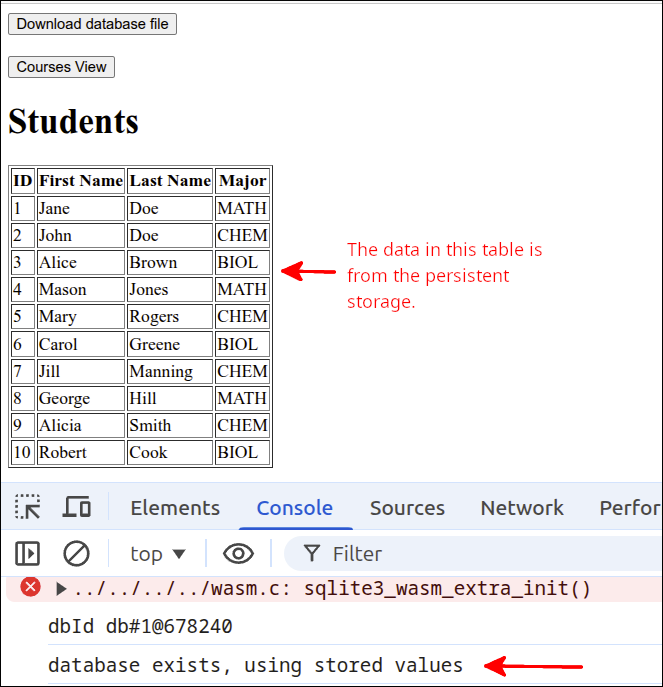
The new lines are 33-49. Lines 33-38 use promiser to get the user_version for the database. The user_version value is set to zero for a newly created database. We can use this value to keep track of whether or not the database is new or not. Line 39 gets the value of user_version returned by the Promise on lines 33-38 and stores this as current_version. Lines 40-46 define a selection statement that tests to see if current_version is 0 or not. If the current_version is 0, then lines 41-42 will create the the tables and insert data into those tables, respectively. Line 43, will set the value for user_version inside the database to 1. So, if the user reloads the application, user_version is no longer 0. So, the tables are not recreated and the data is not reinserted. This means we are using the persistent data. So, if we are using the persistent data, line 45 will print "database exists, using stored values" to the Console.
The following screenshot shows how in the Console "database exists, using stored values" is printed.
Allowing importing a sqlite database
Since we can export the database for downloading, let’s also make it so that we can upload a database file to imported in to our application. Before we modify sqlite3_database.mjs to be able to do this, let’s create a new database file. We can use the same online application as we used earlier ExtendsClass SQLite browser online.
The following animated gif file shows the opening of the file that was exported from the internal database of our application. The students table was modified by deleting students with and id > 5. Then, the enrollments table was modified by deleting all enrollments with student_id > 5. Then, the command 'PRAGMA user_version = 1' was issued. The database was then saved as "modified_testsqlite.sqlite3".
Click on Reload gif to replay animation.
Now, we have a file that we can use for testing out the import. If the import works, then the students HTML table should show only 5 students instead of 10. Here is the new version of sqlite3_database.mjs:
import { sqlite3Worker1Promiser } from "@sqliteai/sqlite-wasm";

export default function createDatabaseAPI() {
  // private values
  const self = {
    initDB: initDB,
    getAllStudents: getAllStudents,
    getAllCourses: getAllCourses,
    getStudentCourses: getStudentCourses,
    getCourseStudents: getCourseStudents,
    downloadDatabase: downloadDatabase,
    importDatabase: importDatabase
  };
  let promiser;
  let dbId;

  // =========== API functions for database interaction ======
  async function initDB() {
    try {
      if (!promiser) {
        promiser = await new Promise((resolve) => {
          const workerPromiser = sqlite3Worker1Promiser({
            onready: () => resolve(workerPromiser),
          });
        });
      }

      const openResponse = await promiser('open', {
        filename: 'file:testsqlite.sqlite3?vfs=opfs',
      });
      dbId = openResponse.result.dbId;
      console.log('dbId', dbId);

      const res = await promiser('exec', {
        dbId,
        sql: 'PRAGMA user_version',
        rowMode: 'array',
        returnValue: 'resultRows'
      });
      const current_version = res.result.resultRows[0][0];
      if (current_version === 0) {
        await createTables();
        await insertData();
        await promiser('exec', { dbId, sql:'PRAGMA user_version = 1'});
      } else {
        console.log('database exists, using stored values');
      }

      await promiser('exec', { dbId, sql: 'PRAGMA foreign_keys = ON'});
      return true;
    } catch (error) { console.error("init failed:", error.message); }
  }

  async function getAllStudents() {
    try {
      const results = await promiser('exec', {
        dbId,
        sql: 'select * from students',
        rowMode: 'object',
        returnValue: 'resultRows'
      });
      console.log('students', results.result.resultRows);
      return results.result.resultRows;
    } catch(error) { console.error(error.message); }
  }

  async function getAllCourses() {
    try {
      const results = await promiser('exec', {
        dbId,
        sql: 'select * from courses',
        rowMode: 'object',
        returnValue: 'resultRows'
      });
      return results.result.resultRows;
    } catch(error) { console.error(error.message); }
  }

  async function getStudentCourses(id) {
    try {
      const results = await promiser('exec', {
        dbId,
        sql: 'select * from student_enrollments_view where sid=:id',
        bind: { ':id': id },
        rowMode: 'object',
        returnValue: 'resultRows'
      });
      return results.result.resultRows;
    } catch(error) { console.error(error.message); }
  }

  async function getCourseStudents(id) {
    try {
      const results = await promiser('exec', {
        dbId,
        sql: 'select * from course_enrollments_view where cid=:id',
        bind: { ':id': id },
        rowMode: 'object',
        returnValue: 'resultRows'
      });
      return results.result.resultRows;
    } catch(error) { console.error(error.message); }
  }

  async function downloadDatabase() {
    try {
      await promiser('close', { dbId});
      await new Promise(resolve => setTimeout(resolve,200));
      const opfsRoot = await navigator.storage.getDirectory();
      const fileHandle = await opfsRoot.getFileHandle('testsqlite.sqlite3');
      const file = await fileHandle.getFile();
      const url = URL.createObjectURL(file);
      const anchor = document.createElement('a');
      anchor.href= url;
      anchor.download = 'testsqlite.sqlite3';
      anchor.click();
      URL.revokeObjectURL(url);
    } catch (error) { console.error("export failed", error); }
  }

  async function importDatabase(inputElement) {
    const file = inputElement.files[0];
    if (!file) { return; }
    try {
      await promiser('close', { dbId });
      await new Promise(resolve => setTimeout(resolve, 200));

      const opfsRoot = await navigator.storage.getDirectory();
      const filesToDelete = ['testsqlite.sqlite3', 'testsqlite.sqlite3-wal',
        'testsqlite.sqlite3-shm'];
      for (const filename of filesToDelete) {
        try {
          await opfsRoot.removeEntry(filename);
        } catch (error) { }
      }
      const fileHandle = await opfsRoot.getFileHandle('testsqlite.sqlite3', {
        create: true
      });
      const writable = await fileHandle.createWritable();
      const buffer = await file.arrayBuffer();
      const view = new DataView(buffer);
      view.setUint32(60, 1, false);

      await writable.write(buffer);
      await writable.close();
      console.log("Import finalized, Reloading...");
      location.reload();
    } catch (error) { console.error("Import failed", error); }
  }
  // =========== end of API functions for database interaction ===

  // =========== helper functions ================================
  async function createTables() {
    const resetQuery = `
      PRAGMA foreign_keys = OFF;
      drop table if exists enrollments;
      drop table if exists students;
      drop table if exists courses;
      drop view if exists student_enrollments_view;
      drop view if exists course_enrollments_view;
      PRAGMA foreign_keys = ON;
    `;
    await promiser('exec', {dbId, sql: resetQuery });

    let query = `
      create table students(
        id integer primary key autoincrement,
        first_name text,
        last_name text,
        major text
      );
      create table courses(
        id integer primary key autoincrement,
        dept text,
        number text,
        title text,
        credits integer
      );
      create table enrollments (
        student_id integer references students(id),
        course_id integer references courses(id),
        primary key (student_id, course_id)
      );
      create view student_enrollments_view as
        select S.id as sid, S.first_name, S.last_name, S.major,
        C.id as cid, C.dept, C.number, C.title, C.credits
        from students as S join enrollments as E on S.id=E.student_id
        join courses as C on E.course_id=C.id;
      create view course_enrollments_view as
        select C.id as cid, C.dept, C.number, C.title, C.credits,
        S.id as sid, S.first_name, S.last_name, S.major
        from courses as C join enrollments as E on C.id=E.course_id
        join students as S on E.student_id=S.id;
    `;
    try {
      await promiser('exec', {
        dbId,
        sql: query,
      });
    } catch(error) { console.error(error.message); }
  }

  async function insertData() {
    console.log('insertData called');
    let query = `
      insert into students (first_name, last_name, major) values
        ('Jane', 'Doe', 'MATH'),
        ('John', 'Doe', 'CHEM'),
        ('Alice', 'Brown', 'BIOL'),
        ('Mason', 'Jones', 'MATH'),
        ('Mary', 'Rogers', 'CHEM'),
        ('Carol', 'Greene', 'BIOL'),
        ('Jill', 'Manning', 'CHEM'),
        ('George', 'Hill', 'MATH'),
        ('Alicia', 'Smith', 'CHEM'),
        ('Robert', 'Cook', 'BIOL');

      insert into courses (dept, number, title, credits) values
        ('BIOL', '100', 'Intro to Biology', 3),
        ('BIOL', '200', 'Biology II', 4),
        ('CHEM', '100', 'Intro to Chemistry', 3),
        ('CHEM', '110', 'Chemistry for Non-majors', 3),
        ('MATH', '110', 'Math for Non-science majors', 3),
        ('MATH', '205', 'Calculus I', 4),
        ('MATH', '205a', 'Calculus for Chemistry majors', 4),
        ('MATH', '205b', 'Calculus for Biology majors', 4),
        ('MATH', '206', 'Calculus II', 3),
        ('ENG', '100', 'Expository Writing', 3);

      insert into enrollments (student_id, course_id) values
        (1, 1),
        (1, 4),
        (1, 6),
        (1, 10),
        (2, 1),
        (2, 3),
        (2, 7),
        (3, 2),
        (3, 4),
        (3, 8),
        (3, 10),
        (4, 1),
        (4, 4),
        (4, 6),
        (5, 1),
        (5, 3),
        (5, 7),
        (5, 10),
        (6, 2),
        (6, 4),
        (6, 8),
        (6, 10),
        (7, 1),
        (7, 3),
        (7, 7),
        (8, 1),
        (8, 4),
        (8, 6),
        (8, 10),
        (9, 1),
        (9, 3),
        (9, 7),
        (10, 1),
        (10, 4),
        (10, 6);
    `;
    try {
      await promiser('exec', {
        dbId,
        sql: query,
      });
    } catch(error) { console.error(error.message); }
  }
  // =========== end of helper functions =========================

  return self;
}
The new lines are 11-12 and 121-149. Line 11 adds a comma to the end of the line, as we are adding a new API function on line 12. Line 12 adds the importDatabase() function to the list of functions that are returned by the createDatabaseAPI() factory function. Lines 121-149 define the importDatabase() API function. On line 121 the inputElement is declared as the parameter to this function. In terms of the HTML markup, inputElement is a reference to the <input type="file" id="inputFile"> element we will place inside of index.html. That will be the element that the user will click on to choose the input file.
Line 122 gets the name of the file that the user selects when they choose an input file. Line 123 will cause this function to end, if the user did not select any input file. Lines 124-148 from a try block. This block will attempt to read the input file and use that to create a new database file by overwriting the existing internal database file. Line 125 will close the database. The internal database file cannot be overwritten if the database is open. But, since the closing process can take some time, line 126 will insert a delay so that the database has a chance to be closed before the rest of the code is executed.
Line 128 gets a reference to the storage area where OPFS stores files, and stores this as opfsRoot. Lines 129-130 define an array of string filenames, that need to be deleted. We are going to replace the existing internal database file, and OPFS maintains several files that need to be deleted. The files ending in -wal or -shm, may or may not exist, depending on the browser implementation. Lines 131-135 define a for loop that attempts to delete all the files specified by the array filesToDelete. Note that the catch block does not do anything. That is because if the -wal and/or the -shm files don’t exist, nothing needs to be done.
Lines 136-138 is where the file handle to the database file is created. Note that the name used here must match the original filename used inside of the initDB() function. Line 139 gets a writable object that will be used to write to the actual database file. Line 140 creates an ArrayBuffer from the input file contents. Lines 141-142 will edit that buffer so that the user_version (specified at position 60), is set to 1. This sets the user_version to 1. That is important, as when initDB() is run, we don’t want to call createTables() and insertData() as those would overwrite the new database tables and data. Line 144 writes to the internal database file and line 145 closes that object. Line 146 is just a message saying that the import succeeded and the web page is going to be reloaded. Line 147 reloads the web page. That will call initDB() but since user_version is 1, the data from the imported file will be used.
To make this work, we need to modify index.mjs and index.html. Here are the changes to index.html:
<!DOCTYPE html>
<html lang="en">
  <head>
    <meta charset="UTF-8" />
    <script type="module" src="index.mjs"></script>
    <title>Students and Courses</title>
  </head>
  <body>
    <button id="download_button">Download database file</button>
    <br />
    Import database file
    <input type="file" id="load_file">
    <br /><br />
    <div id="students_div">
      <button id="courses_button">Courses View</button>
      <h1>Students</h1>
      <table border="1">
        <thead>
          <tr>
            <th id="id" aria-sort="none">ID</td>
            <th id="first_name" aria-sort="none">First Name</th>
            <th id="last_name" aria-sort="none">Last Name</th>
            <th id="major" aria-sort="none">Major</th>
          </tr>
        </thead>
        <tbody id="students_tbody"></tbody>
      </table>
    </div>
    <div id="courses_div">
      <button id="students_button">Students View</button>
      <h1>Courses</h1>
      <table border="1">
        <thead>
          <tr>
            <th id="id" aria-sort="none">ID</th>
            <th id="dept" aria-sort="none">Department</th>
            <th id="number" aria-sort="none">Number</th>
            <th id="title" aria-sort="none">Title</th>
            <th id="credits" aria-sort="none">Credits</th>
          </tr>
        </thead>
        <tbody id="courses_tbody"></tbody>
      </table>
    </div>
    <dialog id="student_courses_dlg">
      <label id="student_name_label"></label>
      <table border="1">
        <tbody id="student_courses_tbody"></tbody>
      </table>
      <br />
      <button id="close_student_courses_button">Close</button>
    </dialog>
    <dialog id="course_students_dlg">
      <label id="course_name_label"></label>
      <table border="1">
        <tbody id="course_students_tbody"></tbody>
      </table>
      <br />
      <button id="close_course_students_button">Close</button>
    </dialog>
  </body>
</html>
The new lines are 10-12. Line 10 makes it so that the <input> for the file is on the line below the "Download database file" button. Line 11 is just a prompt for importing the database file. Line 12 defines the <input type="file" id="load_file"> that will be used to let the user specify the database file to import.
Here is the new version of index.mjs:
import createInterfaceAPI from './user_interface.mjs';
import createDatabaseAPI from './sqlite3_database.mjs';

if (document.readyState === 'loading') {
  document.addEventListener('DOMContentLoaded', init);
} else {
  init();
}

async function init() {
  console.log('init called');
  const courses_div = document.getElementById('courses_div');
  courses_div.style.display = 'none';
  const students_div = document.getElementById('students_div');
  const dbAPI = createDatabaseAPI();
  console.log('dbAPI', dbAPI);
  await dbAPI.initDB();
  const uiAPI = createInterfaceAPI(dbAPI);
  const courses_button = document.getElementById('courses_button');
  courses_button.addEventListener('click', () => {
    uiAPI.switchToCourses(courses_div, students_div);
  });
  const students_button = document.getElementById('students_button');
  students_button.addEventListener('click', () => {
    uiAPI.switchToStudents(courses_div, students_div);
  });
  uiAPI.initHeaders(courses_div, students_div);
  uiAPI.switchToStudents(courses_div, students_div);
  document.getElementById("download_button").addEventListener("click", () => {
    dbAPI.downloadDatabase();
  });
  const fileInput = document.getElementById("load_file")
  fileInput.addEventListener("change", (event) => { dbAPI.importDatabase(event.target) });
}
The new lines are 32-34. Line 32 gets a reference to the <input type="file" id="load_file"> element. Line 33 assigns a "change" event listener. You need to listen for the "change" event, not the "click" event as you are selecting a file from a dialog box. So, the "change" event is triggered when the user selects a file and presses the Select button. That will change the name of the file that is chosen. Note that before the user selects a file, the <input type="file"> element will display No file chosen. When the "change" is detected, event.target which is a reference to the <input> element will be passed to the importDatabase() function.
The following animated gif file shows the original data loaded at first. Then, the new file modified_testsqlite.sqlite3 is imported and this shows that only 5 students are in that modified database.
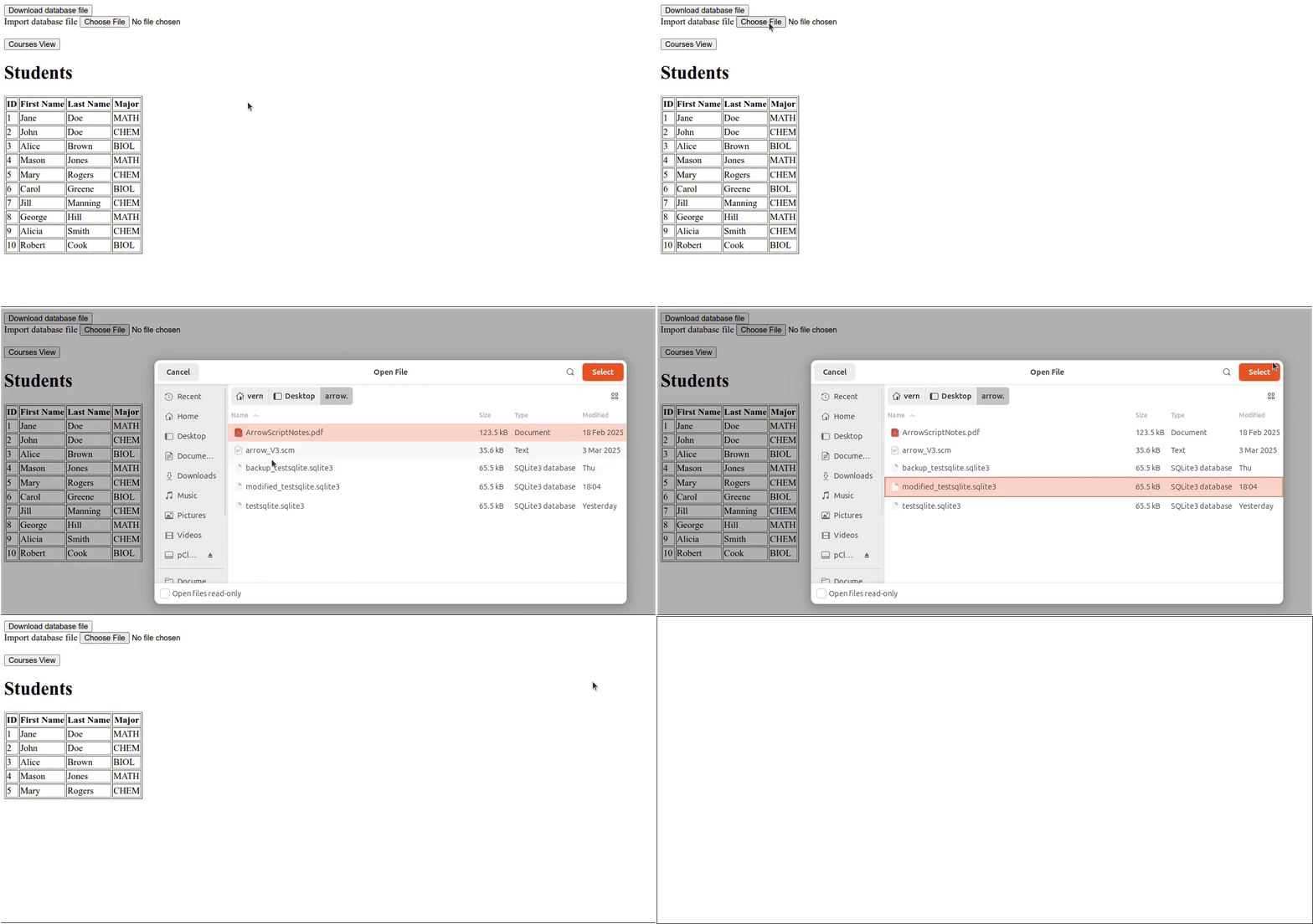
Click on Reload gif to replay animation.
A button to clear the database
As you can see, the new file has been imported. Let’s add a button that can clear the internal database, so we can go back to the original one. Here is the changes to index.html that will add in that button.
<!DOCTYPE html>
<html lang="en">
  <head>
    <meta charset="UTF-8" />
    <script type="module" src="index.mjs"></script>
    <title>Students and Courses</title>
  </head>
  <body>
    <button id="download_button">Export database file</button>
    <button id="clear_button">Clear database</button>
    <br />
    Import database file
    <input type="file" id="load_file">
    <br /><br />
    <div id="students_div">
      <button id="courses_button">Courses View</button>
      <h1>Students</h1>
      <table border="1">
        <thead>
          <tr>
            <th id="id" aria-sort="none">ID</td>
            <th id="first_name" aria-sort="none">First Name</th>
            <th id="last_name" aria-sort="none">Last Name</th>
            <th id="major" aria-sort="none">Major</th>
          </tr>
        </thead>
        <tbody id="students_tbody"></tbody>
      </table>
    </div>
    <div id="courses_div">
      <button id="students_button">Students View</button>
      <h1>Courses</h1>
      <table border="1">
        <thead>
          <tr>
            <th id="id" aria-sort="none">ID</th>
            <th id="dept" aria-sort="none">Department</th>
            <th id="number" aria-sort="none">Number</th>
            <th id="title" aria-sort="none">Title</th>
            <th id="credits" aria-sort="none">Credits</th>
          </tr>
        </thead>
        <tbody id="courses_tbody"></tbody>
      </table>
    </div>
    <dialog id="student_courses_dlg">
      <label id="student_name_label"></label>
      <table border="1">
        <tbody id="student_courses_tbody"></tbody>
      </table>
      <br />
      <button id="close_student_courses_button">Close</button>
    </dialog>
    <dialog id="course_students_dlg">
      <label id="course_name_label"></label>
      <table border="1">
        <tbody id="course_students_tbody"></tbody>
      </table>
      <br />
      <button id="close_course_students_button">Close</button>
    </dialog>
  </body>
</html>
The new lines are 9-10. On line 9, I changed the label on that button to be "Export database file", as that seemed more appropriate. Line 10 adds the <button id="clear_button"> that will be used to clear the database. When that database is cleared, reloading the page will cause the original database to be created and populated again.
Here is the new version of index.mjs:
import createInterfaceAPI from './user_interface.mjs';
import createDatabaseAPI from './sqlite3_database.mjs';

if (document.readyState === 'loading') {
  document.addEventListener('DOMContentLoaded', init);
} else {
  init();
}

async function init() {
  console.log('init called');
  const courses_div = document.getElementById('courses_div');
  courses_div.style.display = 'none';
  const students_div = document.getElementById('students_div');
  const dbAPI = createDatabaseAPI();
  console.log('dbAPI', dbAPI);
  await dbAPI.initDB();
  const uiAPI = createInterfaceAPI(dbAPI);
  const courses_button = document.getElementById('courses_button');
  courses_button.addEventListener('click', () => {
    uiAPI.switchToCourses(courses_div, students_div);
  });
  const students_button = document.getElementById('students_button');
  students_button.addEventListener('click', () => {
    uiAPI.switchToStudents(courses_div, students_div);
  });
  uiAPI.initHeaders(courses_div, students_div);
  uiAPI.switchToStudents(courses_div, students_div);
  document.getElementById("download_button").addEventListener("click", () => {
    dbAPI.downloadDatabase();
  });
  const fileInput = document.getElementById("load_file")
  fileInput.addEventListener("change", (event) => { dbAPI.importDatabase(event.target) });
  document.getElementById("clear_button").addEventListener("click", () => {
    dbAPI.clearDatabase();
  });
}
The new lines is line 34-36. These lines add a "click" handler to the Clear database button. That handler will be the dbAPI.clearDatabase() function, that we will put into the sqlite3_database.mjs module next:
import { sqlite3Worker1Promiser } from "@sqliteai/sqlite-wasm";

export default function createDatabaseAPI() {
  // private values
  const self = {
    initDB: initDB,
    getAllStudents: getAllStudents,
    getAllCourses: getAllCourses,
    getStudentCourses: getStudentCourses,
    getCourseStudents: getCourseStudents,
    downloadDatabase: downloadDatabase,
    importDatabase: importDatabase,
    clearDatabase: clearDatabase
  };
  let promiser;
  let dbId;

  // =========== API functions for database interaction ======
  async function initDB() {
    try {
      if (!promiser) {
        promiser = await new Promise((resolve) => {
          const workerPromiser = sqlite3Worker1Promiser({
            onready: () => resolve(workerPromiser),
          });
        });
      }

      const openResponse = await promiser('open', {
        filename: 'file:testsqlite.sqlite3?vfs=opfs',
      });
      dbId = openResponse.result.dbId;
      console.log('dbId', dbId);

      const res = await promiser('exec', {
        dbId,
        sql: 'PRAGMA user_version',
        rowMode: 'array',
        returnValue: 'resultRows'
      });
      const current_version = res.result.resultRows[0][0];
      if (current_version === 0) {
        await createTables();
        await insertData();
        await promiser('exec', { dbId, sql:'PRAGMA user_version = 1'});
      } else {
        console.log('database exists, using stored values');
      }

      await promiser('exec', { dbId, sql: 'PRAGMA foreign_keys = ON'});
      return true;
    } catch (error) { console.error("init failed:", error.message); }
  }

  async function getAllStudents() {
    try {
      const results = await promiser('exec', {
        dbId,
        sql: 'select * from students',
        rowMode: 'object',
        returnValue: 'resultRows'
      });
      console.log('students', results.result.resultRows);
      return results.result.resultRows;
    } catch(error) { console.error(error.message); }
  }

  async function getAllCourses() {
    try {
      const results = await promiser('exec', {
        dbId,
        sql: 'select * from courses',
        rowMode: 'object',
        returnValue: 'resultRows'
      });
      return results.result.resultRows;
    } catch(error) { console.error(error.message); }
  }

  async function getStudentCourses(id) {
    try {
      const results = await promiser('exec', {
        dbId,
        sql: 'select * from student_enrollments_view where sid=:id',
        bind: { ':id': id },
        rowMode: 'object',
        returnValue: 'resultRows'
      });
      return results.result.resultRows;
    } catch(error) { console.error(error.message); }
  }

  async function getCourseStudents(id) {
    try {
      const results = await promiser('exec', {
        dbId,
        sql: 'select * from course_enrollments_view where cid=:id',
        bind: { ':id': id },
        rowMode: 'object',
        returnValue: 'resultRows'
      });
      return results.result.resultRows;
    } catch(error) { console.error(error.message); }
  }

  async function downloadDatabase() {
    try {
      await promiser('close', { dbId});
      await new Promise(resolve => setTimeout(resolve,200));
      const opfsRoot = await navigator.storage.getDirectory();
      const fileHandle = await opfsRoot.getFileHandle('testsqlite.sqlite3');
      const file = await fileHandle.getFile();
      const url = URL.createObjectURL(file);
      const anchor = document.createElement('a');
      anchor.href= url;
      anchor.download = 'testsqlite.sqlite3';
      anchor.click();
      URL.revokeObjectURL(url);
    } catch (error) { console.error("export failed", error); }
  }

  async function importDatabase(inputElement) {
    const file = inputElement.files[0];
    if (!file) { return; }
    try {
      await promiser('close', { dbId });
      await new Promise(resolve => setTimeout(resolve, 200));

      const opfsRoot = await navigator.storage.getDirectory();
      const filesToDelete = ['testsqlite.sqlite3', 'testsqlite.sqlite3-wal',
        'testsqlite.sqlite3-shm'];
      for (const filename of filesToDelete) {
        try {
          await opfsRoot.removeEntry(filename);
        } catch (error) { }
      }
      const fileHandle = await opfsRoot.getFileHandle('testsqlite.sqlite3', {
        create: true
      });
      const writable = await fileHandle.createWritable();
      const buffer = await file.arrayBuffer();
      const view = new DataView(buffer);
      view.setUint32(60, 1, false);

      await writable.write(buffer);
      await writable.close();
      console.log("Import finalized, Reloading...");
      location.reload();
    } catch (error) { console.error("Import failed", error); }
  }

  async function clearDatabase() {
    try {
      await promiser('close', { dbId });
      await new Promise(resolve => setTimeout(resolve,500));

      const opfsRoot = await navigator.storage.getDirectory();
      const filesToDelete = ['testsqlite.sqlite3', 'testsqlite.sqlite3-wal',
        'testsqlite.sqlite3-shm'];
      for (const filename of filesToDelete) {
        try {
          await opfsRoot.removeEntry(filename);
        } catch (error) { }
      }

      console.log("database cleared, reload browser.")
    } catch (error) { console.error("database not cleared", error); }
  }
  // =========== end of API functions for database interaction ===

  // =========== helper functions ================================
  async function createTables() {
    const resetQuery = `
      PRAGMA foreign_keys = OFF;
      drop table if exists enrollments;
      drop table if exists students;
      drop table if exists courses;
      drop view if exists student_enrollments_view;
      drop view if exists course_enrollments_view;
      PRAGMA foreign_keys = ON;
    `;
    await promiser('exec', {dbId, sql: resetQuery });

    let query = `
      create table students(
        id integer primary key autoincrement,
        first_name text,
        last_name text,
        major text
      );
      create table courses(
        id integer primary key autoincrement,
        dept text,
        number text,
        title text,
        credits integer
      );
      create table enrollments (
        student_id integer references students(id),
        course_id integer references courses(id),
        primary key (student_id, course_id)
      );
      create view student_enrollments_view as
        select S.id as sid, S.first_name, S.last_name, S.major,
        C.id as cid, C.dept, C.number, C.title, C.credits
        from students as S join enrollments as E on S.id=E.student_id
        join courses as C on E.course_id=C.id;
      create view course_enrollments_view as
        select C.id as cid, C.dept, C.number, C.title, C.credits,
        S.id as sid, S.first_name, S.last_name, S.major
        from courses as C join enrollments as E on C.id=E.course_id
        join students as S on E.student_id=S.id;
    `;
    try {
      await promiser('exec', {
        dbId,
        sql: query,
      });
    } catch(error) { console.error(error.message); }
  }

  async function insertData() {
    console.log('insertData called');
    let query = `
      insert into students (first_name, last_name, major) values
        ('Jane', 'Doe', 'MATH'),
        ('John', 'Doe', 'CHEM'),
        ('Alice', 'Brown', 'BIOL'),
        ('Mason', 'Jones', 'MATH'),
        ('Mary', 'Rogers', 'CHEM'),
        ('Carol', 'Greene', 'BIOL'),
        ('Jill', 'Manning', 'CHEM'),
        ('George', 'Hill', 'MATH'),
        ('Alicia', 'Smith', 'CHEM'),
        ('Robert', 'Cook', 'BIOL');

      insert into courses (dept, number, title, credits) values
        ('BIOL', '100', 'Intro to Biology', 3),
        ('BIOL', '200', 'Biology II', 4),
        ('CHEM', '100', 'Intro to Chemistry', 3),
        ('CHEM', '110', 'Chemistry for Non-majors', 3),
        ('MATH', '110', 'Math for Non-science majors', 3),
        ('MATH', '205', 'Calculus I', 4),
        ('MATH', '205a', 'Calculus for Chemistry majors', 4),
        ('MATH', '205b', 'Calculus for Biology majors', 4),
        ('MATH', '206', 'Calculus II', 3),
        ('ENG', '100', 'Expository Writing', 3);

      insert into enrollments (student_id, course_id) values
        (1, 1),
        (1, 4),
        (1, 6),
        (1, 10),
        (2, 1),
        (2, 3),
        (2, 7),
        (3, 2),
        (3, 4),
        (3, 8),
        (3, 10),
        (4, 1),
        (4, 4),
        (4, 6),
        (5, 1),
        (5, 3),
        (5, 7),
        (5, 10),
        (6, 2),
        (6, 4),
        (6, 8),
        (6, 10),
        (7, 1),
        (7, 3),
        (7, 7),
        (8, 1),
        (8, 4),
        (8, 6),
        (8, 10),
        (9, 1),
        (9, 3),
        (9, 7),
        (10, 1),
        (10, 4),
        (10, 6);
    `;
    try {
      await promiser('exec', {
        dbId,
        sql: query,
      });
    } catch(error) { console.error(error.message); }
  }
  // =========== end of helper functions =========================

  return self;
}
The new lines are 12-13 and 152-168. Line 12 adds a comma to the end of the line so that the clearDatabase() function can be added to the list of API functions on line 13. Lines 152-168 define the clearDatabase() function. Lines 153-167 define a try block that attempts to clear the internal database file named testsqlite.sqlite3. Line 154 closes the database. Without closing the database, the database files cannot be deleted. Line 155 adds a delay of 500 milliseconds, to give the database time to close.
Line 157 gets a reference to the OPFS storage area, and stores this reference is opfsRoot. Lines 158-159 define an array of strings that consists of all the filenames that need to be removed. Remember, the presence of -wal and -shm files is browser dependent. Lines 160-164 define a for loop that iterates over that array of filenames to delete those files. Note on line 163 that if there is an error, it is just ignored as this just means the filename does not exist.
Line 166 displays a message to the Console indicating the database has been cleared.
With all these changes, clicking on the Clear database button and then reloading should restore the original database. The following animated gif will show how the application works now. The Clear database button is hit, then the browser is reloaded. The original database is restored. Then, the Choose File button is clicked and the modified_testsqlite.sqlite3 file is loaded.
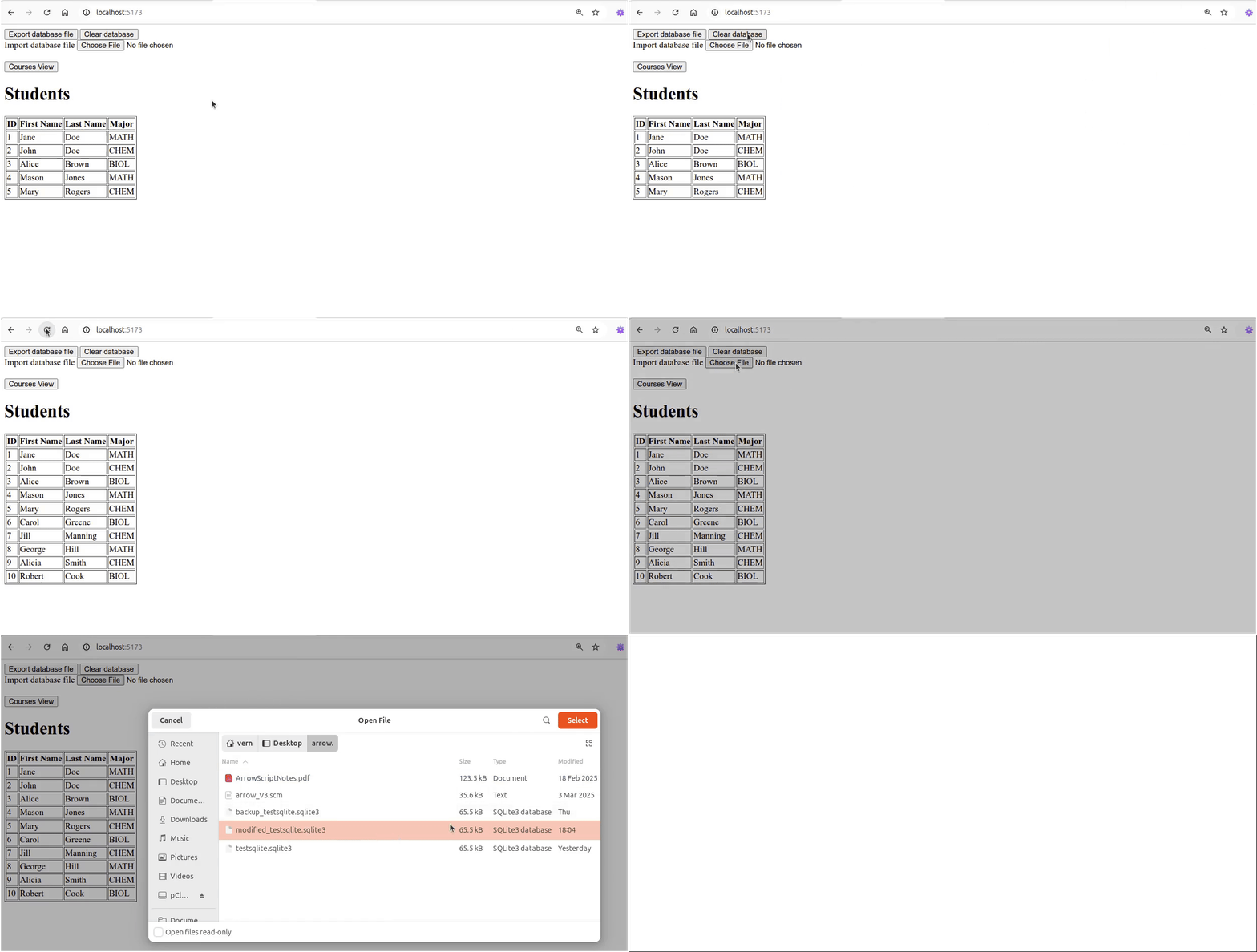
Click on Reload gif to replay animation.